
The Internet and its Uses
Cyber security threats
In this note
- 5.3.1Describe the processes involved in, and the aim of carrying out, a range of cyber security threats: brute-force attack, data interception, DDoS, hacking, malware (virus, worm, Trojan horse, spyware, adware, ransomware), pharming, phishing, social engineering.
Before this: Digital currency and blockchain. Next: Keeping data safe.
The notes: every idea from the start, with our own examples.
What you should already know
Packets
Data is sent across a network in packets.
Quick check: can a packet be read on its way?
Yes, if it is intercepted and not encrypted.
For every threat learn two things: the process (how it is done, step by step) and the aim (why the attacker does it).
Getting into accounts and systems
| Threat | Process | Aim |
|---|---|---|
| Brute-force attack | trial and error to guess a password: combinations are repeatedly entered (often automatically by software) until the correct password is found | to gain access to an account: steal, view, change or delete data; install malware |
| Hacking | gaining unauthorised access to a computer or system, e.g. by exploiting a weakness | to steal, change or delete data; damage a company's reputation; install malware |
| Data interception | data is examined while it is being transmitted, e.g. with a packet sniffer, and copied to a third party, who analyses it | to steal data such as passwords or bank details |
Denial of service
In a distributed denial of service (DDoS) attack, many computers send so many requests to a web server that it cannot cope.
General methodProcess of a DDoS attack
- The attacker spreads malware that users download onto their computers.
- Each infected computer becomes a bot (zombie); together they form a botnet.
- When the attacker starts the attack, all the bots send requests to the web server at the same time.
- The web server is overloaded and crashes / slows, so real users cannot access the website.
Aims: to stop a business trading, damage its reputation, revenge, demand a ransom to stop the attack.
Malware
Malware (malicious software) is software designed to damage a computer or steal data.
| Malware | What it does |
|---|---|
| Virus | software that replicates when the user runs it (it needs an active host program); deletes, damages or corrupts data and files; fills storage |
| Worm | replicates itself across a network without user input; uses up bandwidth; can open back doors and carry other malware |
| Trojan horse | malware hidden inside / disguised as genuine software; when installed, the hidden malware is installed too |
| Spyware | records what the user does, e.g. all key presses (keylogger), and sends it to a third party, who looks for passwords |
| Adware | displays unwanted adverts; may redirect to fake websites or contain other malware; slows the device |
| Ransomware | encrypts the user's data (locks them out) and demands a ransom for the key |
Tricking the user
| Threat | Process | Aim |
|---|---|---|
| Phishing | a legitimate-looking email is sent; the user clicks a link in it (or replies) and is taken to a fake website, where they enter personal data, which is stolen | to obtain personal data: passwords, bank details |
| Pharming | malicious code is downloaded onto the user's computer (or a DNS is changed). When the user types a genuine web address, they are redirected to a fake website, where they enter personal data | to obtain personal data |
| Social engineering | manipulating or deceiving people into giving away data or making a security mistake, e.g. a phone call pretending to be the bank, or leaving an infected USB stick to be found | to obtain data or access |
Try it yourself
Show answer
Answer Ransomware
Show answer
Answer Worm
Show answer
Answer Brute-force attack
Show answer
Answer No
Summary
- Brute force: trial and error until the password is found. Hacking: unauthorised access. Interception: packet sniffer reads data in transit.
- DDoS: malware → bots → botnet → simultaneous requests → server crashes.
- Malware: virus (needs host), worm (spreads itself), Trojan (disguised), spyware (keylogger), adware, ransomware (encrypts, ransom).
- Phishing: email link → fake site. Pharming: malware redirects a typed URL. Social engineering: manipulating people.
If you see …
- "draw and annotate a diagram to represent a DDoS" [6]malware · bots · botnet · third party starts it · simultaneous requests · server fails · users can't connect
- "describe the process of phishing" [4]legitimate-looking email · clicks link · fake website · enters personal data · stolen
Question types, what the examiner gives marks for, and real past-paper questions solved.
Ways they test it
Type 1 Describe a process
"Describe how a brute-force attack can be used to gain access" [3]; "describe the process of phishing" [4]
Spot it "describe how / process".
- Steps in order, from the tables and methods.
Type 2 Diagram
"Draw and annotate a diagram to represent pharming / DDoS / data interception" [4-6]
Spot it "diagram".
- Boxes for the computers and servers; an arrow per step, each with a label saying what happens.
Type 3 Aims
"State two aims of carrying out a DDoS attack" [2]
Spot it "aims".
- Why, not how.
Type 4 Malware table
"Identify and describe two other examples of malware" [6]
Spot it "malware".
- Name + two description points each.
What the examiner looks for
"Draw and annotate a diagram to represent the process of pharming" [4]
Marking points (one mark each, up to the marks shown)
- User clicks / opens an attachment or link that triggers a download
- Malicious software is downloaded onto the user's computer
- User enters the (genuine) website address
- User is redirected to a fake website
Keywords malware downloaded enters web address redirected fake website
Past-paper questions, solved
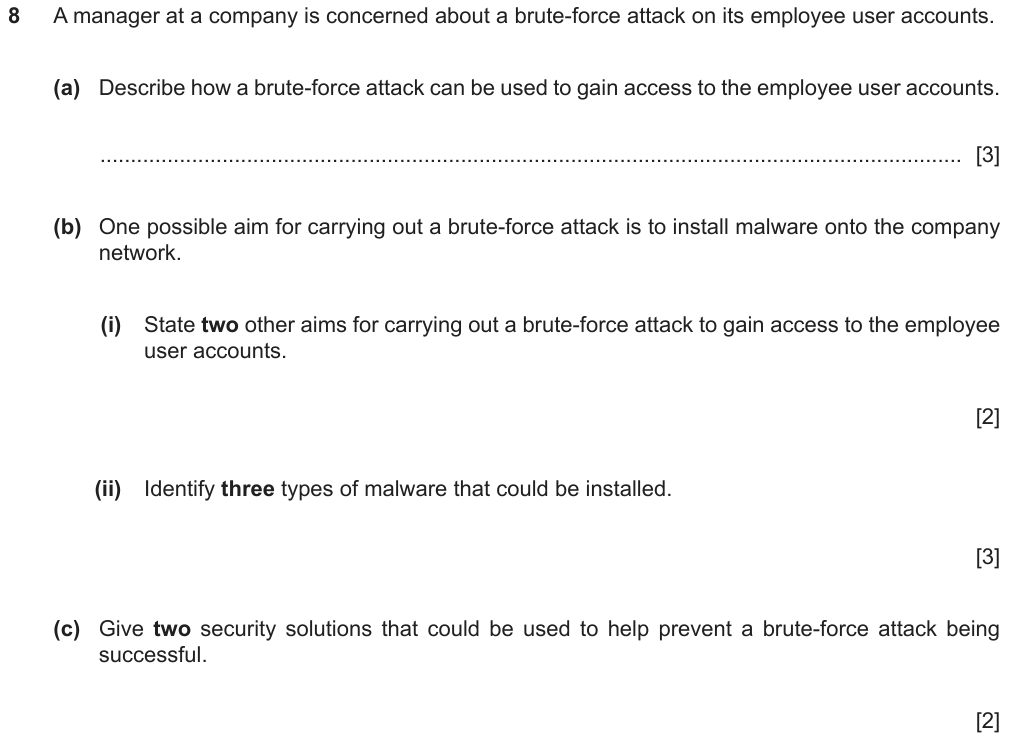
How to start (a) the process, (b)(i) aims other than installing malware, (b)(ii) three malware names, (c) two solutions (next note).
Show a full-mark answer and the mark scheme
(a) The attacker uses trial and error to guess the password: combinations are repeatedly entered, often automatically by software, until the correct password is found.
(b)(i) To steal data; to delete or change data. (ii) Virus; worm; ransomware.
(c) Two-step verification; limiting the number of login attempts.
| Part | Answer / working | Marks | Guidance |
|---|---|---|---|
| 8(a) | trial and error · combinations repeatedly entered · until correct · manual or automatic | B3 | |
| 8(b)(i) | Any two: steal / view data · delete · change · lock account / encrypt · damage reputation | B2 | |
| 8(b)(ii) | Any three: virus · worm · Trojan horse · spyware · adware · ransomware | B3 | |
| 8(c) | Any two: two-step verification · biometrics · firewall / proxy · strong password · limit attempts · drop-down boxes · partial password | B2 | |
| Total: 10 marks | |||
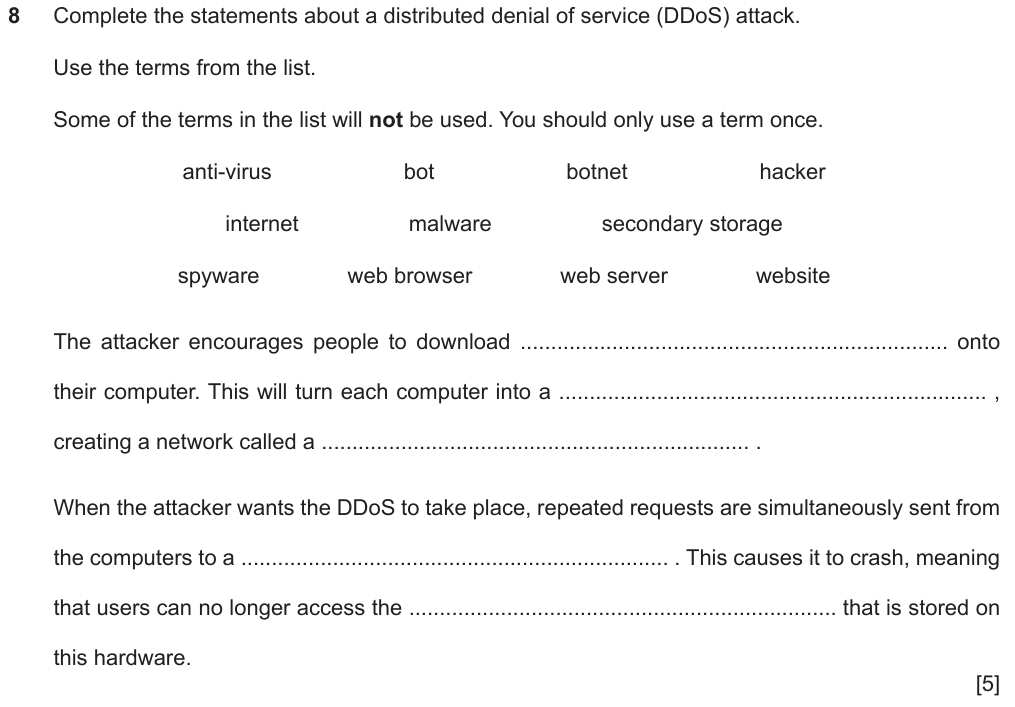
How to start Follow the DDoS method: malware → bot → botnet → server → website.
Show a full-mark answer and the mark scheme
The attacker encourages people to download malware onto their computer. This will turn each computer into a bot, creating a network called a botnet. … repeated requests are simultaneously sent from the computers to a web server. This causes it to crash, meaning that users can no longer access the website that is stored on this hardware.
| Part | Answer / working | Marks | Guidance |
|---|---|---|---|
| 8 | malware · bot · botnet · web server · website | B5 | |
| Total: 5 marks | |||
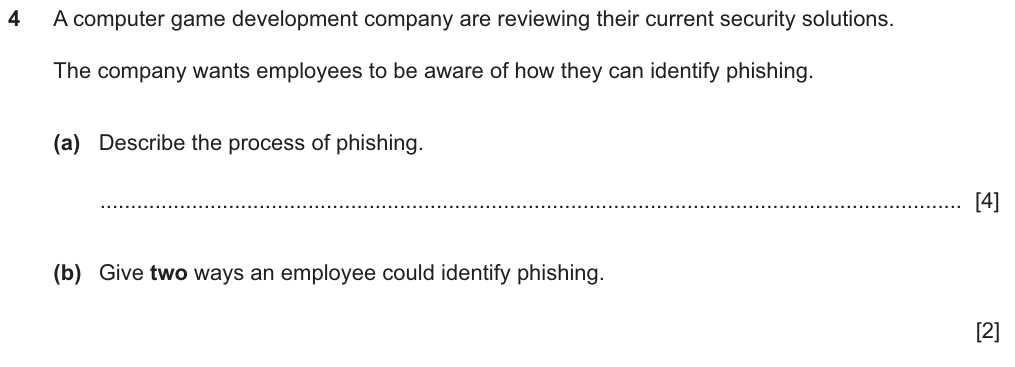
How to start (a) four steps. (b) two checks a user can make.
Show a full-mark answer and the mark scheme
(a) A legitimate-looking email is sent to the user. The user clicks a link in the email and is directed to a fake website. The user enters their personal data, which is then stolen and used by a third party.
(b) Check the email address it was sent from; check the URL attached to the link (also: check the spelling and tone).
| Part | Answer / working | Marks | Guidance |
|---|---|---|---|
| 4(a) | legitimate-looking email · clicks link / replies · fake website · enters personal data · stolen / used by third party | B4 | |
| 4(b) | Any two: check sender's email address · check tone / spelling · check the URL of the link | B2 | |
| Total: 6 marks | |||
Common mistakes
- ✗ "Phishing is a virus"✓ "Phishing is a trick using a fake email; it is not malware"
- ✗ "A DDoS hacks the server"✓ "A DDoS floods the server with requests so it crashes"
- ✗ "Spyware deletes files"✓ "Spyware records key presses and sends them to a third party"
- ✗ Mixing up phishing and pharming✓ phishing = email link; pharming = redirected from a typed URL
Practice
Practice: easy, medium, hard
Easy
Show answer
Answer DDoS (distributed denial of service)
Show answer
Answer Trojan horse
Medium
Show answer
Answer Manipulating / deceiving people to give away data or make an error; e.g. a call pretending to be the bank asking for a PIN
Show answer
Answer To obtain personal data
Hard
Show answer
Answer The user types the genuine URL themselves, but is redirected; there is no suspicious email or link to notice
Can I do this?
- I can describe brute force, hacking and data interception, with aims.
- I can describe and draw a DDoS attack.
- I can describe the six types of malware.
- I can describe phishing, pharming and social engineering.
Anything unticked: revise that section first. All ticked: take the quiz.
Quiz
The multiple-choice and guided questions need JavaScript. The concept checks and exam practice below work without it.
Your progress on this note is saved when JavaScript is on.
⬇️ Download this chapter as a PDF: Full notes