
Data Representation
Number systems: binary, denary and hexadecimal
On this page
- In this note
- What you should already know
- Why computers use binary
- Denary, binary and hexadecimal
- Binary to denary
- Denary to binary
- How big a number can a register hold?
- Converting with hexadecimal
- Summary
- Ways they test it
- What the examiner looks for
- Past-paper questions, solved
- Common mistakes
- Practice
- Can I do this?
- Quiz
In this note
- 1.1.1Explain how and why computers use binary to represent all data.
- 1.1.2Understand the denary, binary and hexadecimal number systems.
- 1.1.2Convert positive whole numbers between denary, binary and hexadecimal, in every direction (up to 16 bits).
- 1.1.2Work out the largest number a register can hold and the fewest bits a number needs.
The notes: every idea from the start, with our own examples.
What you should already know
Place value in denary
In 365 the 3 is worth 300, the 6 is worth 60 and the 5 is worth 5. Each column is worth ten times the column to its right: 1, 10, 100, 1000.
Quick check: what is the 4 worth in 4 072?
4000 (the thousands column).
Powers of 2
Keep doubling from 1: 1, 2, 4, 8, 16, 32, 64, 128, 256, 512, 1024 … You will use these in every question on this page, so learn them up to 128 (and 2048, 4096 … for 12 and 16 bits).
Quick check: what comes after 128?
256.
Why computers use binary
Inside a computer, data is processed by millions of tiny electronic switches called transistors, wired together into logic gates. A switch can only be in one of two states: on or off. So a computer can only hold two values, which we write as 1 and 0.
That is why every kind of data has to be turned into binary before a computer can process or store it: numbers, text, images, sound, and the program instructions themselves. Binary values are held in registers (small stores inside the processor) and in memory.
Denary, binary and hexadecimal
A number system's base is how many different digits it uses. Every system works with place value: each column is worth the base times the column to its right.
| System | Base | Digits | Column values (right to left) | Who uses it |
|---|---|---|---|---|
| Denary | 10 | 0 to 9 | 1, 10, 100, 1000 … | people, every day |
| Binary | 2 | 0 and 1 | 1, 2, 4, 8, 16, 32, 64, 128 … | the computer itself |
| Hexadecimal (hex) | 16 | 0 to 9, then A to F | 1, 16, 256, 4096 | programmers: a short way to write binary |
In hex the letters stand for the numbers 10 to 15, because one column must hold a single digit:
| Denary | 0 | 1 | 2 | 3 | 4 | 5 | 6 | 7 | 8 | 9 | 10 | 11 | 12 | 13 | 14 | 15 |
|---|---|---|---|---|---|---|---|---|---|---|---|---|---|---|---|---|
| Hex | 0 | 1 | 2 | 3 | 4 | 5 | 6 | 7 | 8 | 9 | A | B | C | D | E | F |
| Binary | 0000 | 0001 | 0010 | 0011 | 0100 | 0101 | 0110 | 0111 | 1000 | 1001 | 1010 | 1011 | 1100 | 1101 | 1110 | 1111 |
Binary to denary
An 8-bit binary number has these column (place) values. A 1 means "include this column", a 0 means "leave it out":
| 128 | 64 | 32 | 16 | 8 | 4 | 2 | 1 | |||
|---|---|---|---|---|---|---|---|---|---|---|
| Binary | 1 | 0 | 0 | 1 | 1 | 1 | 0 | 0 |
General methodBinary to denary
- Write the place values over the bits: 1 under the rightmost bit, then 2, 4, 8 … going left.
- Add the place values that have a 1 under them.
- Check: the answer is odd only if the last bit is 1, and 8 bits can never give more than 255.
Example Convert 0010 1101 to denary.
Add the place values of the 1s.
- 32 + 8 + 4 + 1
Answer 45
Try it yourself
Show working
- 64 + 16 + 4 + 1 = 85
Answer 85
Show working
- 128 + 64 + 32 + 16 + 8 + 4 + 2 + 1 = 255 (the largest 8-bit number)
Answer 255
Show working
- 128 + 64 + 8 = 200
Answer 200
Denary to binary
Two methods give the same answer. Use whichever you find quicker; the mark scheme accepts both.
Method A: subtract place values
General methodTake away the biggest place value that fits
- Write the place values 128 64 32 16 8 4 2 1.
- Start at 128. Does it fit into what is left? Yes: write 1 and subtract it. No: write 0.
- Move to the next place value and repeat until you reach 1.
- Read the bits from left to right.
Example Convert 156 to 8-bit binary.
Take away the biggest place value that fits, each time.
- 128 fits: 1, and 156 − 128 = 28 left
- 64? no: 0. 32? no: 0. 16 fits: 1, and 28 − 16 = 12 left
- 8 fits: 1, 4 left. 4 fits: 1, 0 left. 2? no: 0. 1? no: 0
Answer 1001 1100
Method B: divide by 2
General methodKeep dividing by 2 and read the remainders upwards
- Divide the number by 2. Write down the answer and the remainder (0 or 1).
- Divide the answer by 2 again. Keep going until the answer is 0.
- The first remainder is the rightmost bit: read the remainders from the bottom up.
- Add 0s on the left to make 8 bits (or the number of bits asked for).
| Divide | Answer | Remainder |
|---|---|---|
| 156 ÷ 2 | 78 | 0 |
| 78 ÷ 2 | 39 | 0 |
| 39 ÷ 2 | 19 | 1 |
| 19 ÷ 2 | 9 | 1 |
| 9 ÷ 2 | 4 | 1 |
| 4 ÷ 2 | 2 | 0 |
| 2 ÷ 2 | 1 | 0 |
| 1 ÷ 2 | 0 | 1 |
Reading upwards: 1001 1100.
Try it yourself
Show working
- 32 + 16 + 2 = 50
Answer 0011 0010
Show working
- 64 + 32 + 4 + 2 = 102
Answer 0110 0110
Show working
- 128 + 64 + 16 + 8 + 4 + 1 = 221
Answer 1101 1101
How big a number can a register hold?
A register has a fixed number of bits. With all bits set to 1 you get the largest number it can hold.
| Bits | Smallest | Largest | How many different values |
|---|---|---|---|
| 4 (a nibble) | 0 | 15 (1111) | 16 |
| 8 (a byte) | 0 | 255 (1111 1111) | 256 |
| 12 | 0 | 4095 (FFF in hex) | 4096 |
| 16 | 0 | 65 535 (FFFF in hex) | 65 536 |
Largest value
n bits hold up to 2ⁿ − 1: 8 bits → 2⁸ − 1 = 255.
Fewest bits for a number
Keep doubling until the place value is bigger than the number, then count the place values you used. 301: 256 is not bigger, 512 is → 1, 2, 4 … 256 is 9 bits.
Fewest bits for a hex number
Each hex digit is exactly 4 bits, so count the digits × 4: A4D has 3 digits → 12 bits.
Try it yourself
Show answer
Answer 255
Show working
- 128 ≤ 200 < 256, and 256 = 2⁸, so 8 bits
Answer 8
Show working
- 3 hex digits × 4 bits = 12
Answer 12
Converting with hexadecimal
The key fact: one hex digit is exactly 4 bits (a nibble), because 16 = 2⁴. So binary and hex convert by grouping in fours; no adding up of big numbers is needed.
Binary to hex
General methodBinary to hexadecimal
- Split the bits into groups of 4 starting from the right. If the left group is short, add 0s in front.
- Work out each group with the place values 8 4 2 1 (10 to 15 become A to F).
- Write the hex digits in the same order.
| 8 | 4 | 2 | 1 | 8 | 4 | 2 | 1 | 8 | 4 | 2 | 1 | ||||
|---|---|---|---|---|---|---|---|---|---|---|---|---|---|---|---|
| Binary | 1 | 0 | 1 | 1 | 0 | 0 | 1 | 1 | 1 | 0 | 1 | 0 | |||
| Hex | B | 3 | A |
Hex to binary
General methodHexadecimal to binary
- Turn every hex digit into exactly 4 bits, zeros included.
- Write the groups side by side.
Example Convert A04 to binary.
Four bits for every digit, even the 0.
- A = 1010
- 0 = 0000
- 4 = 0100
Answer 1010 0000 0100
Hex to denary
Method A: hex place values
General methodMultiply by 1, 16, 256
- Hex place values from the right are 1, 16, 256 (and 4096).
- Multiply each digit (A = 10 … F = 15) by its place value.
- Add them up.
Example Convert C0F to denary.
Multiply each digit by its place value.
- C = 12 in the 256s: 12 × 256 = 3072
- 0 in the 16s: 0
- F = 15 in the 1s: 15
Answer 3072 + 0 + 15 = 3087
Method B: through binary
General methodGo through binary
- Turn each hex digit into 4 bits.
- Convert the binary to denary by adding place values.
Example Convert F0 to denary.
Through binary.
- F0 = 1111 0000
- 128 + 64 + 32 + 16
Answer 240
Denary to hex
Method A: through binary (safest)
General methodGo through binary
- Convert the denary number to binary.
- Group the bits in fours from the right.
- Turn each group into one hex digit.
Example Convert 251 to hex.
Binary first, then group in fours.
- 251 = 1111 1011
- 1111 = F, 1011 = B
Answer FB
Method B: divide by 16
General methodDivide by 16 and use the remainders
- Divide by 16. The remainder (0 to 15) is the rightmost hex digit.
- Divide the answer by 16 again; the remainder is the next digit to the left.
- Stop when the answer is 0. Read the remainders from the bottom up.
Example Convert 301 to hex.
Divide by 16, keep the remainders.
- 301 ÷ 16 = 18 remainder 13 → D
- 18 ÷ 16 = 1 remainder 2 → 2
- 1 ÷ 16 = 0 remainder 1 → 1
Answer 12D
Try it yourself
Show working
- 1001 = 9, 0011 = 3
Answer 93
Show working
- 2 = 0010, D = 1101
Answer 0010 1101
Show working
- 236 = 1110 1100
- 1110 = E, 1100 = C
Answer EC
Show working
- 1 × 16 + 10 = 26
Answer 26
Summary
- Computers use binary because they are made of switches / logic gates with only two states (1 and 0). All data is converted to binary.
- Denary is base 10, binary is base 2 (0, 1), hexadecimal is base 16 (0-9, A-F).
- 8-bit place values: 128 64 32 16 8 4 2 1. Binary to denary: add the place values of the 1s.
- Denary to binary: subtract the biggest place value that fits (or divide by 2, read remainders upwards). Give the number of bits asked for.
- One hex digit = 4 bits. Binary ↔ hex: group in fours from the right.
- Hex to denary: digit × 16 + digit (× 256 for a third digit). Denary to hex: go through binary, or divide by 16.
- n bits hold 0 to 2ⁿ − 1 (8 bits: 0-255). Fewest bits: first power of 2 bigger than the number; hex: digits × 4.
If you see …
- "Convert … to 8-bit binary"exactly 8 bits, with leading zeros
- "least number of bits"first power of 2 bigger than the number (hex: 4 per digit)
- a hex digit 0 in the middlewrite it as 0000
Question types, what the examiner gives marks for, and real past-paper questions solved.
Ways they test it
Type 1 Convert three numbers
"Convert these three denary numbers to 8-bit binary numbers: 50, 102, 221" [3]. Also binary → hex, hex → binary, denary → hex, often as a table to fill in.
Spot it a list of numbers and a working space.
- One mark per number, all or nothing, so check each one.
- Binary answers: the number of bits asked for.
- Hex answers: "one mark per correct character in the correct order" for longer conversions.
Type 2 Explain the system
"Explain what is meant by a binary number system" [2]
Spot it "what is meant by" / "explain".
- It is base 2.
- It uses only two values, 1 and 0.
Type 3 Why binary
"Explain why data input into the machine needs to be converted to binary" [2]
Spot it "why" + "binary".
- The computer contains logic gates / switches …
- … that only process two states / 1 and 0.
Type 4 Size of a register
"State the highest denary number in an 8-bit register" [1], "Calculate the least number of bits to store 301" [1]
Spot it "highest", "least number of bits".
- 2ⁿ − 1 for the highest.
- First power of 2 bigger than the number for the bits.
Type 5 Similarities and differences
"Give one similarity and two differences between hexadecimal and binary" [3]
Spot it two systems compared.
- Similarity: both are number systems (both can represent the same values).
- Differences: base 2 vs base 16; binary uses only 0 and 1, hex uses 0-9 and A-F; hex is shorter.
What the examiner looks for
"Explain why computers use binary" [2]
Marking points (one mark each, up to the marks shown)
- Computers contain logic gates / switches …
- … that only have two states // only process the values 1 and 0.
Keywords logic gates switches two states 1 and 0
Too vague "computers understand binary"; "binary is easier for computers"
"Explain what is meant by a binary number system" [2]
Marking points (one mark each, up to the marks shown)
- It has a base of 2.
- It only uses two values …
- … that are 1 and 0.
Keywords base 2 1 and 0
Writing an 8-bit binary answer
- 0000 1110
- 1110 (the scheme wrote (0000)1110: leading zeros optional when no number of bits is set)
- 111 (a bit missing)
- 0111 0000 (written backwards)
When the question says 8-bit, write all 8 bits; then a missing leading 0 can never cost you the mark.
From: 0478/13/O/N/23 Q2(b) mark scheme
Past-paper questions, solved
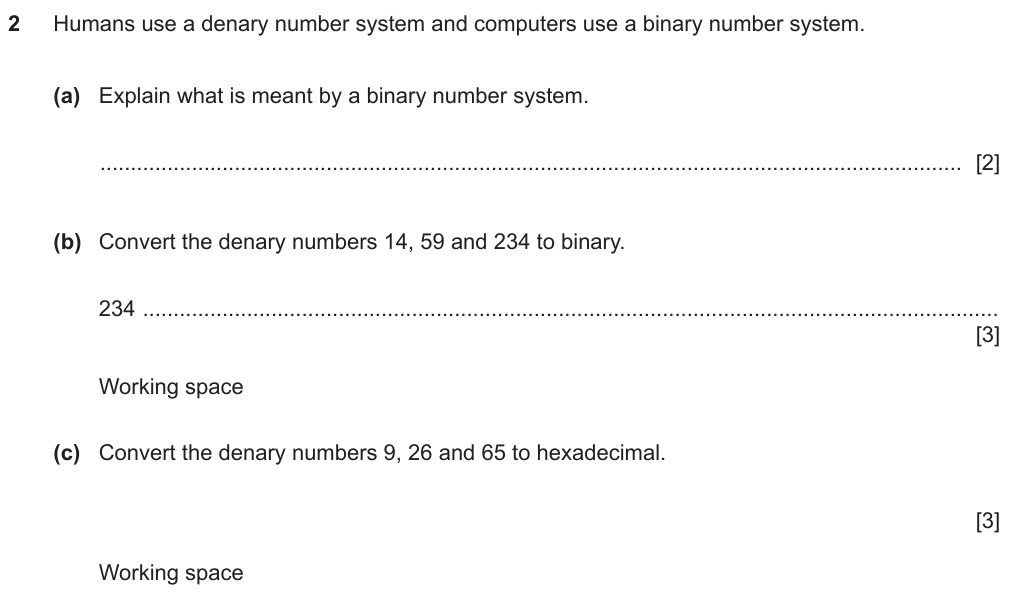
How to start Part (a) is two facts about binary (base, two values). For (b) and (c) use the place-value table; go through binary for the hex.
Show a full-mark answer and the mark scheme
(a) A binary number system has a base of 2. It uses only two values, 1 and 0.
(b) 14 = 0000 1110 · 59 = 0011 1011 · 234 = 1110 1010
(c) 9 = 9 · 26 = 0001 1010 = 1A · 65 = 0100 0001 = 41
| Part | Answer / working | Marks | Guidance |
|---|---|---|---|
| 2(a) | Any two from: it has a base of 2 · it only uses two values · … that are 1 and 0 | B2 | |
| 2(b) | (0000)1110 · (00)111011 · 11101010 | B3 | one mark each |
| 2(c) | 9 · 1A · 41 | B3 | one mark each |
| Total: 8 marks | |||
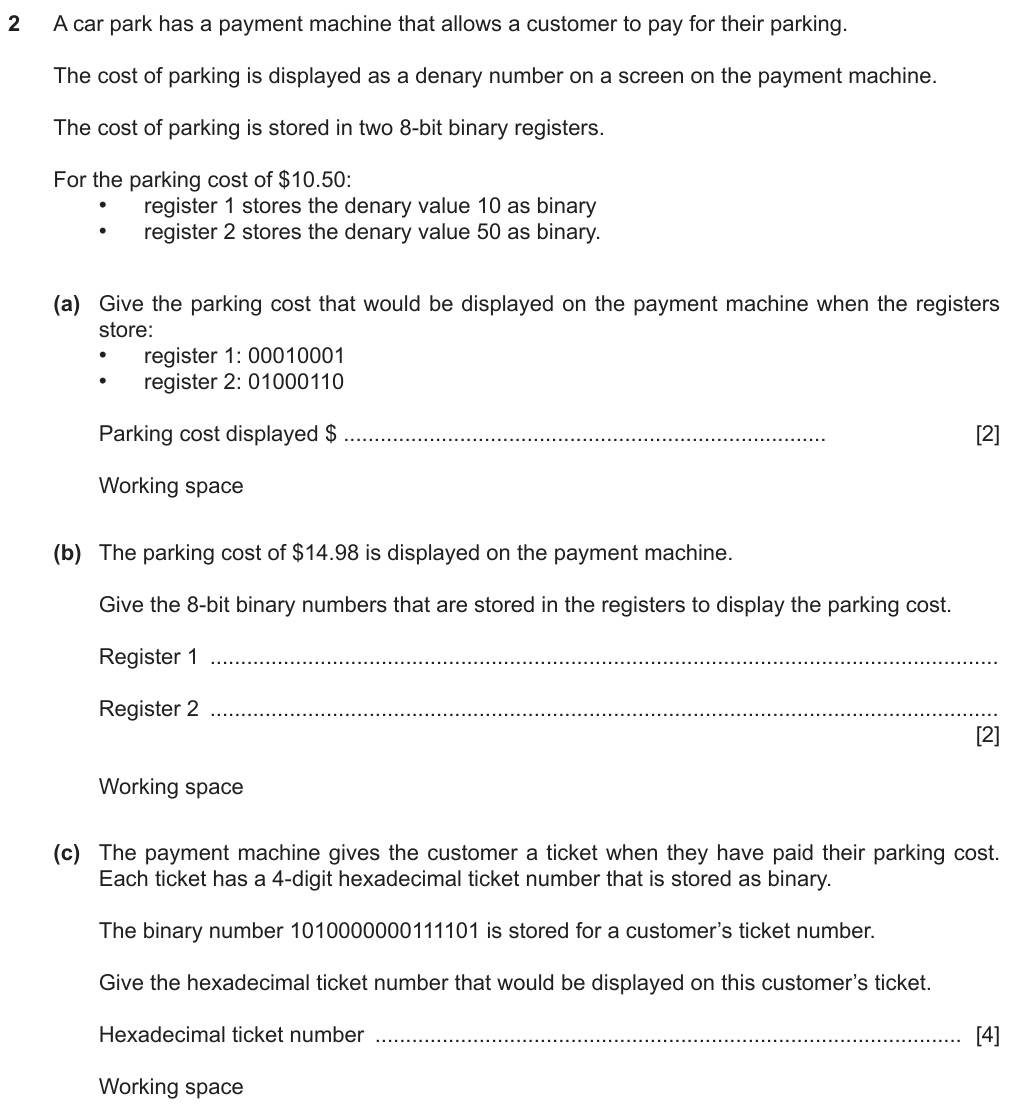
How to start Each register is a separate 8-bit number: convert register 1 for the dollars and register 2 for the cents. For (c) group the 16 bits in fours.
Show a full-mark answer and the mark scheme
(a) 0001 0001 = 16 + 1 = 17 and 0100 0110 = 64 + 4 + 2 = 70, so $17.70.
(b) 14 = 0000 1110 and 98 = 64 + 32 + 2 = 0110 0010.
(c) 1010 | 0000 | 0011 | 1101 = A 0 3 D, so A03D.
| Part | Answer / working | Marks | Guidance |
|---|---|---|---|
| 2(a) | 17 · 70 (correct fee $17.70) | B2 | one mark for each part, in the correct order |
| 2(b) | Register 1: 00001110 · Register 2: 01100010 | B2 | |
| 2(c) | A · 0 · 3 · D | B4 | one mark per correct character in the correct order |
| Total: 8 marks | |||
Examiner tip A whole 16-bit number given at once? Split it into nibbles first and write the four groups down before converting.
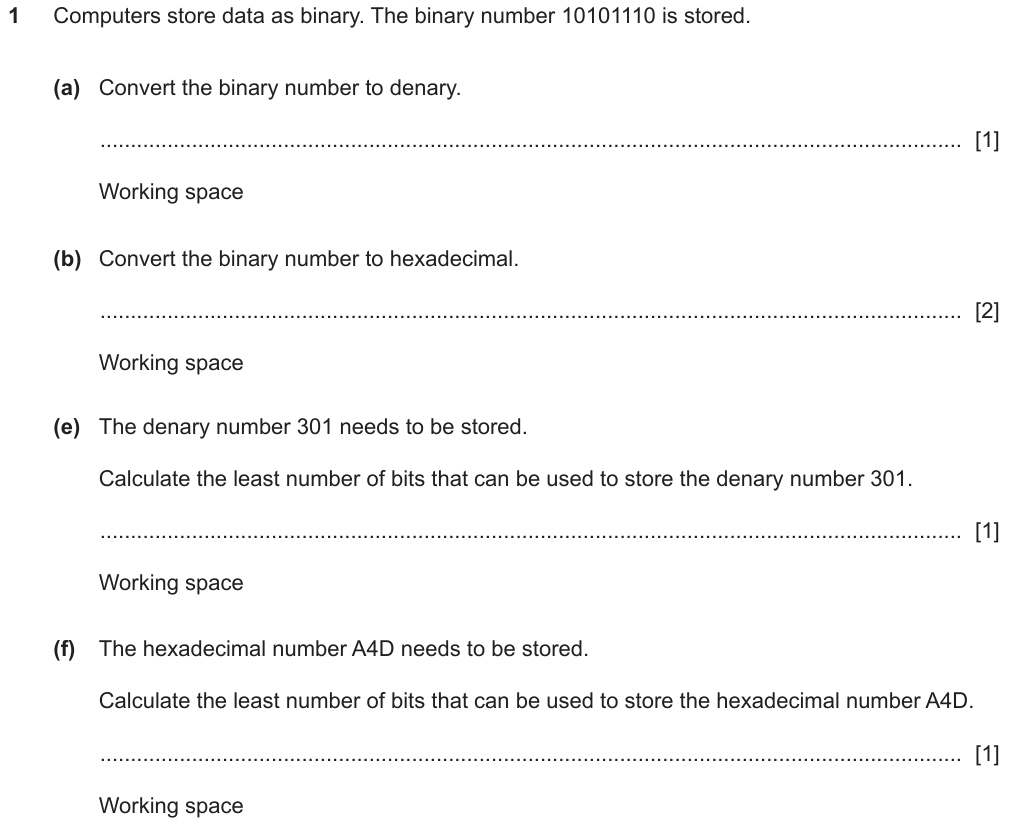
How to start Same number twice: add the place values for denary, group in fours for hex. For the least number of bits, find the first power of 2 above the number.
Show a full-mark answer and the mark scheme
(a) 128 + 32 + 8 + 4 + 2 = 174
(b) 1010 = A, 1110 = E → AE
(e) 256 < 301 < 512 = 2⁹ → 9 bits
(f) 3 hex digits × 4 bits = 12 bits
| Part | Answer / working | Marks | Guidance |
|---|---|---|---|
| 1(a) | 174 | B1 | |
| 1(b) | A · E | B2 | one mark per character in the correct order |
| 1(e) | 9 | B1 | |
| 1(f) | 12 | B1 | |
| Total: 5 marks | |||
Common mistakes
- ✗ 14 → 1110 when 8 bits are asked for✓ 0000 1110Give the number of bits the question asks for.
- ✗ A04 → 1010 0100✓ 1010 0000 0100Every hex digit is 4 bits, the 0 too.
- ✗ F0 → 150✓ F0 = 15 × 16 = 240Multiply each hex digit by its place value.
- ✗ Grouping bits from the left: 101101 → 1011 01✓ 0010 1101 → 2DAlways group from the right and pad the left group.
- ✗ "Computers use binary because it is easy"✓ "made of switches / logic gates with two states, 1 and 0"Name the hardware reason.
Practice
Practice: easy, medium, hard
Easy
Show working
- 64 + 32 + 8 + 1
Answer 105
Show working
- 64 + 8 + 4 + 1
Answer 0100 1101
Show answer
Answer C7
Show answer
Answer 16
Medium
Show working
- 11 × 16 + 9 = 176 + 9
Answer 185
Show working
- 175 = 1010 1111
- A F
Answer AF
Show answer
Answer 0011 1100
Show working
- 512 < 1000 < 1024 = 2¹⁰
Answer 10
Hard
Show answer
Answer 0101 1110 0011
Show working
- 2048 + 8 + 4 + 2 + 1
Answer 2063
Show working
- 700 ÷ 16 = 43 r 12 (C)
- 43 ÷ 16 = 2 r 11 (B)
- 2 ÷ 16 = 0 r 2
Answer 2BC
| Part | Answer / working | Marks | Guidance |
|---|---|---|---|
| 2BC | B2 | one mark for two correct characters, two marks for all three in order | |
| Total: 2 marks | |||
Show working
- 12 bits all 1 = 2¹² − 1 = 4095
- three groups of 1111 = FFF
Answer 4095 · FFF
Can I do this?
- I can explain why computers use binary (switches / logic gates, two states).
- I know the base and the digits of denary, binary and hexadecimal.
- I can convert binary to denary and denary to 8-bit binary.
- I can convert between binary and hex by grouping in fours, keeping every 0000.
- I can convert between hex and denary both ways.
- I can give the largest value of a register and the fewest bits for a number.
Anything unticked: revise that section first. All ticked: take the quiz.
Quiz
The multiple-choice and guided questions need JavaScript. The concept checks and exam practice below work without it.
Your progress on this note is saved when JavaScript is on.
⬇️ Download this chapter as a PDF: Full notes