
Data Representation
Text, sound and images
In this note
- 1.2.1Explain how and why a computer represents text, using a character set such as ASCII or Unicode.
- 1.2.2Explain how sound is sampled and stored, and the effects of the sample rate and sample resolution.
- 1.2.3Explain how an image is stored as pixels, and the effects of the resolution and colour depth.
Before this: Number systems. Next: Data storage and compression (file-size calculations use these ideas).
The notes: every idea from the start, with our own examples.
What you should already know
Everything becomes binary
A computer is made of switches with two states, so text, sound and pictures must all be turned into 1s and 0s before it can process or store them.
Quick check: why can't a computer store the letter A directly?
It can only store binary (1s and 0s), so A must be given a binary code.
n bits give 2ⁿ values
1 bit: 2 values; 2 bits: 4; 8 bits: 256; 16 bits: 65 536.
Quick check: how many values do 3 bits give?
8.
Text and character sets
When you press a key, the computer has to turn the character into binary. It does this with a character set: a list of all the characters the computer can use, with a unique binary code (number) for each one.
Each character typed is looked up in the character set and its code is stored. A word is stored as the codes of its characters, one after another, in sequence. Upper and lower case letters have different codes.
| Character | Denary code | Binary (ASCII) |
|---|---|---|
| A | 65 | 0100 0001 |
| B | 66 | 0100 0010 |
| C | 67 | 0100 0011 |
| a | 97 | 0110 0001 |
| space | 32 | 0010 0000 |
Codes follow the alphabet: if A is 65, then C is 67. So "CAB" is stored as 67, 65, 66.
ASCII and Unicode
| ASCII | Unicode | |
|---|---|---|
| Bits per character | 7 bits (8 bits in extended ASCII) | up to 16 or 32 bits |
| Number of characters | 128 (256 extended) | over a million possible (about 65 000 with 16 bits; about 4 billion with 32) |
| Languages | English only (letters, digits, punctuation, control codes) | almost every language in the world |
| Emojis and symbols | no | yes |
| Storage | less: 1 byte per character | more storage per character, so files are bigger |
Try it yourself
Show working
- D, E, F, G: 68 + 3
Answer 71
Show answer
Answer Unicode
Sound
Sound is an analogue wave: it changes smoothly all the time. A computer can only store separate binary numbers, so the wave must be turned into digital data. A microphone picks up the sound, then the wave is sampled:
General methodHow sound is recorded and converted to binary
- The sound is recorded by a microphone, which turns it into an electrical (analogue) signal.
- The sound wave is sampled at regular time intervals: the amplitude (height) of the wave is measured.
- Each amplitude measured is given a binary value.
- The sample rate sets how many samples are taken per second.
- The sample resolution sets how many bits are used for each sample.
- The binary values of all the samples are stored, in order.
| Change | Effect on the recording | Effect on the file |
|---|---|---|
| Higher sample rate (more samples per second) | more accurate, closer to the original sound | larger file size |
| Higher sample resolution (more bits per sample) | more amplitudes can be recorded, so more accurate / better quality | larger file size |
| Lower rate or resolution | less accurate, poorer quality | smaller file |
Try it yourself
Show working
- 2⁸ = 256
Answer 256
Show answer
Answer The file size increases / it needs more storage space
Images
A digital (bitmap) image is a grid of tiny squares called pixels. Each pixel is one colour, and that colour is stored as a binary number. The whole image is stored as the binary codes of all its pixels, plus some extra data about the image.
| Term | Meaning |
|---|---|
| Pixel | the smallest component of an image: one square of one colour |
| Resolution | the number of pixels in the image: pixels wide × pixels high, e.g. 1920 × 1080 |
| Colour depth (bit depth) | the number of bits used to represent each colour (each pixel) |
| Metadata | extra data stored with the image, e.g. its width and height, colour depth, date and time taken |
| Colour depth | Number of colours | Example |
|---|---|---|
| 1 bit | 2 | black and white |
| 8 bits | 256 | simple graphics |
| 24 bits | about 16.7 million | photographs (8 bits each for red, green, blue) |
| Change | Effect on the image | Effect on the file |
|---|---|---|
| Higher resolution (more pixels) | more detail, better quality | larger file size (more pixels to store) |
| Higher colour depth (more bits per pixel) | a greater range of colours, closer to real life | larger file size (more bits per pixel) |
| Lower resolution or colour depth | less detail / fewer colours | smaller file |
Try it yourself
Show answer
Answer 16
Show answer
Answer 240 000
Summary
- Text: a character set gives every character a unique binary code; the codes are stored in sequence.
- ASCII: 7 (or 8) bits, 128 (256) characters, English. Unicode: up to 16/32 bits, many languages and emojis, more storage per character.
- Sound: microphone → wave sampled → amplitude measured → each sample given a binary value.
- Sample rate = samples per second; sample resolution = bits per sample. Higher → more accurate, bigger file.
- Image: grid of pixels, each colour a binary code. Resolution = number of pixels; colour depth = bits per colour. Higher → better quality, bigger file.
If you see …
- "describe how text is converted to binary"character set · unique binary value per character · e.g. ASCII / Unicode
- "explain how sound is converted"sampled · amplitude · binary value · sample rate · resolution
- "what is meant by colour depth"number of bits used for each colour
Question types, what the examiner gives marks for, and real past-paper questions solved.
Ways they test it
Type 1 Text to binary
"Describe how the text is converted to binary" [2-3]
Spot it keyboard / text / characters.
- A character set is used (name one: ASCII or Unicode).
- Each character has a unique binary value.
- The codes are stored in sequence.
Type 2 ASCII vs Unicode
"Explain the differences between ASCII and Unicode" [4]
Spot it both names in the question.
- Write each point as a comparison: "ASCII has fewer characters, whereas Unicode has more".
- Max 3 marks if you only describe one of them: always cover both.
Type 3 Sound conversion
"Explain how the analogue sound is recorded and converted to digital" [5]
Spot it "analogue", "recorded", "converted".
- Follow the six steps of the method: microphone, sampled, amplitude, binary value, sample rate (defined), resolution (defined).
Type 4 Effects
"State two ways the accuracy of the recording could be increased" [2] / "Explain the effect of changing the colour depth" [2]
Spot it "effect", "increase", "accuracy", "quality".
- Say what happens to quality AND to file size.
- Give the reason: more bits per sample / per colour.
Type 5 Define a term
"State what is meant by the image resolution" [1]; a table of terms to complete [4]
Spot it "what is meant by".
- Use the exact definitions from the table above.
What the examiner looks for
"Explain the differences between the ASCII and Unicode character sets" [4] (MAX 3 for one set only)
Marking points (one mark each, up to the marks shown)
- ASCII has fewer / a limited number of characters // Unicode has more characters
- ASCII covers a limited set of / fewer languages
- Unicode includes many more languages and emojis
- ASCII uses 7 / 8 bits per character; Unicode uses up to 16 / 32 bits per character
- ASCII has 128 / 256 characters; Unicode about 65 536 / over 4 billion
Keywords character set bits per character languages emojis
"Explain how the analogue sound is recorded and converted to digital" [5]
Marking points (one mark each, up to the marks shown)
- The sound is recorded using a microphone
- The sound wave is sampled …
- … measuring the height / amplitude
- Each amplitude has a unique binary value
- The sample rate is set … that is the number of samples taken per second
- The sample resolution is set … that is the number of bits used for each sample
- Each sample taken is converted to binary
Keywords sampled amplitude sample rate sample resolution binary value
Colour depth
- 16 bits are used to represent each colour in the image
- the number of bits used for each colour / pixel (with the 16)
- the number of colours in the image
- how bright the colours are
- 16 colours
Colour depth is a number of BITS. 16 bits give 2¹⁶ = 65 536 colours, not 16.
From: 0478/13/M/J/24 Q2(a) mark scheme
Past-paper questions, solved
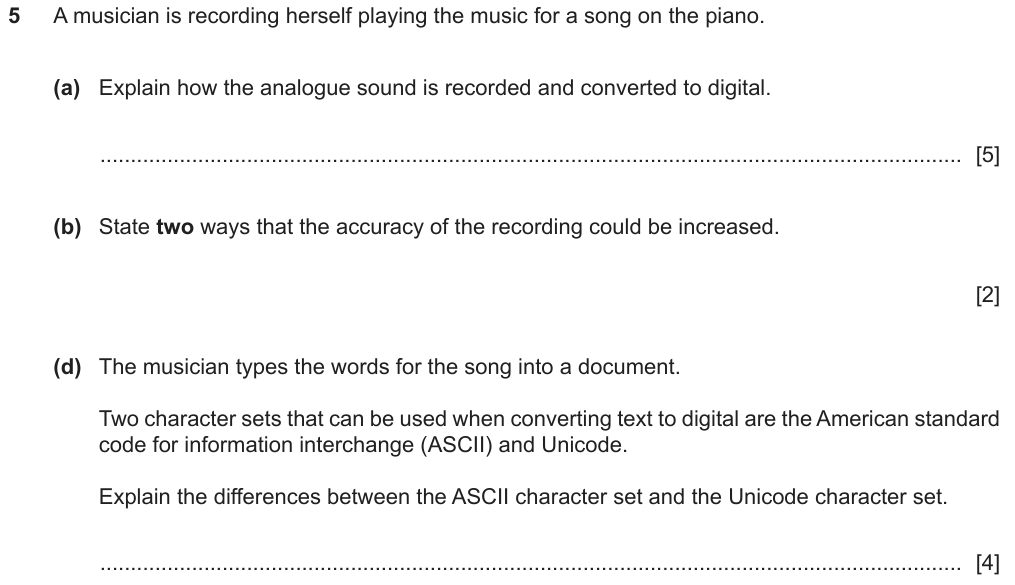
How to start (a) is the six-step sound method. (b) names the two settings. (d) needs points about BOTH character sets, written as comparisons.
Show a full-mark answer and the mark scheme
(a) The piano is recorded with a microphone. The sound wave is sampled at regular intervals and the amplitude (height) of the wave is measured. Each amplitude is given a binary value. The sample rate is the number of samples taken per second and the sample resolution is the number of bits used for each sample.
(b) Increase the sample rate. Increase the sample resolution.
(d) ASCII has fewer characters (128, or 256 extended) whereas Unicode has many more. ASCII covers mainly English, whereas Unicode covers many languages and emojis. ASCII uses 7 or 8 bits per character, whereas Unicode uses up to 16 or 32 bits per character.
| Part | Answer / working | Marks | Guidance |
|---|---|---|---|
| 5(a) | Any five: microphone · wave is sampled · … measuring the amplitude · each amplitude has a unique binary value · sample rate set · … number of samples per second · sample resolution set · … bits per sample · each sample converted to binary | B5 | |
| 5(b) | Increase the sample rate · increase the sample resolution | B2 | |
| 5(d) | Any four (MAX 3 for ASCII or Unicode alone): fewer / more characters · fewer / more languages, emojis · 7/8 vs 16/32 bits per character · 128/256 vs 65 536 / 4 billion characters | B4 | |
| Total: 11 marks | |||
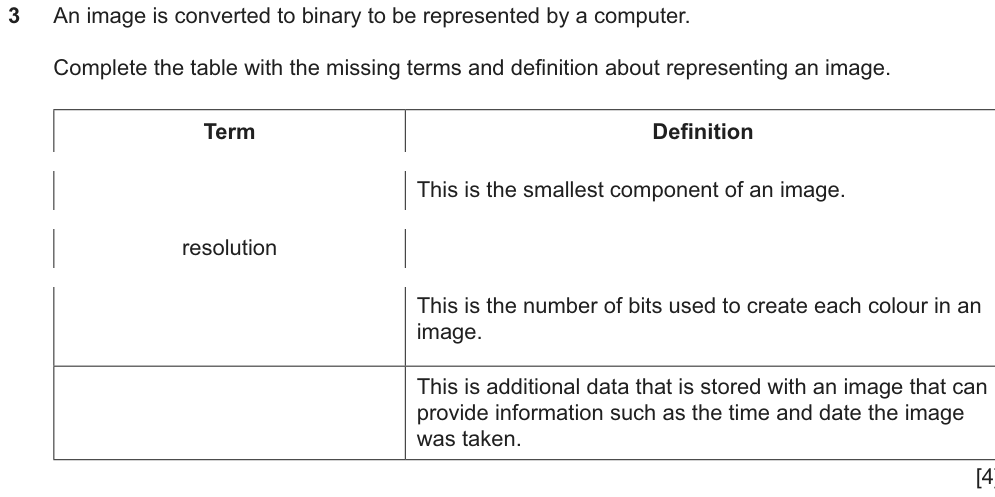
How to start Two rows give the term, two give the definition. Match each to the four key image words: pixel, resolution, colour depth, metadata.
Show a full-mark answer and the mark scheme
pixel: the smallest component of an image.
resolution: the number of pixels high by the number of pixels wide.
colour depth: the number of bits used to create each colour.
metadata: additional data stored with the image, such as the date and time it was taken.
| Part | Answer / working | Marks | Guidance |
|---|---|---|---|
| 3 | pixel / resolution / colour depth (bit depth) / metadata (header), one mark for each correct term or definition | B4 | |
| Total: 4 marks | |||
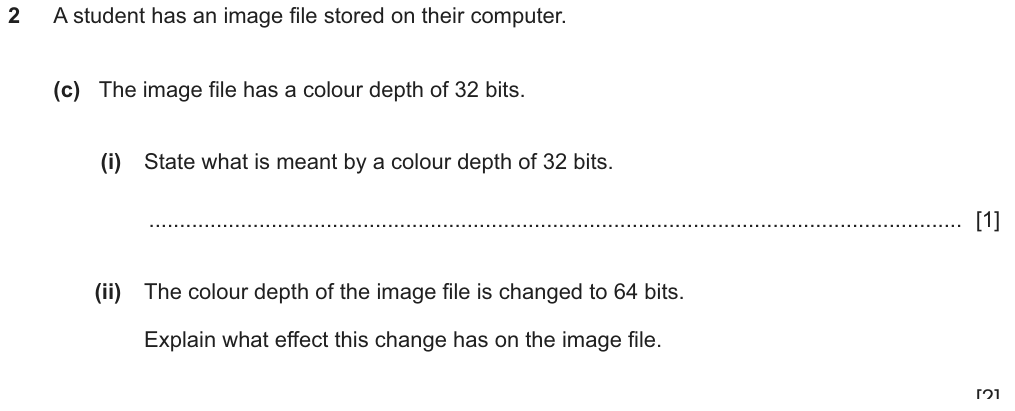
How to start (i) is the definition with the number in it. (ii) asks for the effect on the FILE, with a reason.
Show a full-mark answer and the mark scheme
(c)(i) 32 bits are used to represent each colour in the image.
(c)(ii) The file size increases, because the number of bits used to store each colour has doubled.
| Part | Answer / working | Marks | Guidance |
|---|---|---|---|
| 2(c)(i) | 32 bits are used to represent each colour // 2³² different colours available | B1 | |
| 2(c)(ii) | the size of the image file increases · … as the number of bits per colour has increased | B2 | |
| Total: 3 marks | |||
Common mistakes
- ✗ "Colour depth is the number of colours"✓ "The number of bits used for each colour"
- ✗ "Resolution is how clear the image is"✓ "The number of pixels (wide × high)"
- ✗ "Sample rate is how fast the sound is played"✓ "Number of samples taken per second"
- ✗ Describing only Unicode in a compare question✓ A point about each, as a comparisonMax 3 marks for one side only.
- ✗ "Higher sample rate makes the sound louder"✓ "More accurate / closer to the original; bigger file"
Practice
Practice: easy, medium, hard
Easy
Show answer
Answer The smallest component of an image: one square of one colour
Show answer
Answer 128
Show answer
Answer The number of bits used for each sample
Medium
Show working
- 64 + 32 + 8 + 4 + 1
- 0110 = 6, 1101 = D
Answer 0110 1101 · 6D
Show answer
Answer Benefit: a greater range of colours, closer to real life. Drawback: larger file size
Show answer
Answer Each character is looked up in the character set (e.g. ASCII); its unique binary code is stored; H then i in sequence
Hard
Show answer
Answer Fewer samples per second and fewer bits per sample: less accurate / lower quality, further from the original; smaller files, less storage, quicker to download
| Part | Answer / working | Marks | Guidance |
|---|---|---|---|
| fewer samples per second / bits per sample | B1 | ||
| less accurate / lower quality | B1 | ||
| smaller file size | B1 | ||
| less storage / quicker transmission | B1 | ||
| Total: 4 marks | |||
Show answer
Answer Unicode uses more bits per character (16/32 vs 7/8), so each character needs more storage
Can I do this?
- I can describe how text is converted to binary using a character set.
- I can compare ASCII and Unicode in four points.
- I can explain how sound is sampled and define sample rate and resolution.
- I can define pixel, resolution, colour depth and metadata.
- I can give the effects of changing resolution, colour depth, sample rate and resolution.
Anything unticked: revise that section first. All ticked: take the quiz.
Quiz
The multiple-choice and guided questions need JavaScript. The concept checks and exam practice below work without it.
Your progress on this note is saved when JavaScript is on.
⬇️ Download this chapter as a PDF: Full notes