
Data Transmission
Serial, parallel, duplex and USB
In this note
- 2.1.2aDescribe serial and parallel transmission, and simplex, half-duplex and full-duplex transmission.
- 2.1.2bExplain the suitability of each method for a given situation, with advantages and disadvantages.
- 2.1.3Understand the universal serial bus (USB) interface and how it is used to transmit data.
Before this: Packets and packet switching. Next: Error detection.
The notes: every idea from the start, with our own examples.
What you should already know
Bits
All data is sent as bits (1s and 0s). Eight bits make a byte.
Quick check: how many bits in a byte?
8.
Interference
Electrical signals in wires can be disturbed by other signals nearby. This can change a 1 into a 0, or a 0 into a 1.
Quick check: what can interference do to a bit?
Change it (flip a 1 to a 0 or a 0 to a 1).
Serial and parallel
Every method is described in two ways: how many wires are used (serial or parallel) and which directions the data can go (simplex, half-duplex or full-duplex). An answer always needs both, e.g. "serial half-duplex".
| Serial | Parallel | |
|---|---|---|
| How | data is sent one bit at a time down a single wire | several bits at the same time down several wires |
| Speed | slower | faster (several bits at once) |
| Order of bits | bits arrive in order: they cannot be skewed | bits can arrive at slightly different times: skewing |
| Errors | less interference / crosstalk, so fewer errors | wires next to each other cause crosstalk, so more errors |
| Distance | reliable over long distances | only reliable over short distances (skewing gets worse with length) |
| Cost | cheaper: one wire | more expensive: many wires |
| Typical use | USB, networks, long cables | inside a computer (e.g. buses), very short cables |
Simplex, half-duplex and full-duplex
| Method | What happens | Example |
|---|---|---|
| Simplex | data is sent in one direction only | computer to monitor; microphone to speakers |
| Half-duplex | data is sent in both directions, but only one direction at a time | walkie-talkie; a printer cable that also sends back "out of paper" |
| Full-duplex | data is sent in both directions at the same time | phone call; a network connection with upload and download together |
Try it yourself
Show answer
Answer Serial half-duplex
Show answer
Answer Parallel simplex
Show answer
Answer Bits are not skewed / less interference, so fewer errors
Choosing a method for a situation
General methodChoose and justify a method
- Distance: more than a few metres → serial (no skewing, less interference). Very short and speed matters → parallel.
- Speed / amount of data: small amounts of data → serial is fast enough. Lots of data quickly over a short distance → parallel.
- Direction: does data only go one way? → simplex. Does a reply come back but not at the same time? → half-duplex. Do both sides send at once? → full-duplex.
- Write each reason as point + because: "serial, because the data travels a long distance and the bits will not be skewed".
Example A school's printer is in the next room. The computer sends documents; the printer sends back "paper jam" messages, but never while it is receiving. Choose a method.
Two decisions: wires, then directions.
- Distance: the next room, several metres → serial (bits not skewed, less interference).
- Directions: both ways, but not at the same time → half-duplex.
Answer Serial half-duplex
The universal serial bus (USB)
USB is a standard way to connect devices (mouse, keyboard, printer, memory stick, phone) to a computer. It uses serial transmission: data is sent one bit at a time down a single wire. Newer versions can send in both directions.
| Benefits of USB | Drawbacks of USB |
|---|---|
| it is a universal standard, so most devices and computers have it | maximum cable length is short (about 5 m) |
| the cable can only be inserted one way / cannot be plugged in wrongly | slower than some other connections (e.g. a parallel connection) |
| the device is automatically detected and the driver installed automatically | older versions may be slow for big transfers |
| it can power the device (and charge it) | |
| backwards compatible with older USB versions; supports different speeds | |
| serial, so less chance of skewing / errors |
Try it yourself
Show answer
Answer Serial
Show answer
Answer Two of: powers the mouse, automatically detected / driver installed, universal, cannot be inserted wrongly
Summary
- Serial: one bit at a time, one wire; in order, less interference, long distances, slower.
- Parallel: several bits at the same time, several wires; faster, but skewing and crosstalk, short distances only.
- Simplex: one direction. Half-duplex: both directions, one at a time. Full-duplex: both directions at the same time.
- Choose by distance, speed needed and direction; justify each choice with a reason.
- USB = universal serial bus: serial, universal, auto-detected, powers the device, one-way plug; short cable.
If you see …
- "describe serial half-duplex"one bit at a time · single wire · both directions · not at the same time
- "explain why serial is suitable"long distance · bits not skewed · less interference · speed adequate
- "benefits of USB"universal · auto-detected / driver · powers device · cannot insert wrongly · backwards compatible
Question types, what the examiner gives marks for, and real past-paper questions solved.
Ways they test it
Type 1 Describe a method
"Explain how data is transmitted using serial full-duplex" [4]
Spot it a method name with two words.
- Two marks for the wire part (one bit at a time / single wire) and two for the direction part (both directions / at the same time).
Type 2 Name from a description
a table of descriptions to complete [4]; "circle the two methods" [2]
Spot it "identify", "circle".
- Read each description twice: once for the wires, once for the directions.
Type 3 Choose and justify
"Identify the most appropriate method. Explain your choice" [5]
Spot it a scenario: distance, who sends what.
- One mark per word of the method; then reasons tied to the scenario (distance, direction, speed).
Type 4 Benefits / drawbacks
"Give two drawbacks of using parallel full-duplex" [2]
Spot it "benefit", "drawback".
- Use the comparison table: skewing, crosstalk, collisions, distance, speed.
Type 5 USB
"Explain how data is sent using USB" [2]; "give two benefits" [2]
Spot it "USB".
- How: one bit at a time, single wire. Benefits from the USB table.
What the examiner looks for
"Explain how data is transmitted using serial full-duplex / parallel half-duplex" [4]
Marking points (one mark each, up to the marks shown)
- Serial: data is sent one bit at a time … down a single wire
- Parallel: data is sent multiple bits at the same time … down multiple wires
- Full-duplex: data can be sent in both directions … at the same time
- Half-duplex: data can be sent in both directions … but not at the same time
- Simplex: data is sent in one direction only
Keywords one bit at a time single wire multiple wires both directions at the same time
"Explain why serial is the most appropriate method" [3]
Marking points (one mark each, up to the marks shown)
- The data may travel a long distance … serial is more reliable over long distances
- Bits are sent / arrive in order … so the data will not be skewed
- Less interference / crosstalk (single wire) … so fewer errors
- The data does not need to be sent quickly … only small amounts of data, so serial speed is adequate
Keywords long distance skewed interference crosstalk adequate speed
Too vague "it is faster" (serial is not faster); "it is safer" (say why: fewer errors)
Choosing a method
- The data may be transmitted faster
- it is more secure
- fewer errors
- it can go further
Parallel's only advantage is speed. It has MORE errors and works over SHORTER distances.
From: 0478/11/M/J/25 Q4(a)(ii) mark scheme
Past-paper questions, solved
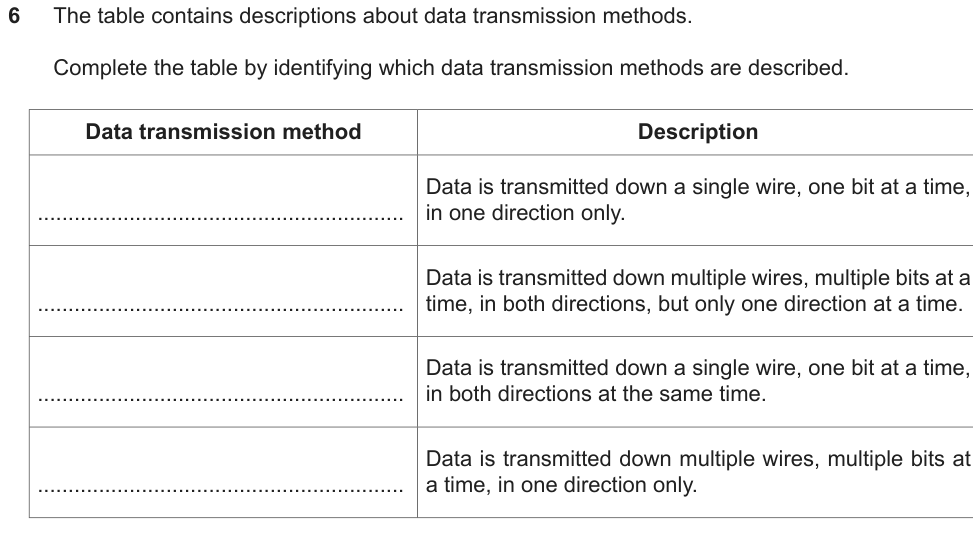
How to start Each description has two parts. Single wire, one bit = serial; multiple wires = parallel. Then the direction words.
Show a full-mark answer and the mark scheme
serial simplex · parallel half-duplex · serial full-duplex · parallel simplex
| Part | Answer / working | Marks | Guidance |
|---|---|---|---|
| 6 | serial simplex · parallel half-duplex · serial full-duplex · parallel simplex (one mark each) | B4 | |
| Total: 4 marks | |||
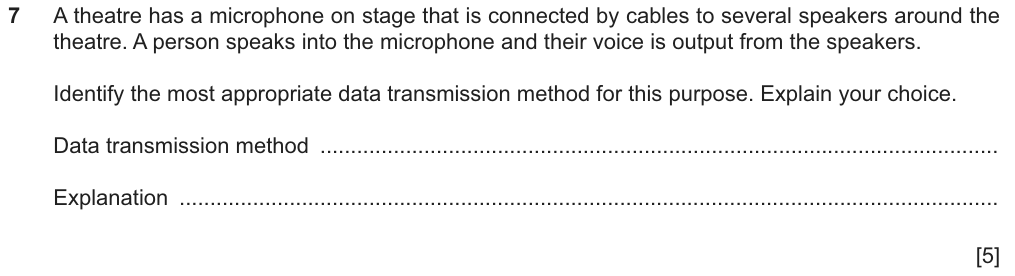
How to start Two marks for the method (one for each word), three for reasons. Look for distance (around the theatre) and direction (sound only goes from microphone to speakers).
Show a full-mark answer and the mark scheme
Method: serial simplex.
Explanation: Serial, because the cables run a long distance around the theatre, and the bits are sent one at a time down one wire, so they will not be skewed and there is less chance of error. Simplex, because the data only needs to go in one direction, from the microphone to the speakers; nothing is sent back.
| Part | Answer / working | Marks | Guidance |
|---|---|---|---|
| 7 | Serial · Simplex | B2 | |
| Any three: long distance · one wire / bits in order · less chance of skewing / error · speed adequate · only one direction needed · nothing sent back from speakers to microphone | B3 | ||
| Total: 5 marks | |||
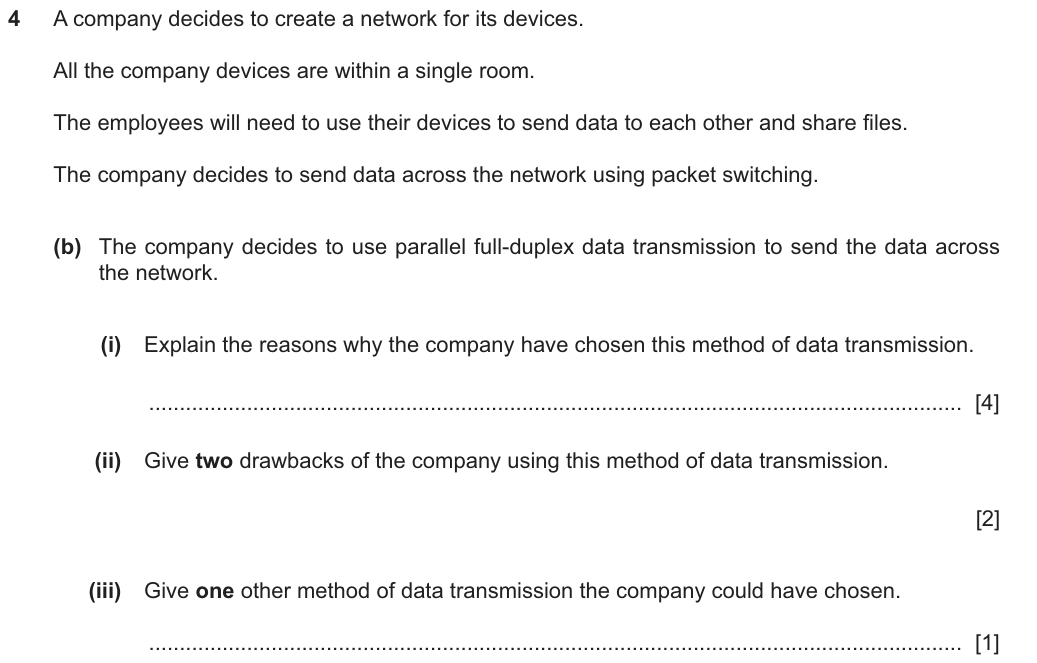
How to start (i) Give a point AND its link to the scenario (single room, sending to each other). (ii) is the parallel and full-duplex drawbacks. (iii) any other method.
Show a full-mark answer and the mark scheme
(b)(i) Parallel sends multiple bits at the same time down multiple wires, so the data is transmitted quickly. The data does not need to travel a long distance, as the devices are all in a single room. Full-duplex sends data in both directions at the same time, so employees can send data to each other with no delay.
(b)(ii) More interference / crosstalk because of the multiple wires. Bits may be skewed and arrive out of order.
(b)(iii) Serial full-duplex.
| Part | Answer / working | Marks | Guidance |
|---|---|---|---|
| 4(b)(i) | Any four: multiple bits / multiple wires · … fast · short distance · … single room · both directions at the same time · … no delay | B4 | |
| 4(b)(ii) | Any two: interference / crosstalk · skewed / out of order · data collisions · more errors | B2 | |
| 4(b)(iii) | Any other combination, e.g. serial full-duplex | B1 | |
| Total: 7 marks | |||
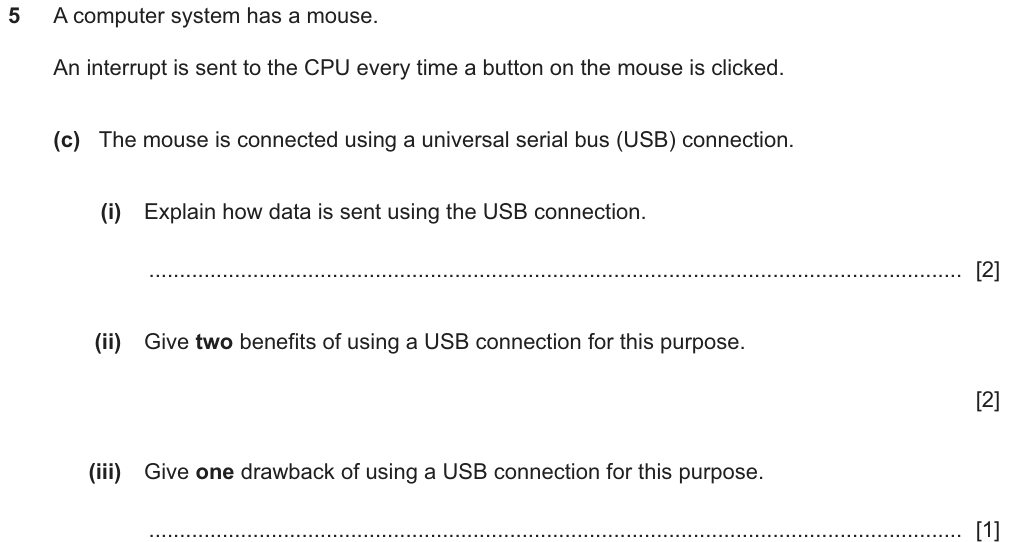
How to start USB is serial: that gives (i). For (ii) and (iii) use the USB benefits / drawbacks, linked to a mouse.
Show a full-mark answer and the mark scheme
(c)(i) The data is sent one bit at a time down a single wire.
(c)(ii) The mouse is powered by the computer through the cable. The mouse is automatically detected and its driver is installed automatically.
(c)(iii) The wire may get in the way and limit the movement of the mouse.
| Part | Answer / working | Marks | Guidance |
|---|---|---|---|
| 5(c)(i) | one bit at a time · single wire | B2 | |
| 5(c)(ii) | Any two: powered by the device · universal · backward compatible · less skewing / errors · different speeds · cannot be inserted incorrectly · automatically detected / driver installed | B2 | |
| 5(c)(iii) | slower than parallel // wire gets in the way / limits movement | B1 | |
| Total: 5 marks | |||
Common mistakes
- ✗ "Serial is faster"✓ "Parallel is faster; serial is more reliable over distance"
- ✗ Naming only half a method: "half-duplex"✓ "Serial half-duplex"Questions about a method want both parts.
- ✗ "Half-duplex sends one way"✓ "Both ways, but only one direction at a time"One way only is simplex.
- ✗ "Serial is more secure"✓ "Fewer errors, because bits are not skewed and there is less interference"Security is not the point.
Practice
Practice: easy, medium, hard
Easy
Show answer
Answer Data is sent one bit at a time down a single wire
Show answer
Answer Full-duplex
Show answer
Answer Universal serial bus
Medium
Show answer
Answer Skewing (bits arrive out of order); crosstalk / interference; only short distances; more expensive
Show answer
Answer Simplex
Show answer
Answer Multiple bits at the same time · down multiple wires · in both directions · but not at the same time
Hard
Show answer
Answer Serial full-duplex. Serial: long distance (40 m), bits not skewed, less interference so fewer errors. Full-duplex: both computers need to send and receive at the same time, so no waiting.
| Part | Answer / working | Marks | Guidance |
|---|---|---|---|
| serial | B1 | ||
| full-duplex | B1 | ||
| long distance / not skewed / fewer errors (max 2) | B2 | ||
| both directions at the same time | B1 | ||
| Total: 5 marks | |||
Show answer
Answer Maximum cable length is short / slower than some other connections
Can I do this?
- I can describe serial and parallel and compare them.
- I can describe simplex, half-duplex and full-duplex.
- I can choose a method for a scenario and justify both parts.
- I can explain how USB sends data and give its benefits and drawbacks.
Anything unticked: revise that section first. All ticked: take the quiz.
Quiz
The multiple-choice and guided questions need JavaScript. The concept checks and exam practice below work without it.
Your progress on this note is saved when JavaScript is on.
⬇️ Download this chapter as a PDF: Full notes