
Software
Programming languages and translators
In this note
- 4.2.1Explain what is meant by a high-level language and a low-level language, including the advantages and disadvantages of each.
- 4.2.2Understand that assembly language is a low-level language that uses mnemonics, and that an assembler translates it into machine code.
- 4.2.3Describe the operation of a compiler and an interpreter: how each translates and how errors are reported.
- 4.2.4Explain the advantages and disadvantages of a compiler and an interpreter.
Before this: Firmware and interrupts. Next: Integrated development environments (IDEs).
The notes: every idea from the start, with our own examples.
What you should already know
Machine code
The CPU can only execute machine code: binary instructions from its instruction set.
Quick check: can the CPU run Python directly?
No: it must be translated into machine code first.
High-level and low-level languages
A high-level language is close to human language (English words and maths symbols), e.g. Python, Java, Visual Basic. A low-level language is close to the language processed by the computer: machine code (binary) or assembly language.
| The same job at three levels | Code |
|---|---|
| high-level | Total ← Price + Tax |
| assembly language (low-level) | LDA Price |
| machine code (low-level) | 0001 1010 |
| High-level language | Low-level language | |
|---|---|---|
| advantages | easier to read, write and understand → fewer mistakes, written faster easier to debug machine independent (portable): runs on different types of computer programmer can focus on the problem, not the hardware | direct manipulation of the hardware / memory more memory efficient, faster to execute can use specialised / machine-specific instructions (machine code) needs no translator |
| disadvantages | cannot directly manipulate the hardware may be less efficient (uses more memory, slower) needs a compiler or interpreter | hard to read and write hard to debug machine dependent: only works on one type of CPU needs knowledge of the hardware |
Assembly language and the assembler
Assembly language is a low-level language that uses mnemonics: short codes such as LDA (load), ADD, STO (store) that stand for machine code instructions. Each assembly instruction usually matches one machine code instruction. An assembler is the translator that converts assembly language into machine code.
Compilers and interpreters
| Compiler | Interpreter | |
|---|---|---|
| how it translates | translates the whole code at once before executing it | translates and executes the code line by line |
| output | produces an executable file (object code) that runs without the compiler | no executable file: the interpreter is needed every time it runs |
| errors | produces an error report for the whole code, listing all errors; nothing runs until they are fixed | stops execution when an error is found; once it is corrected, execution can continue from that point |
| speed of running | the executable runs fast (already translated) | slower: every line is translated each time it runs |
| best used | to translate the final program for distribution (the source code is not given away) | while developing a program: test and debug parts as you go |
| Advantages of an interpreter during development | Advantages of a compiler for the final program |
|---|---|
| errors are found line by line, where they happen → easy to debug can correct and continue without retranslating everything can test sections of incomplete code | executable file runs without the translator runs faster users cannot see the source code (harder to copy) all errors reported at once |
Try it yourself
Show answer
Answer Assembler
Show answer
Answer Compiler
Show answer
Answer Interpreter
Show answer
Answer Independent
Summary
- High-level: close to English; easy to read, write, debug; machine independent; can't manipulate hardware directly.
- Low-level (machine code, assembly): close to the computer; direct hardware control, memory efficient, fast; hard to read/debug, machine dependent.
- Assembly language uses mnemonics; an assembler translates it.
- Compiler: whole code at once, executable file, error report of all errors; used for the final program.
- Interpreter: line by line, stops at an error, no executable; used during development.
If you see …
- "describe the operation of a compiler and of an interpreter"whole code / executable / error report vs line by line / stops at error
- "explain the reasons for your choice" (high or low)match each reason to the scenario: "… so the game can run on any computer"
Question types, what the examiner gives marks for, and real past-paper questions solved.
Ways they test it
Type 1 Choose a level
"Tick high-level or low-level. Explain the reasons for your choice" [4]
Spot it a scenario.
- No mark for the tick: all four marks are for reasons that match it.
Type 2 Low-level / assembly
"Describe what is meant by assembly language" [2]; "identify the translator" [1]
Spot it "assembly".
- low-level · mnemonics · communicates directly with hardware · assembler
Type 3 Which translator?
"Identify the translator that converts and executes line by line / creates an executable" [1] each
Spot it a description.
- line by line / stops → interpreter; whole code / executable / error report → compiler; mnemonics → assembler.
Type 4 Translator cloze
"A compiler translates the … at once before … it …" [5]
Spot it a word list.
- Use the compiler / interpreter table.
Type 5 Advantages
"Describe the advantages of using an interpreter instead of a compiler during software development" [4]
Spot it "during development".
- Line by line errors · correct and continue · no retranslating · test sections.
What the examiner looks for
"Describe how the compiler translates the program" [3] and "how it reports errors" [2]
Marking points (one mark each, up to the marks shown)
- It translates the high-level language into low-level language / machine code / object code
- It translates all the code before it is executed
- It creates an executable file
- It creates an error report after trying to compile … displaying all the errors in the code
- … which must be corrected before the code can be executed
Keywords all the code before executed executable file error report
Past-paper questions, solved
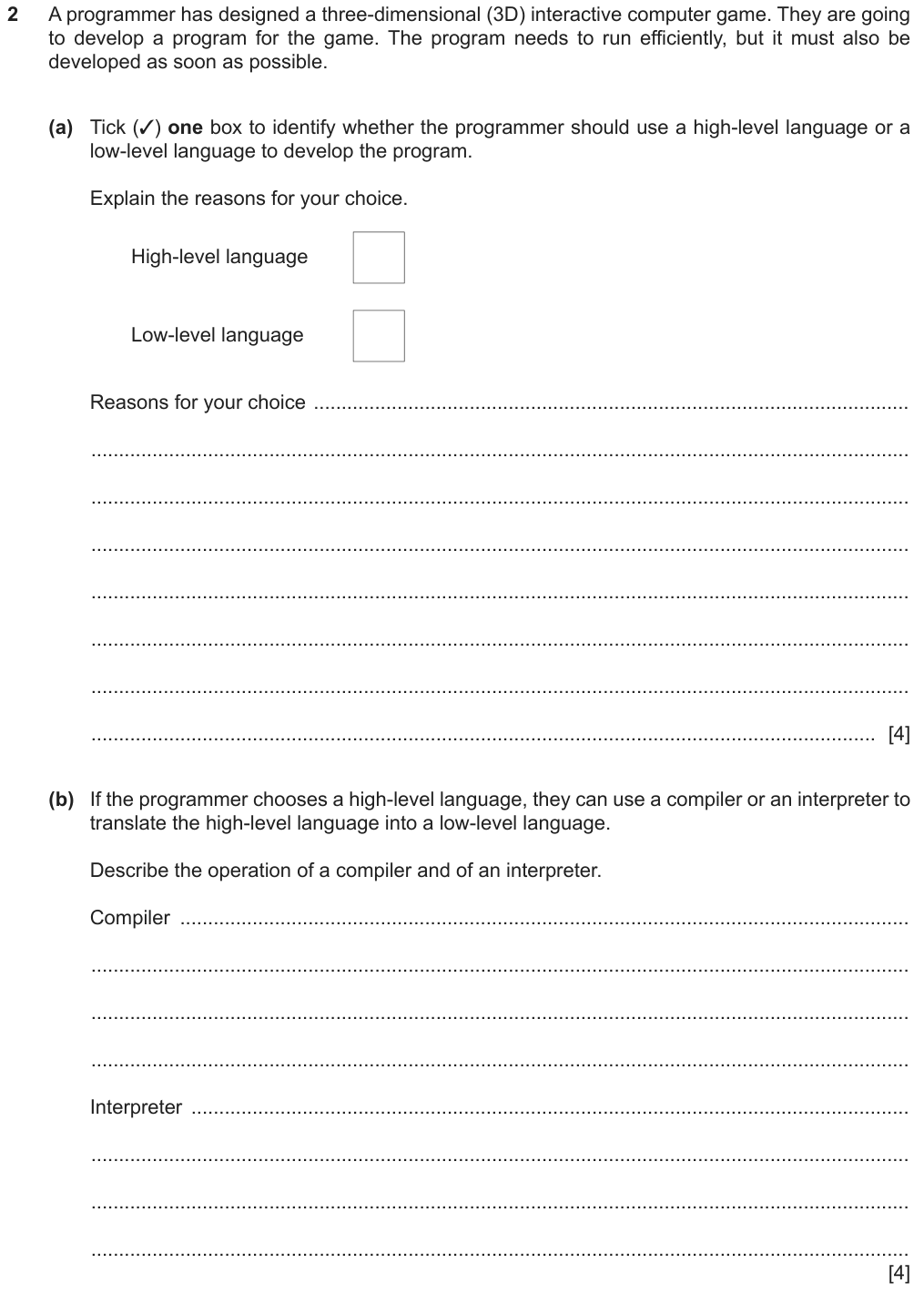
How to start The scenario says "developed as soon as possible", which points to high-level. Then give four reasons with their effect.
Show a full-mark answer and the mark scheme
(a) High-level language. It is easier for the programmer to read and write, so they make fewer mistakes and can write it in a shorter time. It is easier to debug, so errors are found and corrected faster. It is machine independent, so the game can be played on many different computers.
(b) Compiler: translates all the code before executing any of it, produces an executable file, and gives an error report listing all the errors. Interpreter: translates and executes one line at a time, and stops when it finds an error.
| Part | Answer / working | Marks | Guidance |
|---|---|---|---|
| 2(a) | No mark for choice. Any four matching reasons: easier to read / write … fewer mistakes / quicker · easier to debug … less time · machine independent … any computer (or low-level: memory efficient · direct manipulation …) | B4 | |
| 2(b) | Compiler, two from: checks all code before executing · error report for whole code · executable file. Interpreter, two from: one line translated and executed at a time · stops at an error | B4 | |
| Total: 8 marks | |||
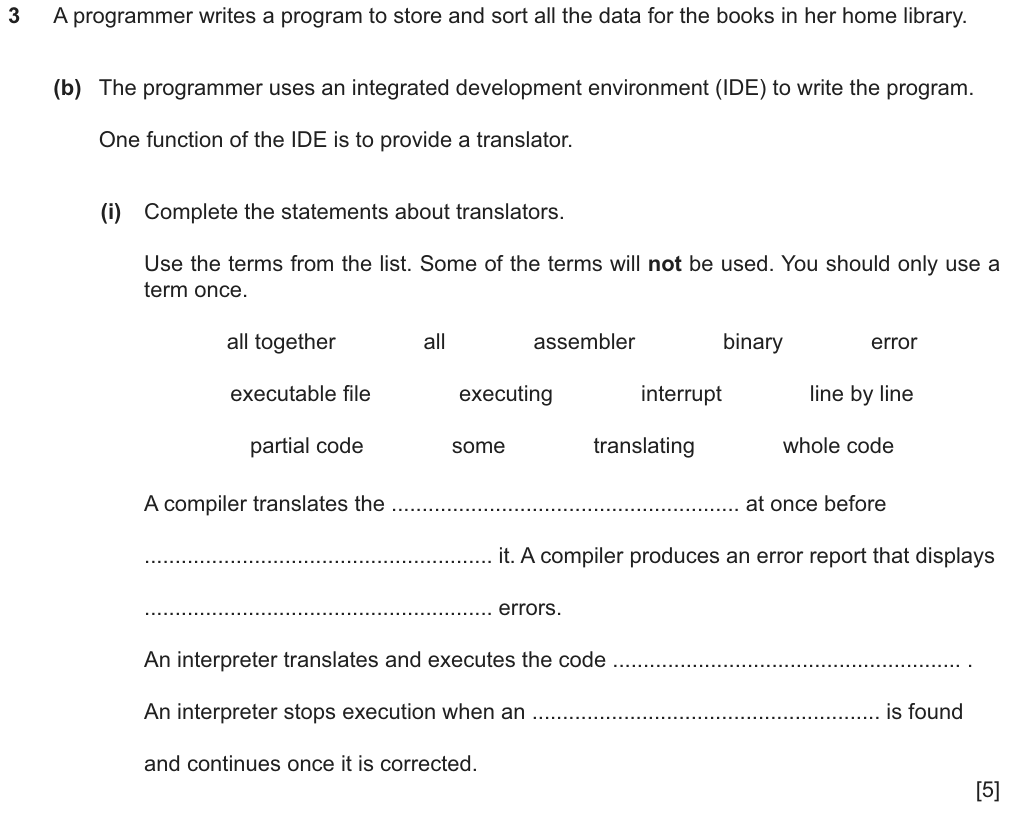
How to start Five gaps, all from the compiler / interpreter table.
Show a full-mark answer and the mark scheme
A compiler translates the whole code at once before executing it. A compiler produces an error report that displays all errors. An interpreter translates and executes the code line by line. An interpreter stops execution when an error is found and continues once it is corrected.
| Part | Answer / working | Marks | Guidance |
|---|---|---|---|
| 3(b)(i) | whole code · executing · all · line by line · error | B5 | |
| Total: 5 marks | |||
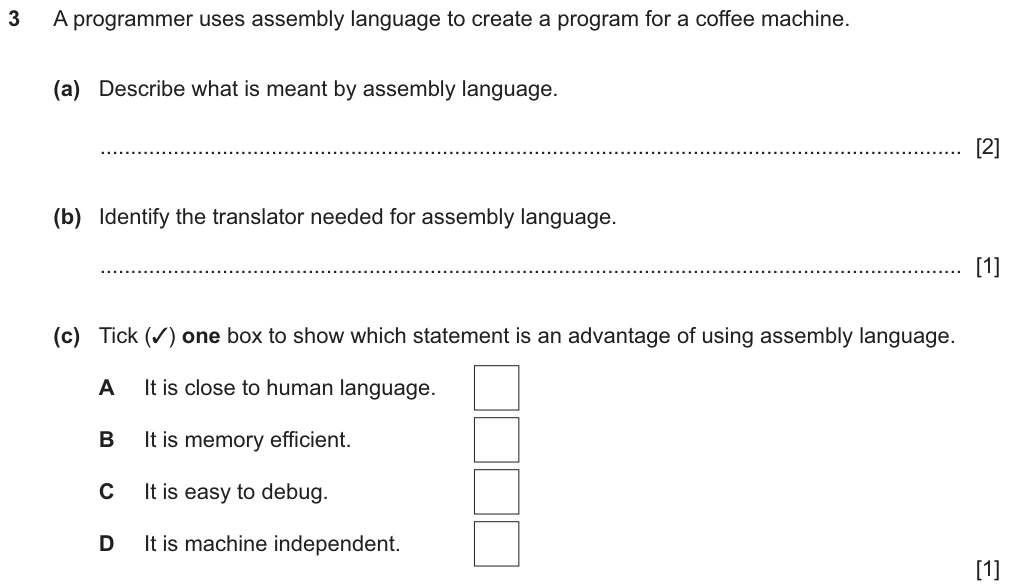
How to start (a) two facts about assembly. (c) which option is a LOW-level advantage?
Show a full-mark answer and the mark scheme
(a) It is a low-level language that uses mnemonics.
(b) Assembler.
(c) B: it is memory efficient.
| Part | Answer / working | Marks | Guidance |
|---|---|---|---|
| 3(a) | Any two: low-level · mnemonics · communicates directly with the hardware | B2 | |
| 3(b) | Assembler | B1 | |
| 3(c) | B | B1 | |
| Total: 4 marks | |||
Common mistakes
- ✗ "A compiler translates line by line"✓ "An interpreter translates line by line"
- ✗ "An assembler translates high-level code"✓ "An assembler translates assembly language"
- ✗ "High-level is easier" (no reason)✓ "easier to read and write, so fewer mistakes"Every reason needs its effect.
- ✗ "Low-level languages are machine independent"✓ "High-level languages are machine independent"
Practice
Practice: easy, medium, hard
Easy
Show answer
Answer Assembly language (or machine code)
Show answer
Answer Mnemonics
Medium
Show answer
Answer Direct manipulation of hardware; more memory efficient (also faster, specialised hardware)
Show answer
Answer Cannot directly manipulate hardware; needs a translator (also less memory efficient)
Hard
Show answer
Answer Executable runs without the translator; runs faster; users cannot see / copy the source code
Can I do this?
- I can explain high- and low-level languages with advantages and disadvantages.
- I can describe assembly language and the assembler.
- I can describe how a compiler and an interpreter translate and report errors.
- I can explain the advantages of each translator.
Anything unticked: revise that section first. All ticked: take the quiz.
Quiz
The multiple-choice and guided questions need JavaScript. The concept checks and exam practice below work without it.
Your progress on this note is saved when JavaScript is on.
⬇️ Download this chapter as a PDF: Full notes