
Software
System and application software
In this note
- 4.1.1Describe the difference between system software and application software and give examples of each.
- 4.1.2Describe the role and basic functions of an operating system.
Next: Firmware and interrupts.
The notes: every idea from the start, with our own examples.
What you should already know
Hardware vs software
Hardware is the physical parts you can touch. Software is the programs: the instructions that tell the hardware what to do.
Quick check: is a printer driver hardware or software?
Software.
System software and application software
Software means the programs / instructions used to operate a computer. There are two types.
| System software | Application software | |
|---|---|---|
| purpose | provides the services that the computer requires: it manages and maintains the hardware and software | provides the services that the user requires: it lets the user perform tasks |
| examples | operating system; utility software such as anti-virus, firewall, defragmentation, backup, compression | word processor, spreadsheet, database, web browser, photo / video editor, email client, games, social media app |
The operating system
The operating system (OS) is the system software that manages the hardware, performs the basic functions of the computer and provides a platform for applications to run on and an interface for the user. Examples: Windows, macOS, Linux, Android, iOS.
| Function | What it means |
|---|---|
| Managing files | creating, naming, saving, moving, copying and deleting files and folders; organising storage |
| Handling interrupts | giving each interrupt a priority, queueing it and calling the interrupt service routine (next note) |
| Providing an interface | a GUI (windows, icons, menus, pointer) or a command-line interface so the user can communicate with the computer |
| Managing peripherals and drivers | communicating with input / output devices through their drivers; sending data to and receiving it from hardware; using buffers |
| Managing memory | allocating RAM to each process and freeing it; preventing two processes using the same memory; virtual memory |
| Managing multitasking | switching the CPU between several running processes so they appear to run at once |
| Providing a platform for running applications | letting application software run and communicate with the hardware |
| Providing system security | usernames and passwords, access rights, firewall, security updates |
| Managing user accounts | allowing several user accounts with their own files, settings and permissions |
Try it yourself
Show answer
Answer System (utility) software
Show answer
Answer Operating system (system software)
Show answer
Answer Managing memory (or managing multitasking)
Summary
- Software = programs / instructions used to operate a computer.
- System software: services the computer requires (OS, utilities). Application software: services the user requires.
- OS functions: files · interrupts · interface · peripherals and drivers · memory · multitasking · platform for apps · security · user accounts.
If you see …
- "describe the difference between system and application software"computer requires … whereas … user requires · + one example of each
- "identify one function of the OS and describe its purpose"name it, then one sentence from the table
Question types, what the examiner gives marks for, and real past-paper questions solved.
Ways they test it
Type 1 Difference + examples
"Describe the difference between system software and application software. Give an example of each" [4]
Spot it "difference".
- Two marks for the contrast ("whereas"), one per example.
Type 2 Which is utility?
"Tick one box to show which software is an example of utility software" [1]
Spot it a list.
- Utilities maintain the computer: anti-virus, defragmenter, backup, compression.
Type 3 OS functions
"Give two functions of an operating system" [2]; "identify one function and describe its purpose" [2]; "which is not a function" [1]
Spot it "function".
- Use the syllabus names exactly.
Type 4 Purpose of the OS
"Describe the purpose of the operating system" [3]
Spot it "purpose".
- basic functions · manages the hardware · platform for software · user interface
What the examiner looks for
Not an OS function
- D: loading the bootstrap
- A, B, C (all are syllabus OS functions)
The bootstrap is firmware: it runs before the operating system and loads it.
From: 0478/11/O/N/24 Q7(a)(i) mark scheme
Past-paper questions, solved
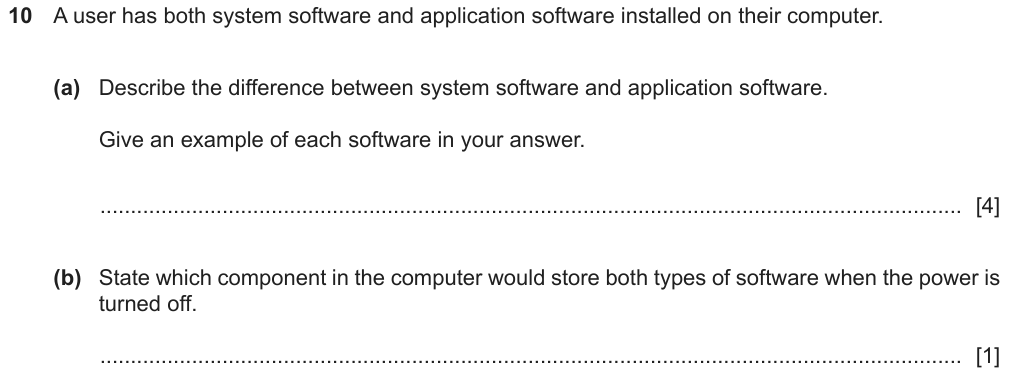
How to start (a) contrast + one example each. (b) where does software live with the power off?
Show a full-mark answer and the mark scheme
(a) System software provides the services that the computer requires, for example an operating system or anti-virus utility, whereas application software provides the services that the user requires, for example a word processor.
(b) Secondary storage (e.g. the hard disk drive or SSD).
| Part | Answer / working | Marks | Guidance |
|---|---|---|---|
| 10(a) | computer requires … whereas user requires · system example (OS / utility) · application example | B4 | |
| 10(b) | Secondary storage // HDD // SSD | B1 | |
| Total: 5 marks | |||
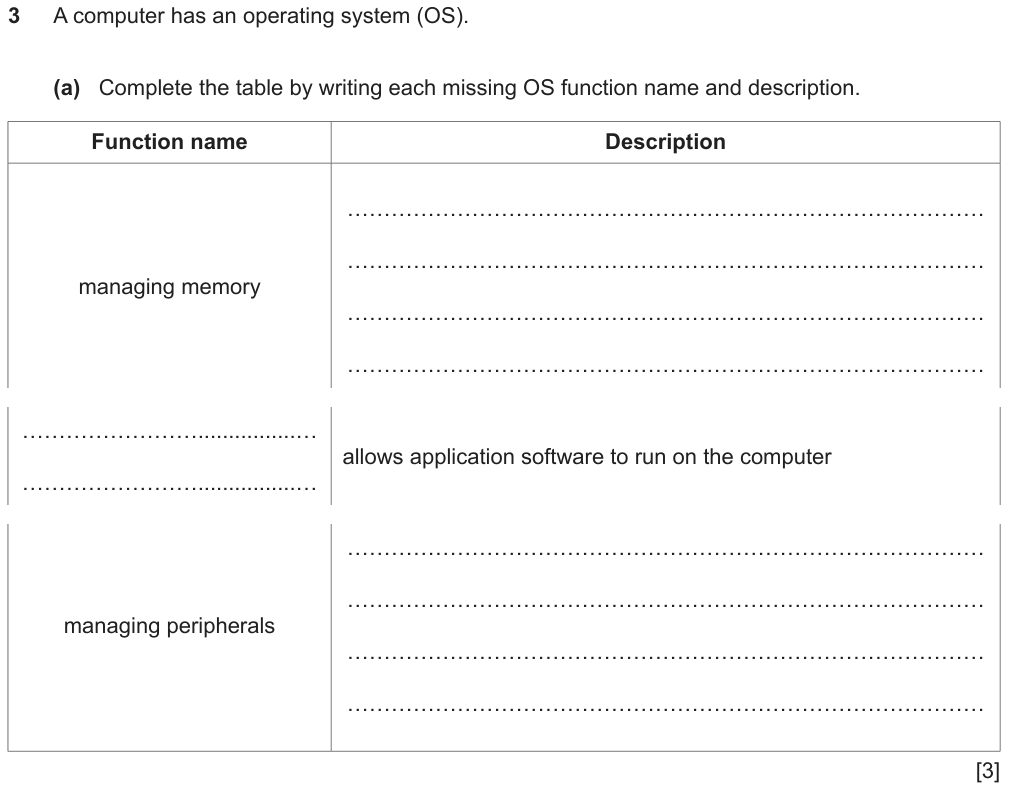
How to start Two descriptions and one function name are missing.
Show a full-mark answer and the mark scheme
Managing memory: allocates memory to each process and stops two processes accessing the same memory. Platform for running applications (allows application software to run). Managing peripherals: transmits data to and receives data from the hardware, using buffers.
| Part | Answer / working | Marks | Guidance |
|---|---|---|---|
| 3(a) | managing memory description · platform for running applications · managing peripherals description | B3 | |
| Total: 3 marks | |||
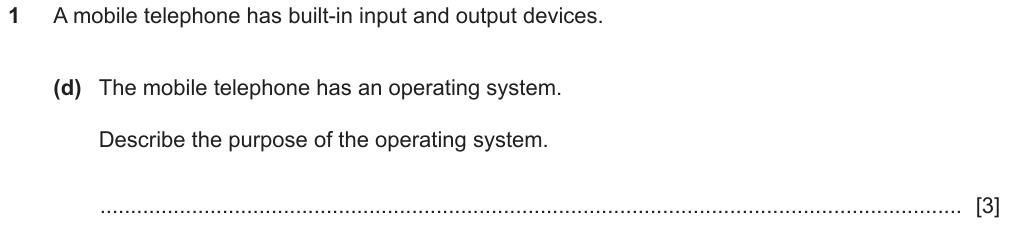
How to start Three marks: three separate points about what the OS does.
Show a full-mark answer and the mark scheme
It manages the phone's hardware, such as the touch screen and memory. It provides a platform for apps to run on. It provides a user interface so the user can communicate with the phone.
| Part | Answer / working | Marks | Guidance |
|---|---|---|---|
| 1(d) | Any three: basic functions · manages the hardware · platform to run software · user interface · any example function | B3 | |
| Total: 3 marks | |||
Common mistakes
- ✗ "A web browser is system software"✓ "A web browser is application software"
- ✗ "The OS loads the bootstrap"✓ "The bootstrap (firmware) loads the OS"
- ✗ "Memory" as an OS function✓ "Managing memory"Name the function, not just the hardware.
Practice
Practice: easy, medium, hard
Easy
Show answer
Answer Application
Show answer
Answer e.g. anti-virus, defragmentation (also backup, compression, firewall)
Medium
Show answer
Answer The OS switches the CPU between several processes so they appear to run at the same time
Show answer
Answer Programs / instructions used to operate a computer
Hard
Show answer
Answer Managing user accounts; providing system security (also managing files)
Can I do this?
- I can describe the difference between system and application software with examples.
- I can name and describe the functions of an operating system.
Anything unticked: revise that section first. All ticked: take the quiz.
Quiz
The multiple-choice and guided questions need JavaScript. The concept checks and exam practice below work without it.
Your progress on this note is saved when JavaScript is on.
⬇️ Download this chapter as a PDF: Full notes