
Hardware
Network hardware
In this note
- 3.4.1Understand that a computer needs a network interface card (NIC) to access a network.
- 3.4.2Understand what is meant by, and the purpose of, a media access control (MAC) address, including its structure.
- 3.4.3Understand what is meant by, and the purpose of, an internet protocol (IP) address, and that there are different types: static / dynamic, IPv4 / IPv6.
- 3.4.4Describe the role of a router in a network.
Before this: Virtual memory and cloud storage.
The notes: every idea from the start, with our own examples.
What you should already know
Hexadecimal
One hex digit = 4 bits; two hex digits = 1 byte.
Quick check: how many bits in 12 hex digits?
48 bits.
Packets
Data on a network is sent in packets, each with the destination address in its header.
Quick check: why does a packet need an address?
So routers can send it to the right device.
Network interface card (NIC)
A network interface card (NIC) is the component in a device that allows it to connect to a network. It can be wired (an Ethernet port) or wireless (a WNIC). Every NIC is given a MAC address when it is manufactured.
MAC address
A media access control (MAC) address is a unique address assigned by the manufacturer that identifies a device on a network. It is usually written in hexadecimal (12 hex digits, 48 bits), in pairs separated by colons or dashes. Because it is set at manufacture it normally does not change.
It has two parts: the manufacturer code (identifies who made the device) and the serial code (identifies this particular device from that manufacturer).
IP address
An internet protocol (IP) address is an address allocated by the network (normally by the router) that is used to identify a device on a network so data can be sent to it. Unlike a MAC address it can change, for example when the device joins a different network.
| Static IP address | Dynamic IP address |
|---|---|
| does not change: the same every time the device connects | can change each time the device connects to the network |
| set manually / reserved | allocated automatically by the router (from a pool) |
| used for servers (a web server must always be found at the same address) | used for most home devices; addresses are reused, so fewer are needed |
| IPv4 | IPv6 | |
|---|---|---|
| size | 32 bits | 128 bits |
| written as | denary, 4 groups of numbers 0-255, separated by dots | hexadecimal, 8 groups of 4 hex digits (0000-FFFF), separated by colons |
| example | 192.168.1.25 | 2001:0db8:85a3:0000:0000:8a2e:0370:7334 shortened: 2001:db8:85a3::8a2e:370:7334 |
| number of addresses | about 4.3 billion (2³²): running out | far more (2¹²⁸) |
| shortening | all digits shown | leading zeros dropped; a double colon :: can replace consecutive groups of zeros (once only) |
Router
A router sends data to a specific destination on a network: it reads the destination IP address in each packet's header and forwards the packet towards it. A router can assign IP addresses to the devices connected to it, and it connects a local network to the internet (a home router joins every device in the house to the internet).
| Term | One-line meaning |
|---|---|
| NIC | component that lets a device connect to a network |
| MAC address | unique hex address set by the manufacturer: manufacturer code + serial code |
| IP address | address allocated by the network to identify a device; static or dynamic; IPv4 or IPv6 |
| Router | forwards packets to their destination; assigns IP addresses; connects a LAN to the internet |
Try it yourself
Show answer
Answer MAC address
Show answer
Answer 128
Show answer
Answer Router
Show answer
Answer No: 300 is greater than 255
Summary
- NIC: needed to connect to a network; given a MAC address at manufacture.
- MAC: unique, set by the manufacturer, hex, 48 bits; manufacturer code + serial code.
- IP: allocated by the network to identify a device; static (same) or dynamic (can change each time).
- IPv4: 32-bit, 4 denary groups 0-255, dots. IPv6: 128-bit, 8 hex groups, colons, :: shortening, more addresses.
- Router: forwards packets to the destination, assigns IP addresses, connects a LAN to the internet.
If you see …
- "describe the characteristics of an IPv4 address"denary · 0-255 · 32 bits · 4 groups · dots · unique · static or dynamic
- "describe two differences between IPv4 and IPv6"state each property for BOTH: bits · denary vs hex · dots vs colons · groups
Question types, what the examiner gives marks for, and real past-paper questions solved.
Ways they test it
Type 1 Identify
"Identify the component needed to access a network" [1]; "the type of address allocated by the manufacturer" [1]
Spot it "identify".
- NIC · MAC address · router.
Type 2 Terms table
"Complete the table by giving the missing term or definition" [5]
Spot it a table.
- Use the one-line meanings; firewall also appears (chapter 5).
Type 3 IPv4 / IPv6
"Describe the characteristics of an IPv4 address" [4]; "two differences" [4]; "give an example" [1]
Spot it "IPv4", "IPv6".
- Comparisons need both sides. An example must follow the format exactly.
Type 4 Dynamic
"Describe what is meant by a dynamic IP address" [3]
Spot it "dynamic".
- identifies a device · can change · each time it connects
What the examiner looks for
"Describe the characteristics of an IPv4 address" [4]
Marking points (one mark each, up to the marks shown)
- It is denary based … with numbers between 0 and 255
- It is 32 bits
- 4 sets / groups of numbers … separated by dots
- Any two: unique · can be static or dynamic · can be public or private · contains the network prefix and host number
Keywords denary 0-255 32 bits 4 groups dots
Past-paper questions, solved
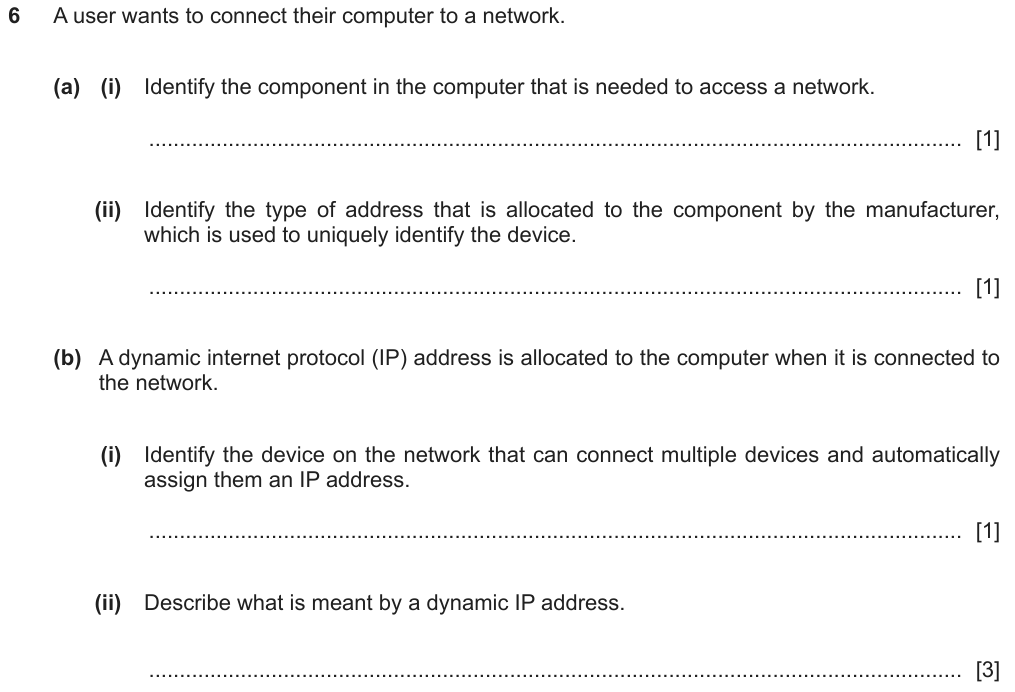
How to start Four short identify answers and one 3-mark description.
Show a full-mark answer and the mark scheme
(a)(i) Network interface card (NIC). (ii) MAC address.
(b)(i) Router. (ii) An IP address that uniquely identifies the device on the network, but it can change: a new one may be allocated each time the device connects to the network.
| Part | Answer / working | Marks | Guidance |
|---|---|---|---|
| 6(a)(i) | NIC // WNIC | B1 | |
| 6(a)(ii) | MAC address | B1 | |
| 6(b)(i) | Router | B1 | |
| 6(b)(ii) | uniquely identifies a device · can change · each time it is connected | B3 | |
| Total: 6 marks | |||
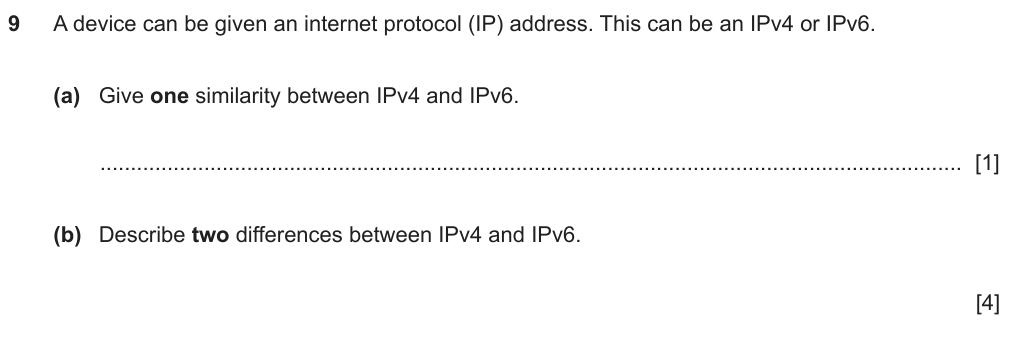
How to start (b) each difference = 2 marks: the IPv4 side and the IPv6 side.
Show a full-mark answer and the mark scheme
(a) Both are used to identify a device on a network.
(b) 1: IPv4 is 32 bits, whereas IPv6 is 128 bits. 2: IPv4 is written in denary separated by dots, whereas IPv6 is written in hexadecimal separated by colons.
| Part | Answer / working | Marks | Guidance |
|---|---|---|---|
| 9(a) | Any one: identify a device · static / dynamic · unique · assigned by a router · public / private | B1 | |
| 9(b) | Two differences, both sides each: denary / hex · dots / colons · 32 / 128 bit · 4 / 8 groups · 0-255 / 0000-FFFF · IPv6 :: shortening · fewer / more addresses | B4 | |
| Total: 5 marks | |||
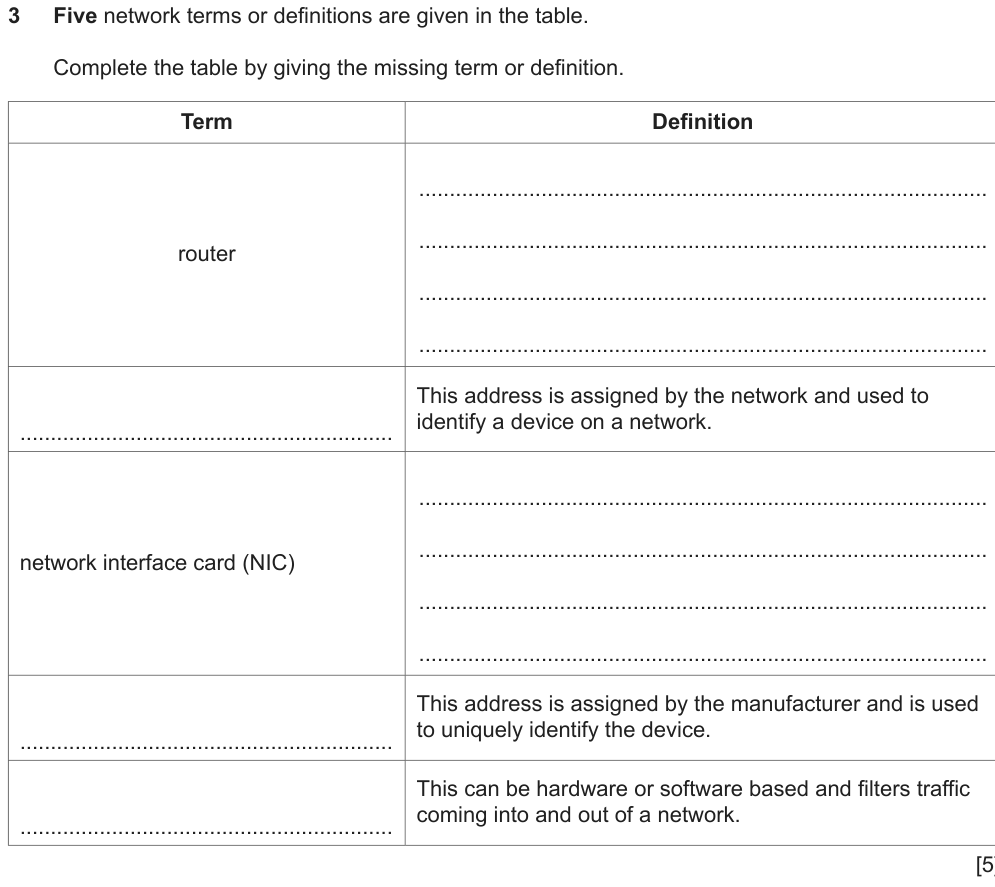
How to start Three definitions and two terms. "Assigned by the network" = IP; "assigned by the manufacturer" = MAC.
Show a full-mark answer and the mark scheme
Router: a device that forwards packets to their correct destination on a network. IP address. NIC: a component in a device that enables it to connect to a network. MAC address. Firewall.
| Part | Answer / working | Marks | Guidance |
|---|---|---|---|
| 3 | router definition · IP address · NIC definition · MAC address · firewall // proxy server | B5 | |
| Total: 5 marks | |||
Common mistakes
- ✗ "A MAC address is assigned by the router"✓ "MAC: by the manufacturer. IP: by the network / router"
- ✗ "IPv6 uses dots"✓ "IPv6 uses colons and hexadecimal"
- ✗ IPv4 example 256.1.1.1✓ every group 0-255, e.g. 10.245.3.99
- ✗ "A dynamic IP address changes all the time"✓ "It can change each time the device connects"
Practice
Practice: easy, medium, hard
Easy
Show answer
Answer 4
Show answer
Answer Hexadecimal
Show answer
Answer Network interface card
Medium
Show answer
Answer Manufacturer code and serial code
Show answer
Answer IPv4 addresses are running out; IPv6 has far more addresses
Hard
Show answer
Answer Its address must not change so users / DNS can always find it at the same IP
Show answer
Answer 2001:db8::1
Can I do this?
- I know a device needs a NIC to access a network.
- I can describe a MAC address and its structure.
- I can describe IP addresses: static vs dynamic, IPv4 vs IPv6.
- I can describe the role of a router.
Anything unticked: revise that section first. All ticked: take the quiz.
Quiz
The multiple-choice and guided questions need JavaScript. The concept checks and exam practice below work without it.
Your progress on this note is saved when JavaScript is on.
⬇️ Download this chapter as a PDF: Full notes