
Data Representation
Data storage units, file sizes and compression
In this note
- 1.3.1Know the units of data storage, from bit to exbibyte (EiB), and convert between them (always 1024).
- 1.3.2Calculate the file size of an image file and of a sound file, in the unit asked for.
- 1.3.3Explain the purpose of and need for compression.
- 1.3.4Explain lossy and lossless compression, including run-length encoding (RLE), and choose one for a situation.
Before this: Text, sound and images (resolution, colour depth, sample rate and resolution). This is the last page of the chapter.
The notes: every idea from the start, with our own examples.
What you should already know
Image and sound settings
Resolution = pixels wide × high; colour depth = bits per pixel; sample rate = samples per second; sample resolution = bits per sample.
Quick check: a sound has 8-bit sample resolution: how many bits does one sample use?
8.
Dividing by 1024
1024 = 2¹⁰. Halving ten times divides by 1024: 2048 ÷ 1024 = 2, 512 ÷ 1024 = 0.5.
Quick check: what is 3072 ÷ 1024?
3.
Units of data storage
| Unit | Equal to | Notes |
|---|---|---|
| bit (b) | one binary digit, 0 or 1 | the smallest unit |
| nibble | 4 bits | one hex digit |
| byte (B) | 8 bits (2 nibbles) | one ASCII character |
| kibibyte (KiB) | 1024 bytes | |
| mebibyte (MiB) | 1024 KiB | |
| gibibyte (GiB) | 1024 MiB | |
| tebibyte (TiB) | 1024 GiB | |
| pebibyte (PiB) | 1024 TiB | |
| exbibyte (EiB) | 1024 PiB | the largest unit on the syllabus |
General methodConverting between units
- Going to a bigger unit: divide (÷ 1024 per step; ÷ 8 from bits to bytes).
- Going to a smaller unit: multiply (× 1024 per step; × 8 from bytes to bits).
- Count the steps between the two units and do one × or ÷ per step.
Example How many bits are there in 1 KiB?
KiB → bytes → bits: two steps down, so multiply.
- 1 × 1024 = 1024 bytes
- 1024 × 8 = 8192 bits
Answer 8192 bits
Try it yourself
Show working
- 2 nibbles per byte
Answer 16
Show answer
Answer 0.5
Show answer
Answer 4096
Show answer
Answer 2048
Calculating file sizes
General methodAny file-size question
- Multiply the values given to get the size in bits (watch out: a colour depth given in bytes is already bytes).
- Divide by 8 to get bytes.
- Divide by 1024 for each step up to the unit the question asks for (KiB, then MiB …).
- Write the answer in the unit asked, and show each stage: there are marks for the working.
Example An image is 1024 × 768 pixels with a colour depth of 16 bits. Calculate its size in MiB.
Bits first, then ÷ 8, then ÷ 1024 twice.
- 1024 × 768 × 16 = 12 582 912 bits
- ÷ 8 = 1 572 864 bytes
- ÷ 1024 = 1536 KiB
- ÷ 1024 = 1.5 MiB
Answer 1.5 MiB
Example A sound is recorded for 60 seconds at a sample rate of 16 384 Hz with a sample resolution of 16 bits. Calculate the size in KiB.
Rate × resolution × seconds gives bits.
- 16 384 × 16 × 60 = 15 728 640 bits
- ÷ 8 = 1 966 080 bytes
- ÷ 1024 = 1920 KiB
Answer 1920 KiB
Try it yourself
Show working
- 640 × 480 × 8 = 2 457 600 bits
- ÷ 8 = 307 200 bytes
- ÷ 1024 = 300 KiB
Answer 300
Show working
- 1000 × 1000 = 1 000 000 pixels
- × 2 bytes = 2 000 000 bytes (already bytes: no ÷ 8)
Answer 2 000 000
Show working
- 8000 × 8 × 5 = 320 000 bits
- ÷ 8 = 40 000 bytes
- ÷ 1024 = 39.0625 KiB
Answer 39.0625
Why files are compressed
Compression reduces the size of a file. A smaller file:
- needs less storage space;
- is quicker to transmit (upload, download, send by email);
- needs less bandwidth to transmit;
- uses less of a mobile data allowance;
- is more likely to fit file size limits, such as email attachment limits.
Lossy and lossless compression
| Lossy | Lossless | |
|---|---|---|
| What it does | permanently removes some data | no data is permanently removed: the original file can be restored exactly |
| File size | much smaller | smaller, but usually less reduction than lossy |
| Quality | reduced (often not noticed by people) | unchanged |
| How (examples) | reduce the resolution or colour depth of an image; reduce the sample rate or sample resolution of a sound; remove sounds people cannot hear; JPEG, MP3 | run-length encoding (RLE); indexing repeated words or patterns |
| Use it for | photos, music and video for sharing or streaming | text and documents, program files, images or sound that will be edited or printed at full quality |
Run-length encoding (RLE)
Run-length encoding is a lossless method. It finds runs of repeated data (characters, or pixels of the same colour) and stores each run once, with the number of times it repeats, instead of storing every item.
| Original data | RLE | Items stored |
|---|---|---|
| AAAAABBBCC (10 characters) | 5A 3B 2C | 6 instead of 10 |
| a row of pixels: W W W W W W B B W W W W | 6W 2B 4W | 6 instead of 12 |
For text, a lossless algorithm can also find repeated words or phrases, store each one once in an index, and record the positions where it appears.
Try it yourself
Show answer
Answer 6G 4R 1B
Show answer
Answer Lossless
Summary
- bit → nibble (4 bits) → byte (8 bits) → KiB → MiB → GiB → TiB → PiB → EiB, × 1024 each step from byte up.
- Image size (bits) = width × height × colour depth. Sound size (bits) = sample rate × resolution × seconds.
- Bits ÷ 8 = bytes; ÷ 1024 = KiB; ÷ 1024 = MiB. Answer in the unit asked, show every stage.
- Compression reduces file size: less storage, quicker transmission, less bandwidth, fits email limits.
- Lossy permanently removes data (smaller, lower quality). Lossless removes nothing permanently (original restored).
- RLE (lossless): runs of repeated characters / pixels stored once with the number of repeats.
If you see …
- "calculate the file size … in KiB"multiply → ÷ 8 → ÷ 1024, show each stage
- text, documents, programs, editing, printinglossless
- "describe how lossless compression works"RLE: repeated patterns identified, stored once with the count
Question types, what the examiner gives marks for, and real past-paper questions solved.
Ways they test it
Type 1 Units
"State how many kibibytes equal a mebibyte" [1]; "Complete each conversion" [4]; "Tick the largest unit" [1]
Spot it unit names.
- Know the ladder and 1024.
- Show working for conversions with more than one step.
Type 2 File size
"Calculate the file size of the image in kibibytes. Show all your working" [2-3]
Spot it resolution + colour depth, or rate + resolution + length.
- Marks: one for each correct stage of working, one for the answer.
- Answer in the unit asked.
Type 3 Why compress
"Give two reasons why the file may have been compressed" [2-3]
Spot it "compressed", "reason", "benefit".
- Pick from: less storage · quicker to transmit · less bandwidth · email size limit · less data allowance.
Type 4 Choose and justify
"Explain why the musician would choose lossless compression instead of lossy" [3]
Spot it both types named.
- Lossless keeps all the data / original quality.
- Lossy would permanently remove data and reduce quality.
- Link to the scenario: editing, printing, text.
Type 5 Describe a method
"Describe how lossless compression compresses the text file" [3-4]
Spot it "describe how" + lossless.
- Name RLE.
- Repeating characters / pixels / patterns are identified …
- … stored once with the number of repeats (and the colour / position).
What the examiner looks for
"Explain how the image file is compressed using lossless compression" [3]
Marking points (one mark each, up to the marks shown)
- The size of the file is reduced without permanently removing any data
- A compression algorithm is used … such as run-length encoding / RLE
- Repeating pixels are identified / grouped // patterns are identified …
- … and stored with the number of times they are repeated // indexed
Keywords RLE repeating number of times no data permanently removed
"Explain why lossless was chosen instead of lossy" [3]
Marking points (one mark each, up to the marks shown)
- Lossless will keep all the data / the image is not changed
- Lossy would permanently remove data …
- … and reduce the quality (of the print / recording)
- Link to the scenario: they want to edit it / print it in detail / it is text
Keywords permanently original quality
Working for a file size
- 512 × 512 × 16 = 4 194 304 bits, ÷ 8 = 524 288 bytes, ÷ 1024 = 512 KiB
- 512 × 512 = 262 144; × 2 bytes = 524 288 bytes; ÷ 1024 = 512 KiB
- dividing by 1000 (524.288)
- only the final answer, with a slip in it
Each stage of working earns a mark even if the last number goes wrong. The syllabus always uses 1024.
From: 2210/12/M/J/24 Q1(d) mark scheme
Past-paper questions, solved
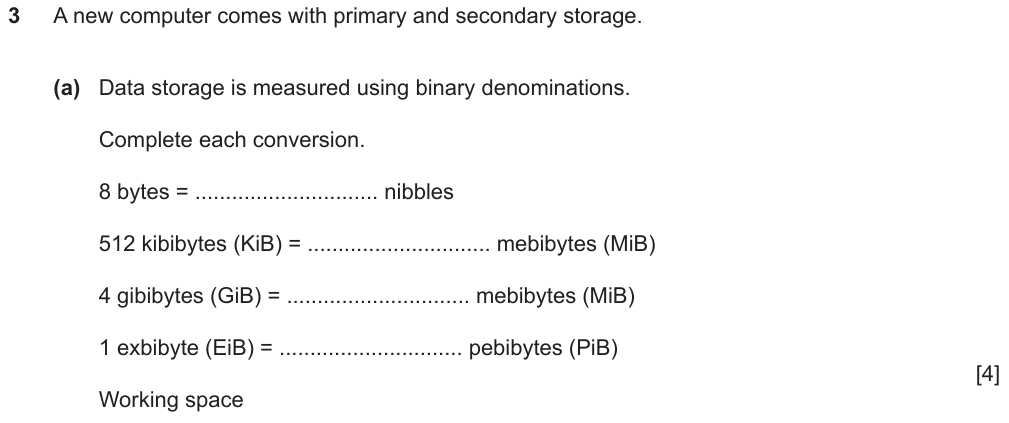
How to start For each, count the steps on the unit ladder: going up divide, going down multiply.
Show a full-mark answer and the mark scheme
8 bytes = 16 nibbles · 512 KiB = 0.5 MiB · 4 GiB = 4096 MiB · 1 EiB = 1024 PiB
| Part | Answer / working | Marks | Guidance |
|---|---|---|---|
| 3(a) | 16 · 0.5 · 4096 · 1024 | B4 | one mark each |
| Total: 4 marks | |||
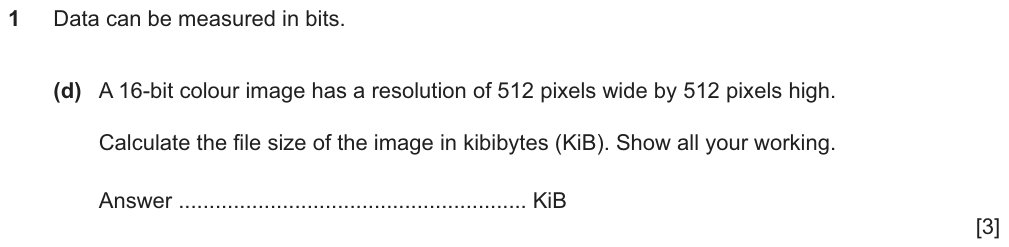
How to start Pixels × colour depth gives bits; then ÷ 8 and ÷ 1024.
Show a full-mark answer and the mark scheme
512 × 512 = 262 144 pixels · × 16 = 4 194 304 bits · ÷ 8 = 524 288 bytes · ÷ 1024 = 512 KiB
| Part | Answer / working | Marks | Guidance |
|---|---|---|---|
| 1(d) | 512 × 512 (= 262 144) | M1 | |
| 1(d) | × 16 ÷ 8 // × 2 bytes, then 524 288 / 1024 | M1 | max 2 for working |
| 1(d) | 512 (KiB) | A1 | |
| Total: 3 marks | |||
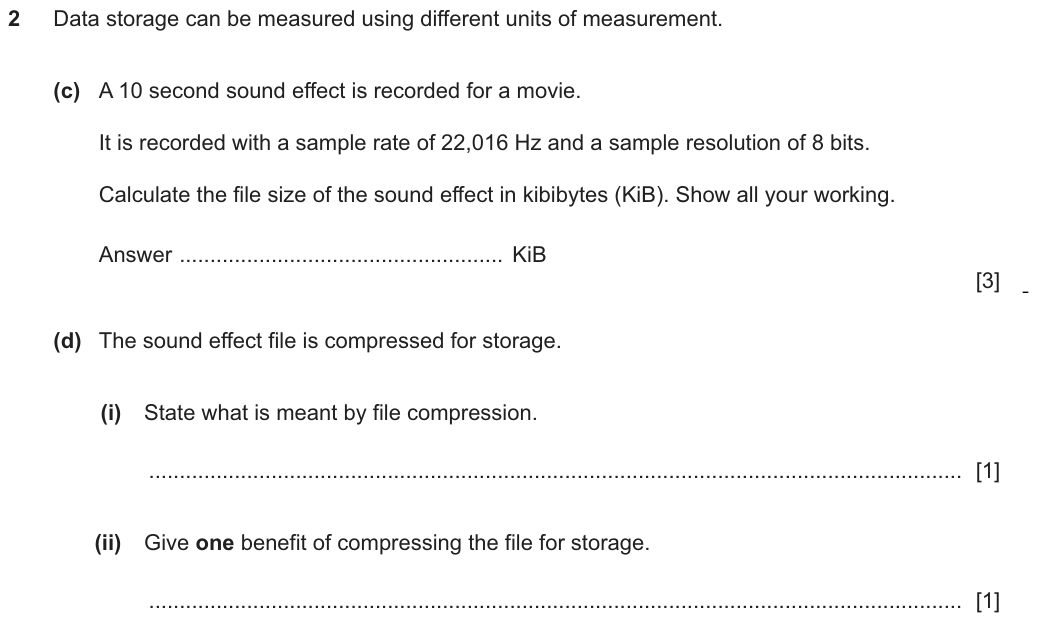
How to start Rate × resolution × seconds gives bits; then ÷ 8 and ÷ 1024. (d) is recall.
Show a full-mark answer and the mark scheme
(c) 22 016 × 8 × 10 = 1 761 280 bits · ÷ 8 = 220 160 bytes · ÷ 1024 = 215 KiB
(d)(i) Reducing the size of a file. (ii) It takes up less storage space.
| Part | Answer / working | Marks | Guidance |
|---|---|---|---|
| 2(c) | Any two stages: 22 016 × 8 then ÷ 8 · × 10 · 220 160 / 1024 | M2 | |
| 2(c) | 215 KiB | A1 | |
| 2(d)(i) | reducing the size of a file | B1 | |
| 2(d)(ii) | it will take up / use less storage space | B1 | |
| Total: 5 marks | |||
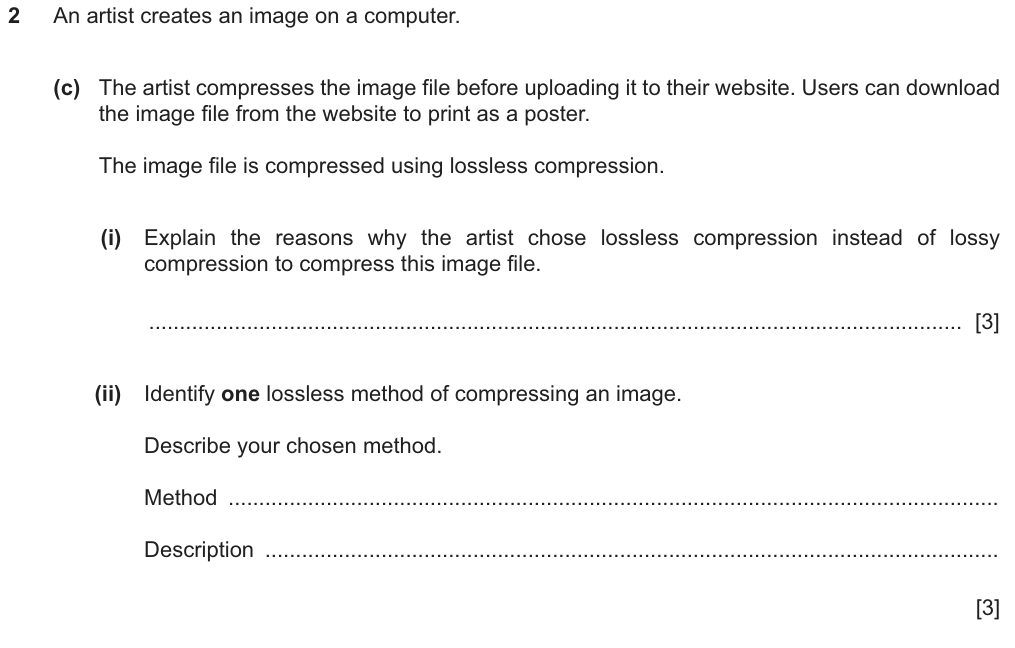
How to start (i) contrast the two types and link to the scenario (people print the image as a poster). (ii) name RLE, then describe it.
Show a full-mark answer and the mark scheme
(c)(i) Lossless keeps all of the image data, so the downloaded image is exactly the original. Lossy would permanently remove data and reduce the quality, and the artist wants users to print a detailed poster.
(c)(ii) Run-length encoding. Runs of repeating pixels of one colour are identified and each run is stored once, as the number of repetitions and the colour code.
| Part | Answer / working | Marks | Guidance |
|---|---|---|---|
| 2(c)(i) | Any three: lossless retains all parts of the image // does not delete data · lossy reduces quality · artist wants a detailed image · image may be small anyway / server has space / download time OK | B3 | |
| 2(c)(ii) | Run-length encoding (name) | B1 | |
| 2(c)(ii) | repeating pixels of one colour / patterns identified · … indexed / put into a table · … as the number of repetitions and the colour code | B2 | max 2 for describing |
| Total: 6 marks | |||
Common mistakes
- ✗ Dividing by 1000✓ Divide by 1024The syllabus says calculations must use 1024.
- ✗ Forgetting ÷ 8✓ Bits ÷ 8 = bytes, then ÷ 1024Image and sound formulas give BITS.
- ✗ Answer in the wrong unit✓ Give exactly the unit in the question
- ✗ "Lossless removes some data"✓ Lossless removes no data permanentlyThat is lossy.
- ✗ "Compression makes the file faster"✓ "Quicker to transmit / less storage"Be specific.
Practice
Practice: easy, medium, hard
Easy
Show answer
Answer 8
Show answer
Answer 3072
Show answer
Answer Less storage space; quicker to transmit (or less bandwidth / fits email limits)
Medium
Show answer
Answer 3
Show working
- 800 × 600 × 24 = 11 520 000 bits
- ÷ 8 = 1 440 000 bytes
Answer 1 440 000
Show answer
Answer It permanently removes data, so words / characters would be lost and the document corrupted
Hard
Show working
- 120 s × 32 768 × 16 = 62 914 560 bits
- ÷ 8 = 7 864 320 bytes
- ÷ 1024 = 7680 KiB
- ÷ 1024 = 7.5 MiB
Answer 7.5 MiB
| Part | Answer / working | Marks | Guidance |
|---|---|---|---|
| 32 768 × 16 × 120 | M1 | ||
| ÷ 8 and ÷ 1024 (twice) | M1 | ||
| 7.5 MiB | A1 | ||
| Total: 3 marks | |||
Show answer
Answer Lossy: permanently removes data, e.g. reduces resolution / colour depth / removes detail people won't notice; much smaller files, quicker to send; quality loss acceptable for viewing
Can I do this?
- I know the units from bit to EiB in order and convert with 1024.
- I can calculate an image file size and a sound file size in the unit asked.
- I can give reasons for compressing a file.
- I can compare lossy and lossless and choose one for a situation.
- I can describe run-length encoding and apply it.
Anything unticked: revise that section first. All ticked: take the quiz.
Quiz
The multiple-choice and guided questions need JavaScript. The concept checks and exam practice below work without it.
Your progress on this note is saved when JavaScript is on.
⬇️ Download this chapter as a PDF: Full notes