
Software
Firmware and interrupts
In this note
- 4.1.3Understand how hardware, firmware and an operating system are required to run applications software.
- 4.1.4Describe the role and operation of interrupts: how one is generated, how it is handled using an interrupt service routine, and what happens as a result.
Before this: System and application software. Next: Programming languages and translators.
The notes: every idea from the start, with our own examples.
What you should already know
ROM
ROM is non-volatile, read-only primary storage. It keeps its contents with the power off.
Quick check: what does ROM store?
The start-up instructions: the BIOS / bootstrap (firmware).
The FDE cycle
The CPU fetches, decodes and executes one instruction at a time.
Quick check: when can the CPU check for interrupts?
At the end of each fetch-decode-execute cycle.
Hardware, firmware, OS, applications
Firmware is software permanently stored in ROM that controls the hardware. The most important firmware is the bootloader (also called the bootstrap / BIOS): the instructions that start up the computer and load the operating system.
General methodWhat happens when you switch on
- The hardware powers up and the CPU runs the bootloader, which is firmware stored in ROM.
- The bootloader loads the operating system from secondary storage into RAM: the OS runs on the firmware.
- The OS gives a platform for the applications, which run on the operating system.
Interrupts
An interrupt is a signal sent to the CPU to show that something needs its attention. Interrupts let the computer react straight away to events (a key press, a printer running out of paper) instead of checking every device all the time. They are managed by the operating system (its interrupt handler).
| Hardware interrupts (from a device) | Software interrupts (from a program) |
|---|---|
| pressing a key on the keyboard; moving the mouse or clicking a button; plugging in a device; printer out of paper / ink; paper jam | division by zero; two processes trying to access the same memory location; a program asking for input / output; a null value error |
General methodHow an interrupt is handled
- A device or program generates an interrupt (e.g. a key is pressed) and it is sent to the CPU.
- The interrupt is given a priority and placed in the interrupt queue.
- The CPU finishes its current fetch-decode-execute cycle, then checks the interrupt queue.
- If the interrupt has a higher priority than the current task, the CPU saves the current task (the contents of its registers) and calls the interrupt service routine (ISR) for that interrupt.
- The ISR handles the interrupt (e.g. reads the key, shows the "out of paper" message).
- The CPU checks the queue again; when there are no more higher-priority interrupts it restores the saved task and carries on.
- If the interrupt has a lower priority, the CPU simply continues the current task and the interrupt waits in the queue.
Example A printer runs out of paper
Describe what happens.
- The printer sends an interrupt to the CPU.
- The interrupt is given a priority and placed in the interrupt queue.
- The CPU finishes its current FDE cycle and checks the queue: the paper interrupt has a higher priority.
- The CPU saves its current task and calls the ISR for the printer.
- The ISR displays a message telling the user to add paper; the CPU then restores the saved task.
Answer Result: the user sees "Out of paper" straight away, and the program they were using carries on.
Try it yourself
Show answer
Answer In ROM (it is firmware)
Show answer
Answer Software
Show answer
Answer Interrupt service routine (ISR) / interrupt handler
Summary
- Applications run on the OS; the OS runs on the firmware; the bootloader (firmware, in ROM) runs on the hardware.
- Interrupt: a signal to the CPU that something needs attention; managed by the OS.
- Hardware interrupts: key press, mouse, printer. Software: division by zero, two processes same memory.
- Handling: priority → queue → CPU finishes FDE cycle → checks queue → saves task → ISR → restores task.
If you see …
- "explain how the processor manages the current program and the interrupt" [5]priority · queue · finish FDE cycle · check queue · store task · ISR · restore
- "state the purpose of an interrupt"to indicate something needs the attention of the CPU
Question types, what the examiner gives marks for, and real past-paper questions solved.
Ways they test it
Type 1 Layers cloze
"… software is run on the operating system. The … system is run on the firmware, which is run on the …" [4]
Spot it a word list.
- Applications → OS → firmware → hardware.
Type 2 Firmware
"State the purpose of firmware" [1]; "give one example" [1]
Spot it "firmware".
- Purpose: permanently stores instructions to start the computer / control the hardware. Example: bootloader, BIOS.
Type 3 Examples
"Give two examples of a hardware / software interrupt" [2]
Spot it "examples".
- Use the table.
Type 4 Handling
"Describe how interrupts are used when a key is pressed" [5]; the printer paragraph [7]
Spot it "describe how".
- Follow the handling method in order, naming the device from the question.
What the examiner looks for
"Describe how interrupts are used when a key is pressed on a keyboard" [5]
Marking points (one mark each, up to the marks shown)
- Key press generates the interrupt
- Interrupt is given a priority
- Interrupt is sent to the CPU … and placed in a queue
- CPU stops its current task (at the end of the FDE cycle) to check the queue / service the interrupt …
- … using an interrupt service routine
- If the key press is the highest priority the interrupt is processed
Keywords priority queue interrupt service routine
Past-paper questions, solved
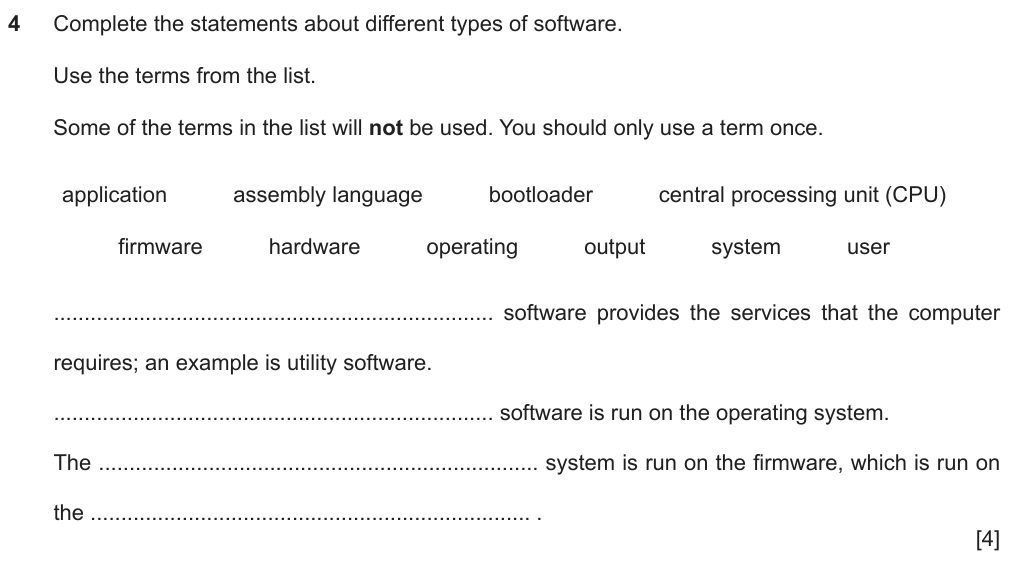
How to start Use the layer diagram: who runs on whom?
Show a full-mark answer and the mark scheme
System software provides the services that the computer requires … Application software is run on the operating system. The operating system is run on the firmware, which is run on the hardware.
| Part | Answer / working | Marks | Guidance |
|---|---|---|---|
| 4 | System · Application · Operating · Hardware | B4 | |
| Total: 4 marks | |||
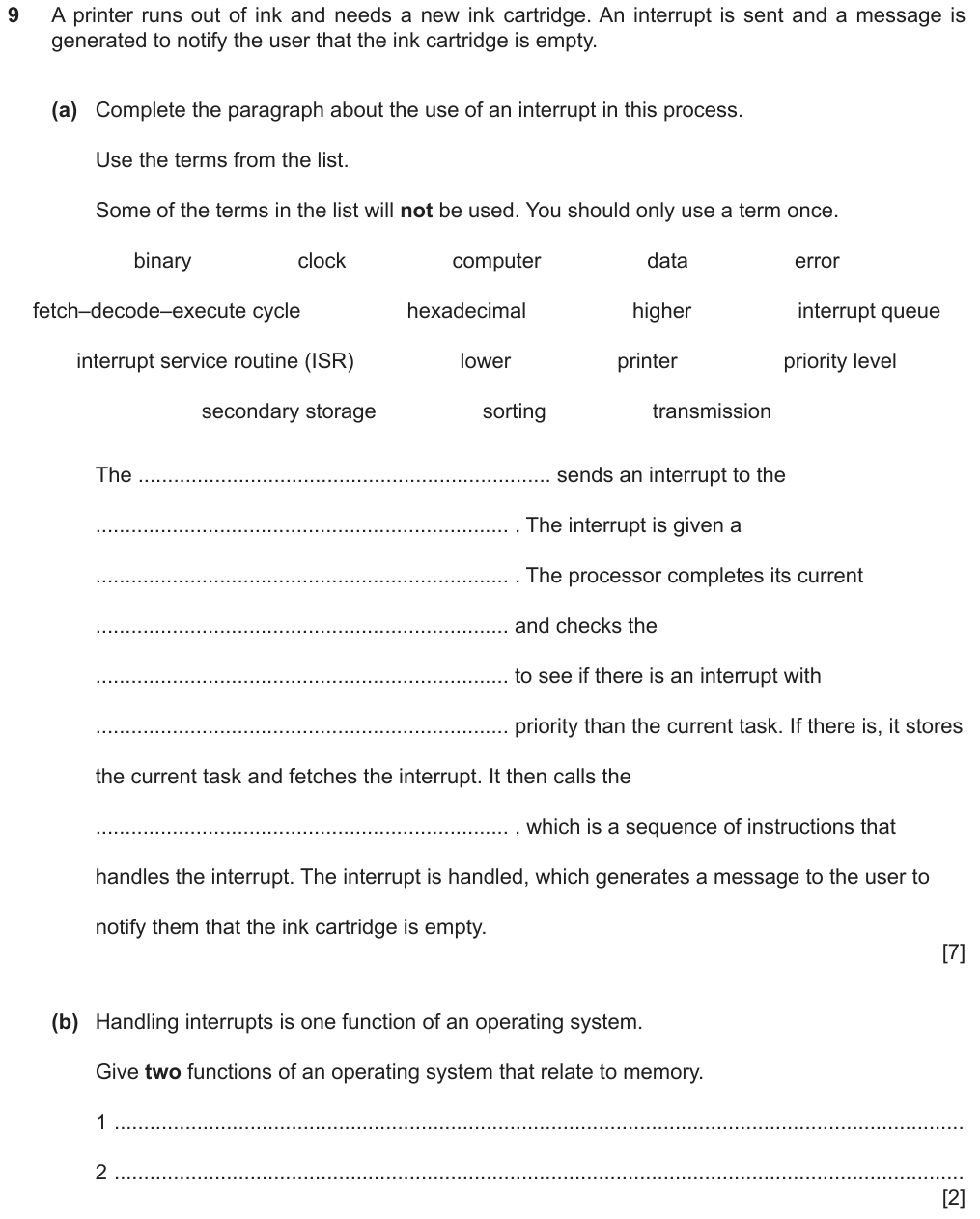
How to start (a) follow the handling method. (b) which OS functions are about memory?
Show a full-mark answer and the mark scheme
(a) printer · computer · priority level · fetch-decode-execute cycle · interrupt queue · higher · interrupt service routine (ISR)
(b) Managing memory; managing multitasking.
| Part | Answer / working | Marks | Guidance |
|---|---|---|---|
| 9(a) | printer · computer · priority level · FDE cycle · interrupt queue · higher · ISR | B7 | |
| 9(b) | memory management · multitasking | B2 | |
| Total: 9 marks | |||
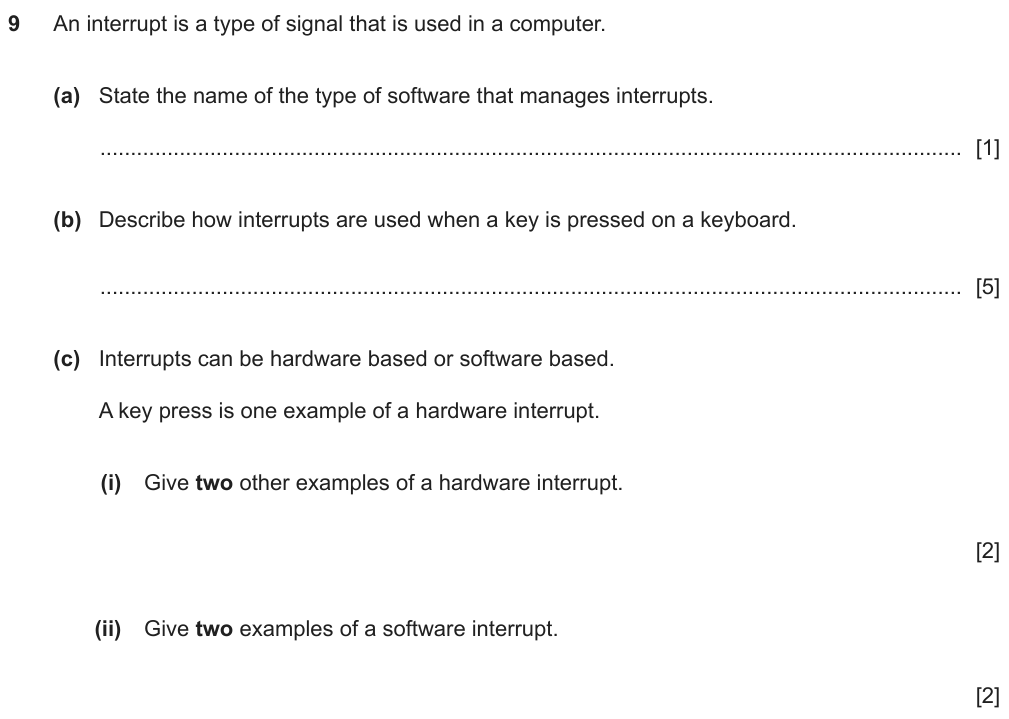
How to start (b) is the handling method for a key press. (c) two of each kind.
Show a full-mark answer and the mark scheme
(a) The operating system.
(b) Pressing the key generates an interrupt, which is sent to the CPU. It is given a priority and placed in the interrupt queue. The CPU finishes its current FDE cycle and checks the queue. If the key press has the highest priority, the CPU saves its current task and services the interrupt using an interrupt service routine.
(c)(i) Moving the mouse; a printer running out of paper. (ii) Division by zero; two processes accessing the same memory location.
| Part | Answer / working | Marks | Guidance |
|---|---|---|---|
| 9(a) | Operating system // interrupt handler | B1 | |
| 9(b) | Any five: key press generates · priority · sent to CPU · queue · CPU stops current task / checks queue · ISR · highest priority processed | B5 | |
| 9(c)(i) | Any two: moving / clicking the mouse · plugging in a device · paper jam · out of paper | B2 | |
| 9(c)(ii) | Any two: division by zero · two processes same memory location · null value | B2 | |
| Total: 10 marks | |||
Common mistakes
- ✗ "The CPU stops immediately"✓ "The CPU finishes its current FDE cycle first"
- ✗ "The interrupt is always handled straight away"✓ "Only if it has a higher priority than the current task"
- ✗ "Firmware is stored in RAM"✓ "Firmware is permanently stored in ROM"
- ✗ "Typing a letter" as a software interrupt✓ A key press is a hardware interrupt
Practice
Practice: easy, medium, hard
Easy
Show answer
Answer Firmware (the bootloader)
Show answer
Answer e.g. a key press
Medium
Show answer
Answer To indicate that something needs the attention of the CPU
Show answer
Answer So it can restore it and carry on from the same point afterwards
Hard
Show answer
Answer Each interrupt is given a priority and placed in a queue; the CPU services the highest priority one first
Can I do this?
- I can explain how hardware, firmware and the OS are needed to run applications.
- I can give examples of hardware and software interrupts.
- I can describe how an interrupt is handled using an ISR.
Anything unticked: revise that section first. All ticked: take the quiz.
Quiz
The multiple-choice and guided questions need JavaScript. The concept checks and exam practice below work without it.
Your progress on this note is saved when JavaScript is on.
⬇️ Download this chapter as a PDF: Full notes