
The Internet and its Uses
Keeping data safe
In this note
- 5.3.2Explain how a range of solutions help keep data safe: access levels, anti-malware, authentication (username and password, biometrics, two-step verification), automating software updates, checking spelling and tone, checking the URL, firewalls, privacy settings, proxy-servers, SSL.
Before this: Cyber security threats.
The notes: every idea from the start, with our own examples.
What you should already know
The threats
Brute force, hacking, interception, DDoS, malware, phishing, pharming, social engineering.
Quick check: which threat does encryption defend against?
Data interception: intercepted data is meaningless.
Authentication and access
Authentication means proving that a user is who they claim to be.
| Solution | How it keeps data safe | Helps against |
|---|---|---|
| Username and password | only someone who knows the password gets in. A strong password (mix of letters, numbers, symbols) is very hard to guess; limiting login attempts stops repeated guessing | brute force, hacking |
| Biometrics | uses a unique physical feature (fingerprint, face, iris, voice); very difficult to fake | brute force, hacking |
| Two-step verification | after the password, a code is sent to the user's registered device (or email) and must be entered: a hacker would need that device too | brute force, hacking, phishing |
| Access levels | give users different permissions: some can only read certain data, some can edit or delete it; linked to the username | limits the damage any one account can do |
| Privacy settings | control who can see a user's personal information (e.g. on social media) | social engineering, identity theft |
Software and network defences
| Solution | How it keeps data safe |
|---|---|
| Firewall (hardware or software) | sits between a network / computer and the internet; examines all incoming and outgoing traffic, compares it with set criteria (rules) and blocks any that does not meet them; can block certain IP addresses or websites |
| Proxy-server | sits between users and the internet / a web server: examines each request; can limit the rate of requests (stopping a DDoS reaching the web server); hides the server's / user's IP address; caches web pages to answer requests itself |
| Anti-malware (anti-virus, anti-spyware) | scans files and downloads, compares them with a database of known malware, and quarantines or deletes malware it finds; anti-spyware stops keyloggers sending passwords |
| Automating software updates | updates are installed automatically, so security weaknesses are fixed as soon as possible and anti-malware always knows the latest malware |
| SSL (secure socket layer) | encrypts data sent between browser and web server; checks the server's digital certificate; intercepted data is meaningless |
What the user can check
| Solution | How it keeps data safe |
|---|---|
| Checking the spelling and tone of communications | phishing emails often have spelling mistakes or an urgent, threatening tone ("your account will be closed today") |
| Checking the URL attached to a link | hover over a link before clicking: a fake site's address is often slightly different (examp1e-bank.com) or not HTTPS |
| Threat | Best solutions |
|---|---|
| brute-force attack | strong password · limit login attempts · two-step verification · biometrics |
| data interception | encryption / SSL (HTTPS) |
| DDoS | proxy-server · firewall · anti-malware on users' computers |
| hacking | firewall · strong passwords · two-step verification · access levels |
| malware | anti-malware · firewall · automatic updates · only download from trusted sources |
| phishing / pharming | check the URL · check spelling and tone · anti-malware (pharming) · never give personal details |
| social engineering | staff training · privacy settings · never give data to unverified callers |
Try it yourself
Show answer
Answer Two-step verification
Show answer
Answer Encryption (SSL)
Show answer
Answer Proxy-server
Summary
- Authentication: password (strong, limited attempts), biometrics, two-step verification.
- Access levels: read / edit permissions. Privacy settings: who sees your data.
- Firewall: compares traffic both ways with criteria, blocks what fails.
- Proxy: examines and rate-limits requests, hides IP, caches. Anti-malware: scans, quarantines, deletes.
- Auto-updates fix weaknesses. SSL encrypts. Users: check spelling / tone and the URL.
If you see …
- "explain how the firewall operates" [5]monitors traffic in and out · set criteria / rules · compares · blocks / allows · can block IP addresses / sites
- "identify two solutions and explain how each helps" [6]name (1) + two points of how it stops the attacker
Question types, what the examiner gives marks for, and real past-paper questions solved.
Ways they test it
Type 1 Solution + explanation
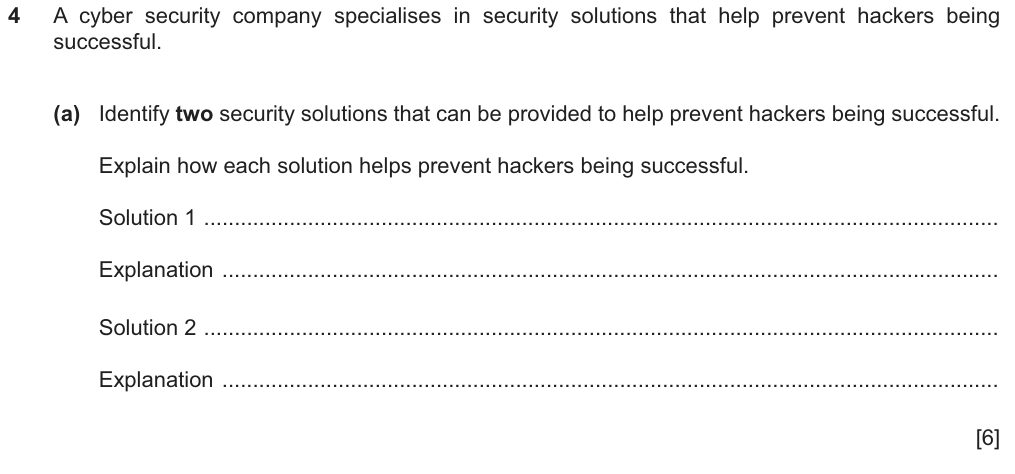
"Identify two security solutions … explain how each helps prevent hackers" [6]
Spot it "explain how".
- 1 mark the name, 2 marks how it stops the attack.
Type 2 Firewall diagram
"Draw and annotate a diagram to demonstrate how a firewall works" [4]
Spot it "firewall".
- Traffic both ways, criteria set, compared, rejected / accepted.
Type 3 Proxy vs firewall
"Identify two similarities and one difference" [3]; "tasks a proxy performs that a firewall does not" [2]
Spot it "proxy".
- Both filter traffic / can block IPs. Proxy only: hides the IP, caches pages.
Type 4 Match to a threat
"Give two solutions that could prevent a brute-force / DDoS attack" [2]
Spot it a named threat.
- Use the threat → solution table.
What the examiner looks for
"Draw and annotate a diagram to demonstrate how a firewall works" [4]
Marking points (one mark each, up to the marks shown)
- Traffic passing both ways through the firewall
- An indication that criteria are set for the firewall
- Traffic is compared to the criteria
- Traffic being rejected if it does not meet the criteria
- Traffic being accepted if it meets the criteria
Keywords both ways criteria compared rejected accepted
Past-paper questions, solved
How to start Choose solutions you can explain in two steps each.
Show a full-mark answer and the mark scheme
Solution 1: two-step verification. After the password, a code is sent to the user's registered device, so a hacker who has guessed the password would also need that device.
Solution 2: firewall. It examines incoming traffic and blocks any data that does not meet the set criteria, so the hacker's attempts to connect can be stopped.
| Part | Answer / working | Marks | Guidance |
|---|---|---|---|
| 4(a) | Per solution: name (1) + two matching points (2), e.g. strong password · limit attempts · biometrics · two-step verification · firewall · anti-spyware | B6 | |
| Total: 6 marks | |||
How to start (a) three different solutions. (b) two marks of description + an example. (c) three points about permissions.
Show a full-mark answer and the mark scheme
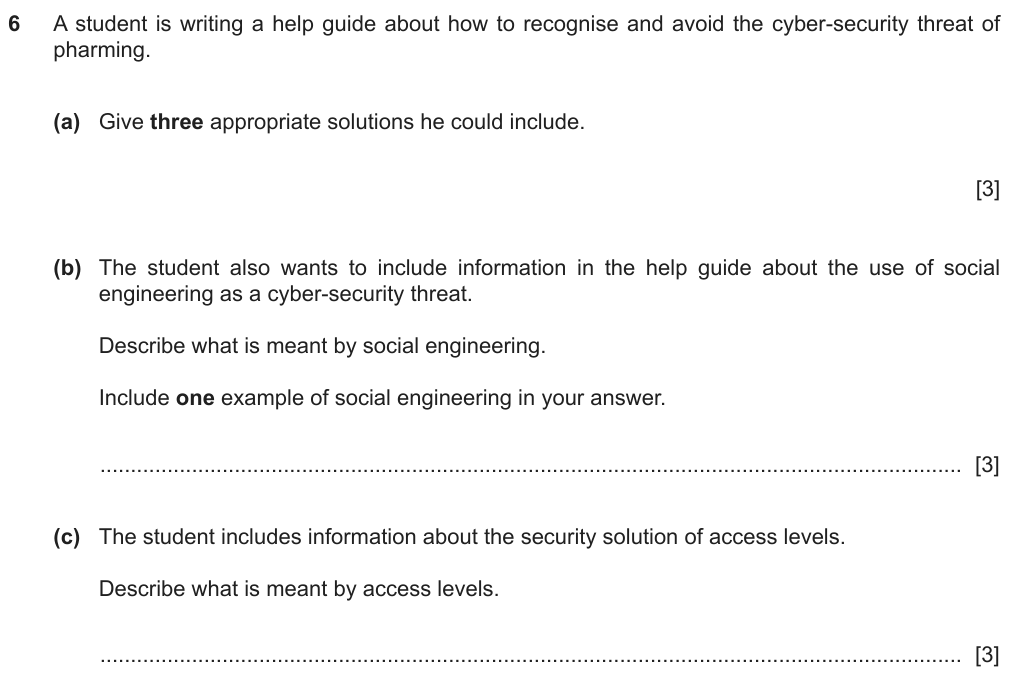
(a) Check the URL attached to a link; scan downloads with anti-malware; only download software from trusted sources.
(b) Social engineering is manipulating or deceiving people into giving away data or making a security mistake. For example, someone phones pretending to be from the bank and asks for a PIN.
(c) Access levels give users different permissions for the data: some users can only read certain data, while others can also edit or delete it. They are normally linked to a username.
| Part | Answer / working | Marks | Guidance |
|---|---|---|---|
| 6(a) | Any three: check spelling / tone · check URL · anti-malware scan · trusted sources only · no personal details · firewall | B3 | |
| 6(b) | manipulating / deceiving people … to obtain data / make an error · any suitable example | B3 | |
| 6(c) | Any three: different permissions · limit reading / viewing · limit editing / deleting · linked to a username | B3 | |
| Total: 9 marks | |||
Common mistakes
- ✗ "A firewall removes viruses"✓ "Anti-malware removes viruses; a firewall blocks traffic that fails its criteria"
- ✗ "Encryption stops data being intercepted"✓ "Encryption makes intercepted data meaningless"It can still be intercepted.
- ✗ "Use a password" for 3 marks✓ name it + how it helps + why that stops this attacker
Practice
Practice: easy, medium, hard
Easy
Show answer
Answer e.g. fingerprint
Show answer
Answer Anti-malware (anti-virus)
Medium
Show answer
Answer Updates are installed as soon as released, fixing security weaknesses before attackers can exploit them
Show answer
Answer Hide the IP address; cache web pages
Hard
Show answer
Answer Access levels: teachers' accounts get edit permission, students' accounts read-only, linked to each username
Can I do this?
- I can explain passwords, biometrics, two-step verification, access levels and privacy settings.
- I can explain firewalls, proxy-servers, anti-malware, automatic updates and SSL.
- I can match each threat to suitable solutions.
Anything unticked: revise that section first. All ticked: take the quiz.
Quiz
The multiple-choice and guided questions need JavaScript. The concept checks and exam practice below work without it.
Your progress on this note is saved when JavaScript is on.
⬇️ Download this chapter as a PDF: Full notes