
The Internet and its Uses
The internet, the web and browsers
In this note
- 5.1.1Understand the difference between the internet and the world wide web.
- 5.1.2Understand what is meant by a uniform resource locator (URL).
- 5.1.3Describe the purpose and operation of HTTP and HTTPS.
- 5.1.4Explain the purpose and functions of a web browser.
The notes: every idea from the start, with our own examples.
What you should already know
IP addresses
Every device on the internet is identified by an IP address.
Quick check: who allocates a device's IP address?
The network (the router).
Asymmetric encryption
Data encrypted with a public key can only be decrypted with the matching private key.
Quick check: who holds the private key?
Only its owner (e.g. the web server).
The internet and the world wide web
| The internet | The world wide web (WWW) |
|---|---|
| the infrastructure: a global network of interconnected networks (cables, routers, servers) | the collection of websites and web pages that are accessed using the internet |
| carries many services: email, video calls, online games, file transfer … and the web | is just one of the services that uses the internet |
URLs
A uniform resource locator (URL) is a text-based address for a web page. It is easier for people to remember than an IP address. A URL can contain the protocol, the domain name and the web page / file name.
HTTP and HTTPS
A protocol is a set of rules for transmitting data. Hypertext transfer protocol (HTTP) is the protocol used to request and send web pages between a web browser and a web server. HTTPS (hypertext transfer protocol secure) is HTTP with security added: it uses SSL / TLS to encrypt the data, so if it is intercepted it cannot be understood. Websites that take passwords or payments should use HTTPS (the padlock in the address bar).
General methodHow HTTPS / SSL secures the connection
- The web browser asks the web server to identify itself.
- The web server sends back its digital certificate (which contains its public key).
- The web browser authenticates the certificate (checks it is genuine and in date).
- If it is authentic, encrypted data transmission begins: data is encrypted with the server's public key, and only the server's private key can decrypt it.
Web browsers
A web browser is the software used to access and view web pages. Its main purpose is to render HTML and display web pages. (HTML, hypertext markup language, is the language web pages are written in, with tags such as <head> and <body>.)
| Function | Example |
|---|---|
| storing bookmarks and favourites | jump straight to a site you visit often |
| recording user history | find a page you visited yesterday |
| allowing multiple tabs | have several web pages open at once |
| storing cookies | stay logged in; payment details filled in for you |
| providing navigation tools | back, forward, refresh, home buttons |
| providing an address bar | type in a URL |
Try it yourself
Show answer
Answer The internet
Show answer
Answer www.examplebooks.com
Show answer
Answer Bookmarks / favourites
Summary
- Internet = infrastructure (network of networks). WWW = collection of web pages accessed using the internet.
- URL = text-based address: protocol + domain name + web page / file name.
- HTTP: protocol to request and send web pages. HTTPS: HTTP + SSL/TLS encryption, digital certificate.
- Browser: main purpose = render HTML and display web pages; bookmarks, history, tabs, cookies, navigation, address bar.
If you see …
- "describe the difference between the internet and the WWW"infrastructure … whereas … collection of web pages
- "explain how HTTPS makes transmission secure"SSL/TLS · encrypts · meaningless if intercepted · public / private key · certificate
Question types, what the examiner gives marks for, and real past-paper questions solved.
Ways they test it
Type 1 Internet vs WWW
"Describe the difference between the internet and the world wide web" [2]
Spot it "difference".
- Two facts, joined by "whereas".
Type 2 URL parts
"Identify the three different parts of the URL" [3]; a labelled URL
Spot it a URL.
- protocol · domain name · file (web page) name
Type 3 Browser
"Explain the purpose of the web browser" [2]; "give three other functions" [3]; "which function …" [1]
Spot it "browser".
- Purpose: renders HTML, displays web pages. Functions from the table.
Type 4 SSL paragraph
"The … asks the … to identify itself …" [5]
Spot it a word list.
- Follow the HTTPS method.
What the examiner looks for
"Explain how HTTPS makes the transmission of data secure" [4]
Marking points (one mark each, up to the marks shown)
- Uses SSL / TLS
- Encrypts the data …
- … which stops the data being understood if it is intercepted
- … using asymmetric encryption: data encrypted with the web server's public key
- … can only be decrypted with the web server's private key
Keywords SSL encrypts intercepted public key private key
Past-paper questions, solved
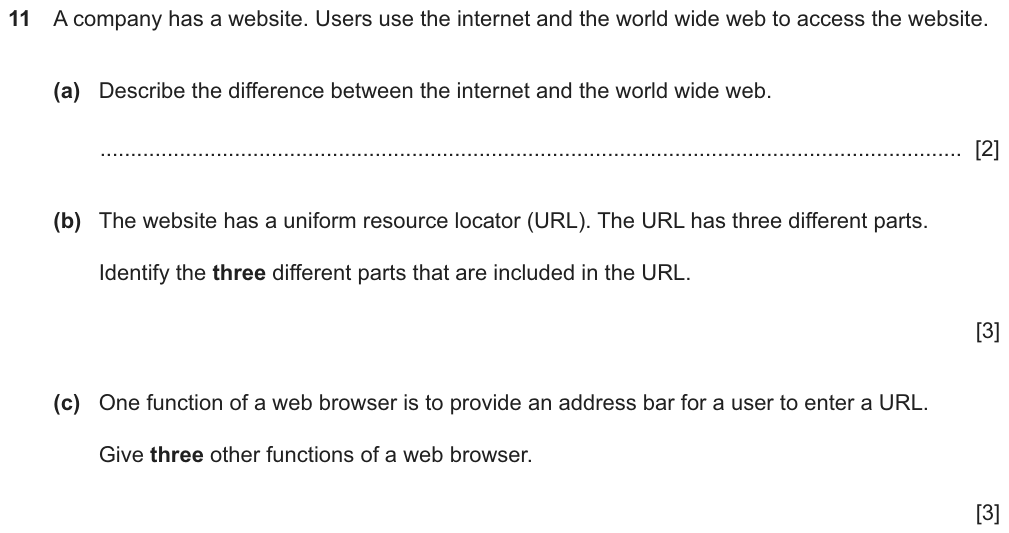
How to start (c) the address bar is given, so pick three other functions.
Show a full-mark answer and the mark scheme
(a) The internet is the infrastructure, whereas the world wide web is the collection of web pages accessed using it.
(b) Protocol; domain name; web page (file) name.
(c) Storing bookmarks and favourites; recording the user's history; allowing multiple tabs.
| Part | Answer / working | Marks | Guidance |
|---|---|---|---|
| 11(a) | internet is the infrastructure · WWW is a collection of web pages | B2 | |
| 11(b) | protocol · domain name · file name // web page name | B3 | |
| 11(c) | Any three: displays web pages · bookmarks · history · tabs · cookies · navigation tools · home page | B3 | |
| Total: 8 marks | |||
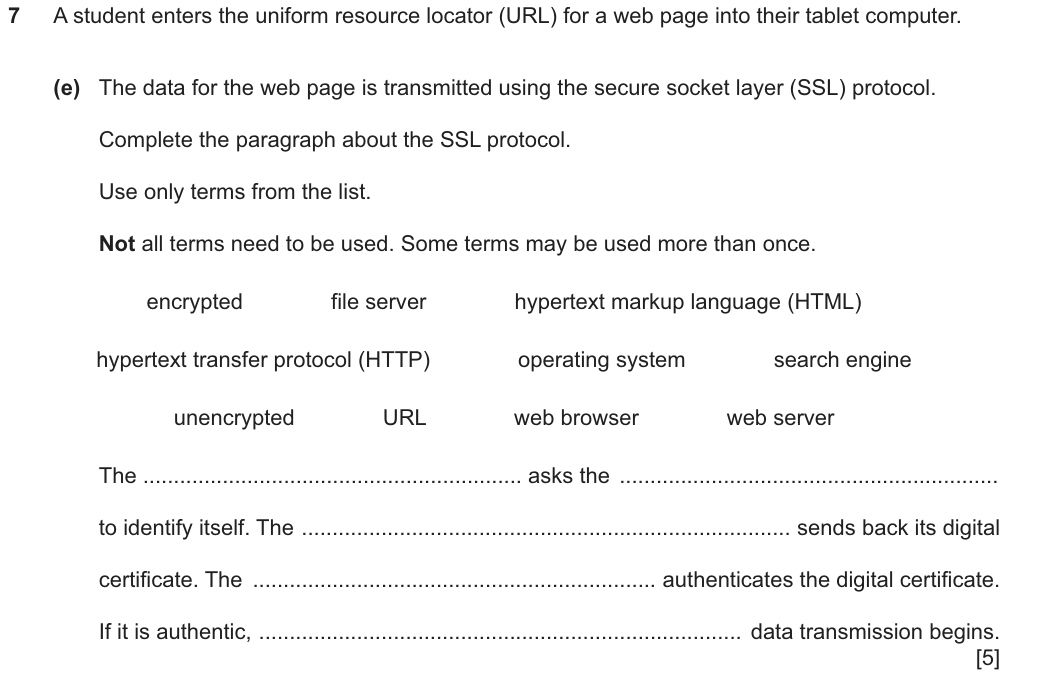
How to start Follow the HTTPS method: who asks, who answers, who checks.
Show a full-mark answer and the mark scheme
The web browser asks the web server to identify itself. The web server sends back its digital certificate. The web browser authenticates the digital certificate. If it is authentic, encrypted data transmission begins.
| Part | Answer / working | Marks | Guidance |
|---|---|---|---|
| 7(e) | web browser · web server · web server · web browser · encrypted | B5 | |
| Total: 5 marks | |||
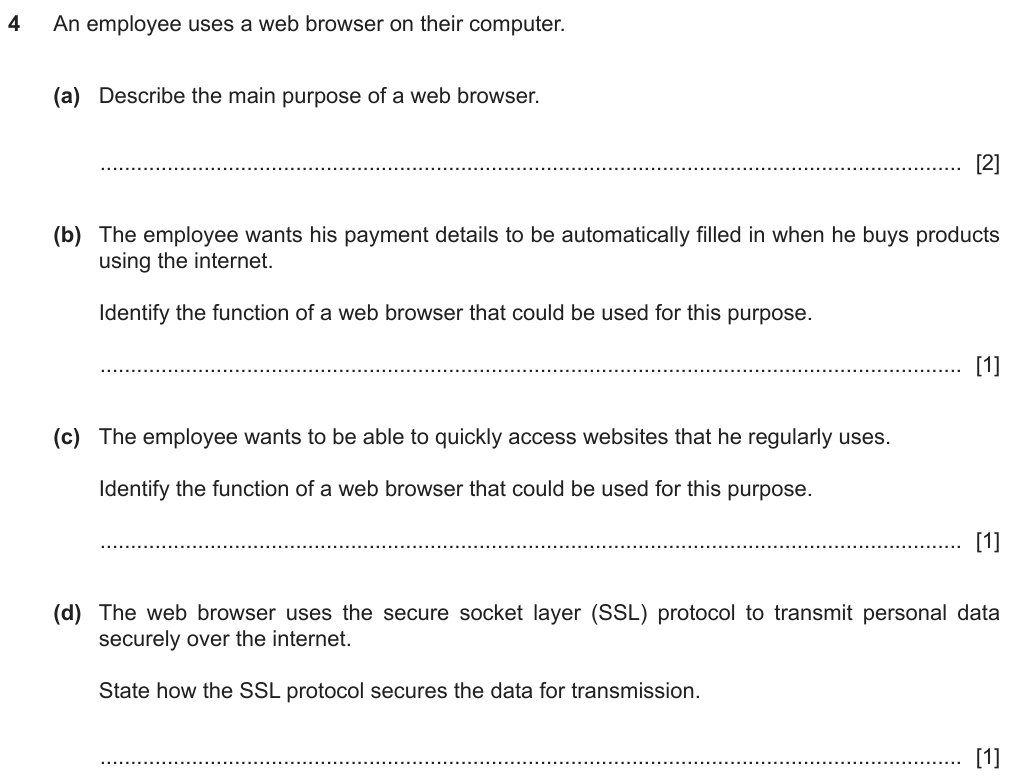
How to start (b) and (c) each name ONE browser function from the table.
Show a full-mark answer and the mark scheme
(a) To display web pages, by rendering HTML.
(b) Storing cookies.
(c) Storing bookmarks / favourites.
(d) It encrypts the data.
| Part | Answer / working | Marks | Guidance |
|---|---|---|---|
| 4(a) | display web pages · by rendering HTML | B2 | |
| 4(b) | storing cookies | B1 | |
| 4(c) | bookmarks // favourites | B1 | |
| 4(d) | encrypts it // uses digital certificates | B1 | |
| Total: 5 marks | |||
Common mistakes
- ✗ "The internet and the WWW are the same"✓ "The internet is the infrastructure; the WWW is the web pages"
- ✗ "A browser finds the IP address"✓ "The DNS finds the IP address; the browser renders HTML"Next note.
- ✗ "HTTPS is faster"✓ "HTTPS encrypts the data (SSL/TLS)"
Practice
Practice: easy, medium, hard
Easy
Show answer
Answer Uniform resource locator
Show answer
Answer Secure
Show answer
Answer HTML
Medium
Show answer
Answer To render HTML and display web pages
Show answer
Answer e.g. bookmarks, history (also tabs, cookies, navigation tools)
Hard
Show answer
Answer Customers enter personal / payment details; HTTPS encrypts them so they are meaningless if intercepted
Can I do this?
- I can explain the difference between the internet and the WWW.
- I can name the parts of a URL.
- I can describe HTTP and how HTTPS secures data.
- I can give the purpose and functions of a web browser.
Anything unticked: revise that section first. All ticked: take the quiz.
Quiz
The multiple-choice and guided questions need JavaScript. The concept checks and exam practice below work without it.
Your progress on this note is saved when JavaScript is on.
⬇️ Download this chapter as a PDF: Full notes