
Hardware
Primary and secondary storage
In this note
- 3.3.1Understand what is meant by primary storage, including the role of RAM and ROM, why a computer needs both and the difference between them.
- 3.3.2Understand what is meant by secondary storage.
- 3.3.3Describe the operation of magnetic, optical and solid-state (flash memory) storage and give examples of each.
Before this: Sensors. Next: Virtual memory and cloud storage.
The notes: every idea from the start, with our own examples.
What you should already know
Volatile
Volatile memory loses its contents when the power is turned off. Non-volatile keeps them.
Quick check: is a USB flash drive volatile?
No: it is non-volatile.
Primary storage: RAM and ROM
Primary storage is memory that is directly accessed by the CPU. There are two types: RAM and ROM.
| RAM (random access memory) | ROM (read only memory) | |
|---|---|---|
| volatile? | volatile: contents lost when power is off | non-volatile: contents kept |
| can it be changed? | read and written to | read only: contents cannot (normally) be changed |
| what it stores | the data and programs currently in use, including parts of the operating system | the start-up instructions: the BIOS / bootstrap and firmware |
| size | large (e.g. 8-32 GB) | small |
A computer needs both. ROM holds the instructions to start the computer (they must survive with the power off, and must not be changed by accident). RAM holds whatever is running now: it is much faster than secondary storage, so the CPU can fetch instructions quickly, and it can be written to as the data changes.
Secondary storage
Secondary storage is not directly accessed by the CPU and is non-volatile. It is needed to store data, files and software permanently: otherwise everything would have to be re-installed or re-entered every time the computer was switched on. It also provides the space for virtual memory.
Magnetic storage (hard disk drive, HDD)
General methodHow a hard disk drive works
- Data is stored on platters, round disks coated in a magnetic material, which spin at high speed.
- Each platter is divided into concentric tracks, and each track into sectors.
- A read/write head on an arm moves across the platter to the correct track.
- The head uses an electromagnet to magnetise tiny areas (writing) or to sense their magnetisation (reading).
- The direction of the magnetisation of each area represents 1 or 0.
Optical storage (CD, DVD, Blu-ray)
General methodHow optical storage works
- The disk spins.
- To write, a laser burns pits into the reflective surface; the unburnt areas are lands. The pits are laid in a spiral track.
- To read, a laser is shone onto the surface: pits and lands reflect the light differently, which a sensor detects.
- The pits and lands represent the binary values.
- CD and DVD use a red laser; Blu-ray uses a blue laser with a shorter wavelength, so the pits are smaller and more data fits.
Solid-state storage (SSD, SD card, USB flash drive)
General methodHow solid-state (flash memory) storage works
- It has no moving parts: data is stored in transistors on silicon chips, laid out in a grid.
- It uses NAND or NOR technology.
- Each transistor has a control gate and a floating gate.
- The gates control the flow of electrons: when electrons are trapped in the floating gate the value changes between 1 and 0.
- The electrons stay trapped with the power off, so it is non-volatile.
| Magnetic (HDD) | Optical | Solid state (SSD) | |
|---|---|---|---|
| moving parts | yes | yes | none |
| access speed | medium | slowest | fastest |
| capacity | very large | small (≈ 0.7-100 GB) | large |
| cost per GB | cheap | cheapest (disks) | more expensive |
| durability | can be damaged if dropped | scratches easily | robust (no moving parts) |
| power / noise / heat | more power, some noise | noisy drive | low power, silent, cool |
| good for | servers, cheap large storage | distributing films / software, archive | laptops, phones, portable use |
Try it yourself
Show answer
Answer Optical
Show answer
Answer Solid state
Show answer
Answer ROM
Show answer
Answer It is directly accessed by the CPU
Summary
- Primary = directly accessed by the CPU: RAM (volatile, data in use) and ROM (non-volatile, read only, bootstrap / BIOS / firmware).
- Secondary = not directly accessed, non-volatile, permanent storage.
- Magnetic: spinning platters, tracks and sectors, read/write head with electromagnets.
- Optical: laser, pits and lands, spiral track; red laser CD/DVD, blue laser Blu-ray.
- Solid state: NAND/NOR, transistors with control and floating gates, electrons trapped; no moving parts.
If you see …
- "why does a computer need RAM?"store data / software currently in use · temporarily · faster than secondary storage
- "why does it need ROM?"store the BIOS / bootstrap / firmware · non-volatile · should not change
- "describe how optical storage works"disk spun · laser · pits burnt · spiral track · pits and lands = binary
Question types, what the examiner gives marks for, and real past-paper questions solved.
Ways they test it
Type 1 Which storage type?
"Complete the table by writing the type of storage for each statement" [6]
Spot it operation keywords.
- pits/lands/laser = optical; platters/tracks/electromagnets = magnetic; NAND/NOR/gates/transistors = solid state.
Type 2 Why RAM / ROM
"Explain why a computer needs RAM" [3]; "why the smartwatch needs ROM" [2]
Spot it "why".
- Use the RAM vs ROM table: role + one characteristic.
Type 3 Describe operation
"Describe how the data is stored on the optical disk" [4]
Spot it "describe how".
- Follow the method boxes in order.
Type 4 Compare / choose
"Describe three differences between solid-state and optical storage" [6]; "most suitable storage for a smartphone; explain" [4]
Spot it "differences", "suitable".
- Compare the SAME property for both types. For a choice, link each property to the scenario.
What the examiner looks for
"Identify the most suitable type of secondary storage for the smartphone. Explain your choice" [4]
Marking points (one mark each, up to the marks shown)
- Solid state (1 mark), then any three:
- small / thin … so it fits easily into the smartphone
- no moving parts … so it is durable; data less likely to be lost if the phone is dropped
- fast read/write … so files and apps load quickly
- low power … so it does not drain the battery
- runs cool and quietly
Keywords no moving parts durable low power battery fast
Too vague listing features without linking them to the smartphone
Past-paper questions, solved
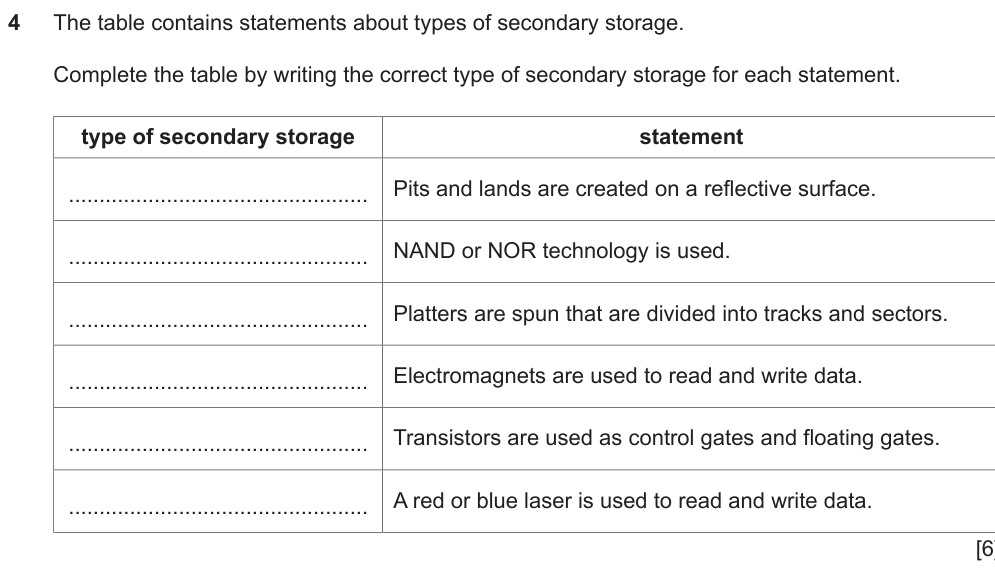
How to start Look for the keyword in each statement and map it with the operation methods.
Show a full-mark answer and the mark scheme
optical · solid state · magnetic · magnetic · solid state · optical
| Part | Answer / working | Marks | Guidance |
|---|---|---|---|
| 4 | optical (pits and lands) · solid-state (NAND/NOR) · magnetic (platters) · magnetic (electromagnets) · solid-state (control and floating gates) · optical (red or blue laser) | B6 | |
| Total: 6 marks | |||
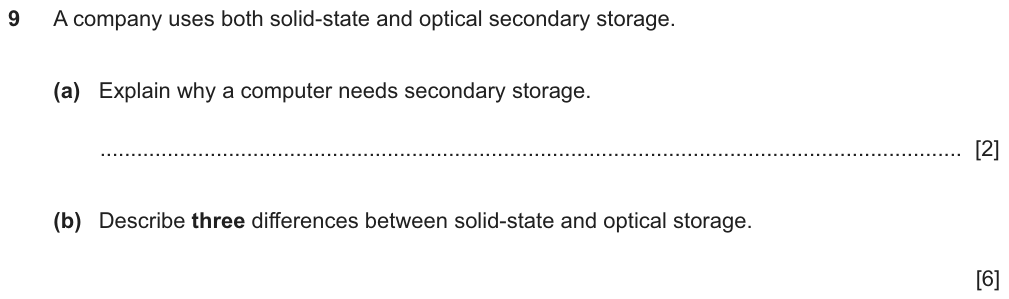
How to start (b) is six marks: three properties, each stated for BOTH types.
Show a full-mark answer and the mark scheme
(a) To store data and files permanently, otherwise programs would need to be installed again every time the computer was used.
(b) Solid-state has no moving parts, whereas optical has moving parts (the disk spins). Solid-state is faster to access data, whereas optical is slower. Solid-state stores data in transistors using NAND/NOR gates, whereas optical uses a laser to burn pits and lands onto a disk.
| Part | Answer / working | Marks | Guidance |
|---|---|---|---|
| 9(a) | Any two: store permanently · otherwise reinstall each time · allow software to be installed · virtual memory | B2 | |
| 9(b) | Any six (max 3 for one type): moving parts · access speed · power · noise · durability · capacity · cost per GB · how data is stored | B6 | |
| Total: 8 marks | |||
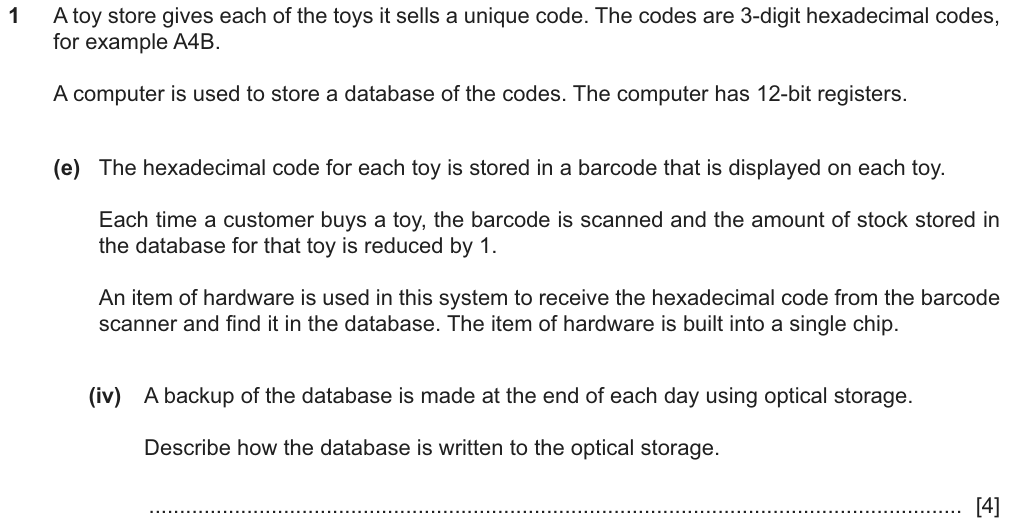
How to start Follow the optical method: four marking points.
Show a full-mark answer and the mark scheme
The disk is spun. A laser is shone onto the disk and burns pits into its surface in a spiral track. The pits and the unburnt lands represent the binary values.
| Part | Answer / working | Marks | Guidance |
|---|---|---|---|
| 1(e)(iv) | Any four: disk spun · laser shone · pits burnt · in a spiral track · pits and lands represent binary | B4 | |
| Total: 4 marks | |||
Common mistakes
- ✗ "ROM stores the operating system"✓ "ROM stores the BIOS / bootstrap"The OS is on secondary storage and loaded into RAM.
- ✗ "RAM is permanent storage"✓ "RAM is volatile: data in use, lost when power is off"
- ✗ "An SSD uses lasers"✓ "An SSD uses transistors with control and floating gates"
- ✗ "Solid state is faster" (only one side)✓ "Solid state is faster … optical is slower"Differences need both sides.
Practice
Practice: easy, medium, hard
Easy
Show answer
Answer Volatile
Show answer
Answer e.g. CD, DVD (also Blu-ray)
Show answer
Answer Tracks and sectors
Medium
Show answer
Answer RAM volatile / ROM non-volatile; RAM can be written to / ROM read only (also contents)
Show answer
Answer A blue laser has a shorter wavelength, so pits are smaller and closer together
Hard
Show answer
Answer Solid state: no moving parts so durable when carried; fast access for large video files; low power for battery
Can I do this?
- I can explain primary storage, and why a computer needs both RAM and ROM.
- I can explain why secondary storage is needed.
- I can describe how magnetic, optical and solid-state storage work.
- I can compare storage types and choose one for a scenario.
Anything unticked: revise that section first. All ticked: take the quiz.
Quiz
The multiple-choice and guided questions need JavaScript. The concept checks and exam practice below work without it.
Your progress on this note is saved when JavaScript is on.
⬇️ Download this chapter as a PDF: Full notes