
Hardware
Sensors
In this note
- 3.2.3Understand what is meant by a sensor and its purposes; identify the type of data captured by each sensor and where each is used: acoustic, accelerometer, flow, gas, humidity, infra-red, level, light, magnetic field, moisture, pH, pressure, proximity, temperature.
Before this: Input and output devices. Next: Primary and secondary storage.
The notes: every idea from the start, with our own examples.
What you should already know
Input devices
An input device captures data and sends it to the computer.
Quick check: is a sensor input or output?
Input.
What a sensor is
A sensor is an input device that measures a physical quantity from its surroundings (temperature, light, sound …) and sends the reading to a computer or microprocessor. It captures data automatically, with no person entering it. If the reading is analogue it is converted to digital before the microprocessor can process it.
| Why use sensors? | |
|---|---|
| data is collected without human intervention | nobody has to stand and watch |
| readings are taken continuously (24/7) | the system reacts the moment something changes |
| readings are accurate and taken faster than a human | no human error |
| they work in dangerous places | e.g. inside a chemical plant or a nuclear reactor |
The fourteen sensors you must know
For each sensor, learn what it measures and one use. Exam questions give a scenario and ask for "the most appropriate sensor", so match the quantity that changes.
| Sensor | Measures | Example use |
|---|---|---|
| Acoustic | sound | detecting breaking glass in a burglar alarm; a dripping, leaking pipe |
| Accelerometer | acceleration / movement and tilt | rotating a phone screen; fitness trackers; air-bag deployment in a crash |
| Flow | rate of flow of a liquid or gas | monitoring water through a pipe; fuel flow in an engine |
| Gas | presence / level of a gas (e.g. CO₂, carbon monoxide) | carbon monoxide alarm; gas leak detector |
| Humidity | water vapour in the air | greenhouse; spray-painting room; museum display case |
| Infra-red | infra-red radiation (heat / a broken beam) | motion detection in a security system; automatic doors |
| Level | how full a container is | fuel tank gauge; refilling a water tank or an animal's water bowl |
| Light | light intensity | street lights switching on at dusk; phone screen brightness; barcode scanner |
| Magnetic field | changes in a magnetic field | counting vehicles over a bridge / into a car park; phone compass |
| Moisture | water in a substance (e.g. soil) | automatic watering of plants |
| pH | acidity / alkalinity | soil in a greenhouse; water in a swimming pool or a fish tank |
| Pressure | force applied / pressure | a car on a car-park barrier; weighing; burglar alarm pad under a carpet |
| Proximity | how close an object is | parking sensors on a car; phone screen turning off at your ear |
| Temperature | temperature | central heating; a kettle; a freezer; a climate-controlled room |
Sensor + microprocessor: how a system reacts
In an automated system the sensor and a microprocessor work in a loop. Questions often ask for this as a 6-mark description, so learn the steps.
General methodDescribing a sensor-controlled system
- The sensor continually takes readings and sends the (digitised) data to the microprocessor.
- The microprocessor compares the reading with a stored value (or range).
- If the reading is outside the range, the microprocessor sends a signal to an actuator (e.g. to open a valve, switch on a heater).
- If the reading is within the range, no action is taken.
- The process repeats continuously until the system is switched off.
Example A greenhouse that keeps the soil damp
Describe how a moisture sensor and a microprocessor keep the soil damp.
- The moisture sensor continually sends readings of the soil moisture to the microprocessor.
- The microprocessor compares each reading with the stored minimum moisture level.
- If the reading is below it, the microprocessor sends a signal to an actuator to open the water valve.
- When the reading reaches the stored level, the microprocessor signals the actuator to close the valve.
- This repeats continuously.
Answer Five marking points: sensor · compare · actuator opens · stops · repeats.
Try it yourself
Show answer
Answer Magnetic field (or pressure)
Show answer
Answer pH
Show answer
Answer Accelerometer
Summary
- A sensor is an input device that measures a physical quantity and sends the data to a microprocessor.
- Benefits: no human needed, continuous, accurate, fast, works in dangerous places.
- 14 sensors: acoustic, accelerometer, flow, gas, humidity, infra-red, level, light, magnetic field, moisture, pH, pressure, proximity, temperature.
- Control loop: sensor → microprocessor compares with stored value → signal to actuator → repeat.
If you see …
- "identify the most appropriate sensor"name the quantity that changes
- "describe how the sensor and microprocessor are used" [6]continually · digital data · compare · stored value · signal · actuator · repeats
Question types, what the examiner gives marks for, and real past-paper questions solved.
Ways they test it
Type 1 Which sensor?
"Identify the most appropriate sensor for this system" [1]
Spot it a scenario.
- One word: the sensor's name from the list of 14.
Type 2 Sensor uses table
"Complete the table by giving a suitable use for each type of sensor" [4]
Spot it a table.
- A specific use: "monitoring the temperature in a greenhouse", not just "measures temperature".
Type 3 Benefits
"Give two benefits of using sensors in this type of system" [2]
Spot it "benefits".
- no human needed · continuous · accurate · fast · dangerous places
Type 4 Control loop
"Describe how the sensor and the microprocessor are used to …" [6]
Spot it "describe how".
- Follow the five-step method, using the scenario's own words (water bowl, valve).
What the examiner looks for
"Describe how the sensor and the microprocessor are used to automatically refill the water bowl" [6]
Marking points (one mark each, up to the marks shown)
- Sensor continually sends digitised data to the microprocessor
- Microprocessor compares the data to stored value(s)
- If the value is outside the range / matches, the microprocessor sends a signal to release water
- … bowl filled by a set amount // for a certain time
- Actuator used to release the water
- Whole process repeats until turned off
Keywords continually compares stored value signal actuator repeats
Too vague "the sensor decides to refill the bowl" (the microprocessor decides); "the sensor sends a signal to the actuator"
Past-paper questions, solved
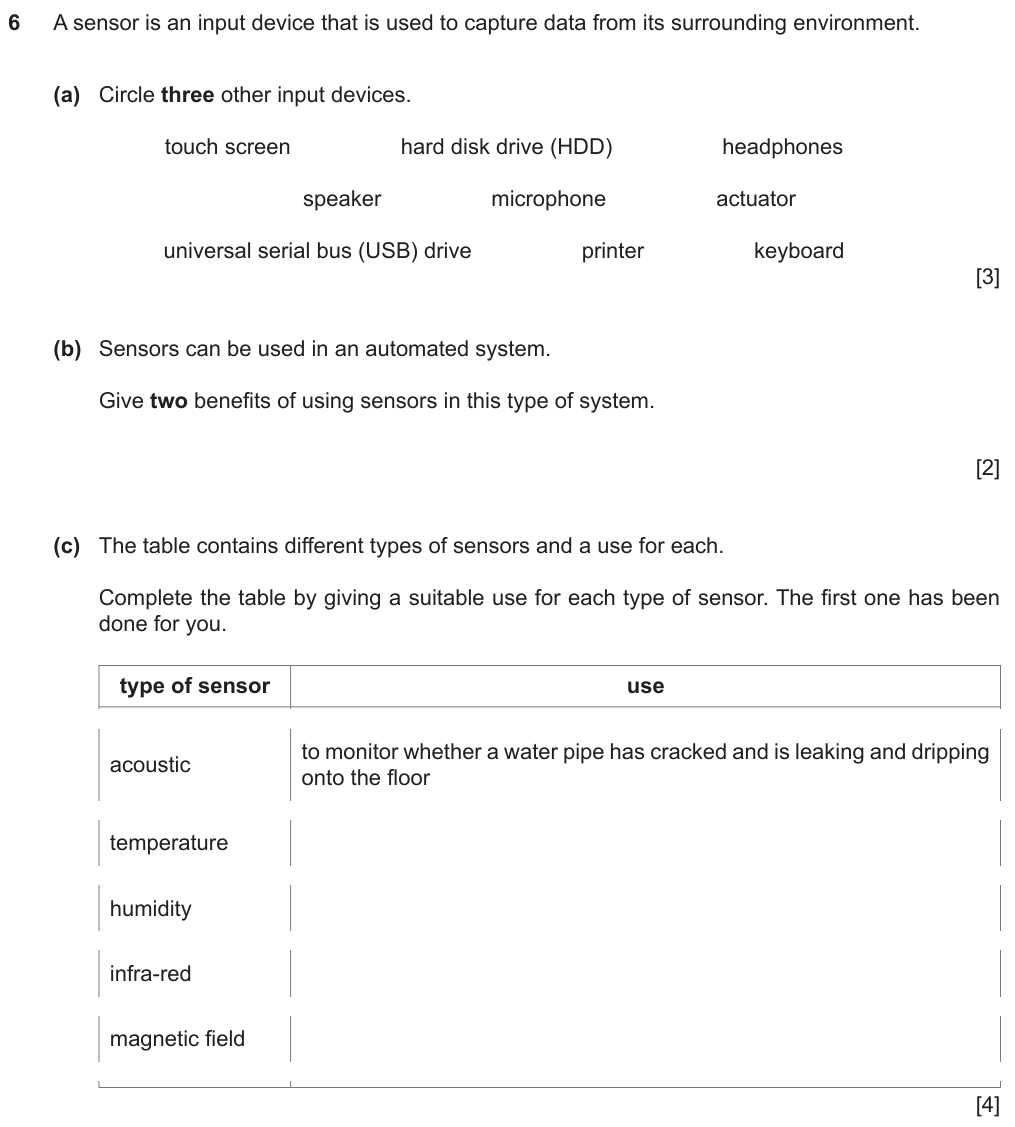
How to start (a) cross out storage and outputs. (c) give a specific situation for each sensor.
Show a full-mark answer and the mark scheme
(a) touch screen · microphone · keyboard
(b) Data can be collected without human intervention; readings can be taken continuously, 24/7.
(c) Temperature: monitoring the temperature in a climate-controlled room. Humidity: checking the air in a greenhouse is moist enough. Infra-red: detecting a person approaching automatic doors. Magnetic field: counting vehicles that cross a bridge.
| Part | Answer / working | Marks | Guidance |
|---|---|---|---|
| 6(a) | touch screen · microphone · keyboard | B3 | |
| 6(b) | Any two: no human intervention · faster · accurate · continuous · dangerous environments | B2 | |
| 6(c) | One suitable use per sensor (temperature, humidity, infra-red, magnetic field) | B4 | |
| Total: 9 marks | |||
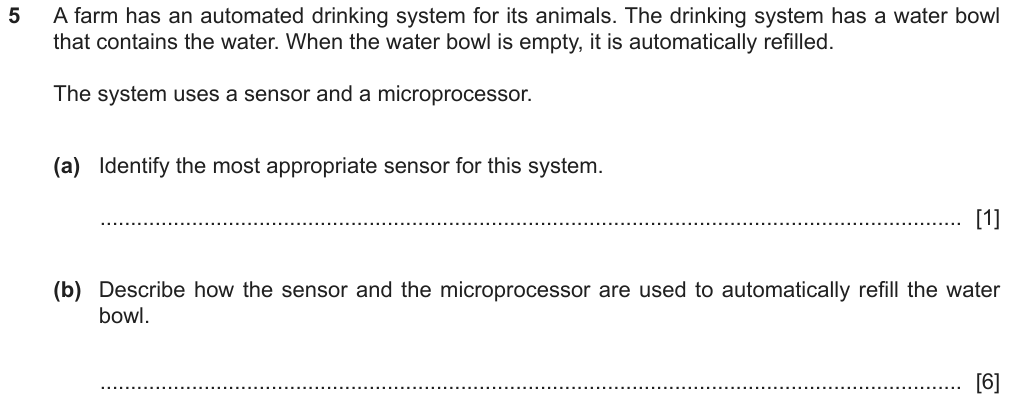
How to start (a) What changes when the bowl empties? (b) Use the control-loop method.
Show a full-mark answer and the mark scheme
(a) A level sensor.
(b) The level sensor continually sends digitised readings to the microprocessor. The microprocessor compares each reading with the stored value for an empty bowl. If they match, the microprocessor sends a signal to an actuator to open a valve and release water. The bowl is filled for a set time or until the stored full level is reached, then the valve is closed. The whole process repeats until the system is turned off.
| Part | Answer / working | Marks | Guidance |
|---|---|---|---|
| 5(a) | Any one: level · pressure · moisture | B1 | |
| 5(b) | Any six: continually sends digitised data · compares to stored value · if outside range / matches sends signal · filled by set amount / for a set time · actuator releases water · repeats until stopped | B6 | |
| Total: 7 marks | |||
Common mistakes
- ✗ "Heat sensor"✓ "Temperature sensor"Use the syllabus names.
- ✗ "Motion sensor"✓ "Infra-red sensor" (or accelerometer if the device itself moves)
- ✗ "The sensor turns on the heater"✓ "The microprocessor sends a signal to the actuator"Sensors only measure.
- ✗ Forgetting the loop repeats✓ "The process repeats continuously"It is a mark every time.
Practice
Practice: easy, medium, hard
Easy
Show answer
Answer Gas
Show answer
Answer Light
Show answer
Answer Proximity
Medium
Show answer
Answer Works continuously; no human in a dangerous place (also: accurate, fast)
Show answer
Answer e.g. monitoring the rate of water through a pipe
Hard
Show answer
Answer Sensor continually sends readings; microprocessor compares with −18 °C; if above, signal to actuator to switch on the compressor; when below, switch off; repeats
Can I do this?
- I can name all 14 sensors, what each measures and a use.
- I can give benefits of using sensors.
- I can describe a sensor + microprocessor control system.
Anything unticked: revise that section first. All ticked: take the quiz.
Quiz
The multiple-choice and guided questions need JavaScript. The concept checks and exam practice below work without it.
Your progress on this note is saved when JavaScript is on.
⬇️ Download this chapter as a PDF: Full notes