
Hardware
Virtual memory and cloud storage
In this note
- 3.3.4Describe what is meant by virtual memory, how it is created and used and why it is necessary.
- 3.3.5Understand what is meant by cloud storage.
- 3.3.6Explain the advantages and disadvantages of storing data on the cloud in comparison to storing it locally.
Before this: Primary and secondary storage. Next: Network hardware.
The notes: every idea from the start, with our own examples.
What you should already know
RAM
RAM holds the data and programs currently in use. It is fast but limited in size.
Quick check: what happens if you open more programs than RAM can hold?
Without virtual memory, the computer could crash or refuse to open them.
Virtual memory
Virtual memory is an area of secondary storage (usually the hard disk or SSD) that is used as if it were RAM when RAM is full. It is created by partitioning part of the secondary storage. Data is moved in blocks called pages.
General methodHow virtual memory is used
- RAM becomes full.
- Pages of data that are not needed immediately are transferred from RAM to virtual memory.
- This frees space in RAM for the new data or program that is needed now.
- When a page in virtual memory is needed again, it is transferred back into RAM (another page may be moved out to make room).
| Why it is necessary | Its drawback |
|---|---|
| stops the computer crashing when RAM is full; lets more / larger programs run than RAM alone allows | secondary storage is much slower than RAM, so heavy use slows the computer ("disk thrashing" when pages keep swapping) |
Cloud storage
Cloud storage is storage that is accessed remotely, usually over the internet, on a collection of servers owned and maintained by a third party (e.g. Google Drive, iCloud, OneDrive). The cloud still needs physical servers and storage: the data is just not on your own device. Storing data on your own device or your own server is storing it locally.
| Advantages of the cloud (vs local) | Disadvantages of the cloud (vs local) |
|---|---|
| data can be accessed from any location and any device with an internet connection | needs an internet connection: no or unstable connection = no access |
| the third party maintains the hardware and its security; you do not | you rely on the third party: its security, and whether it stays in business |
| storage can be increased easily without buying new hardware | an ongoing fee (subscription) is often charged |
| no need to buy, house and power your own storage hardware | data may be less secure / stored in another country |
| the provider backs up the data | uploading / downloading large files can be slow |
| easy to share and collaborate on files |
Try it yourself
Show answer
Answer On secondary storage (a partition of the hard disk / SSD)
Show answer
Answer Pages
Show answer
Answer Needs an internet connection (also: relies on third party, fee, security)
Summary
- Virtual memory: a partition of secondary storage used as RAM when RAM is full.
- Pages not needed now move RAM → virtual memory; moved back when needed.
- Necessary: prevents crashing, more programs run. Drawback: slower than RAM.
- Cloud: remote collection of servers, third party, accessed over the internet; still physical servers.
- Cloud vs local: anywhere access, no maintenance, scalable, backed up · needs internet, third party, fees, security.
If you see …
- "explain how virtual memory can be used in this scenario"partition · page B to VM · space for D · B back when needed
- "explain two advantages of cloud storage"point + consequence for the scenario ("… so employees can work from home")
Question types, what the examiner gives marks for, and real past-paper questions solved.
Ways they test it
Type 1 VM scenario
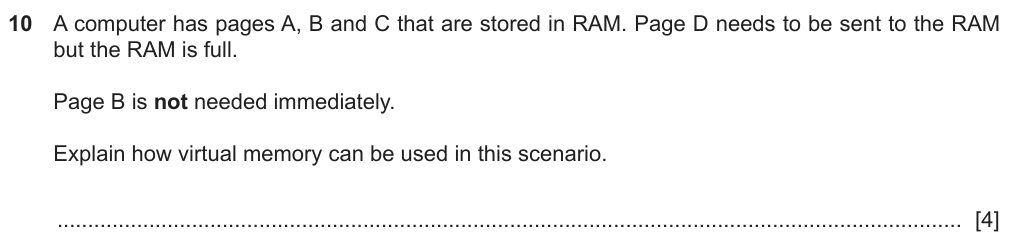
"Pages A, B, C in RAM; page D needs to be sent; explain how virtual memory can be used" [4]
Spot it named pages.
- Use the letters given: page B to VM, D into RAM, B back later.
Type 2 Name it
"Give the name of the partitioned section of the secondary storage" [1]
Spot it "partitioned".
- Virtual memory.
Type 3 Cloud definition
"Describe what is meant by cloud storage" [2]
Spot it "cloud".
- collection of servers · remote · accessed over the internet · third party
Type 4 Cloud pros / cons
"Explain two advantages for the owners …" [4]; "one disadvantage to employees" [2]
Spot it "explain".
- Two marks each: the point, then "… meaning that" for the people in the question.
What the examiner looks for
"Explain two advantages for the owners of the company of storing its data in cloud storage" [4]
Marking points (one mark each, up to the marks shown)
- Data can be accessed from any location … meaning employees can work from anywhere with a connection
- Hardware is owned/maintained by a third party … so the company is not responsible for maintenance / security
- Storage can be increased easily … without buying new hardware
- No need to house the hardware … saving the cost of the space
- The cloud system backs up the data … so the company does not need to
Keywords any location third party maintain increase back up
Past-paper questions, solved
How to start Follow the method with the question's letters.
Show a full-mark answer and the mark scheme
Part of the secondary storage is partitioned to create virtual memory. Page B, which is not needed immediately, is sent from RAM to virtual memory. This makes space in RAM for page D. When page B is needed again (once another page has been processed), it is sent back from virtual memory to RAM.
| Part | Answer / working | Marks | Guidance |
|---|---|---|---|
| 10 | Any four: secondary storage partitioned · page B sent to VM · makes space for page D · once another page not required · page B sent back to RAM when required | B4 | |
| Total: 4 marks | |||
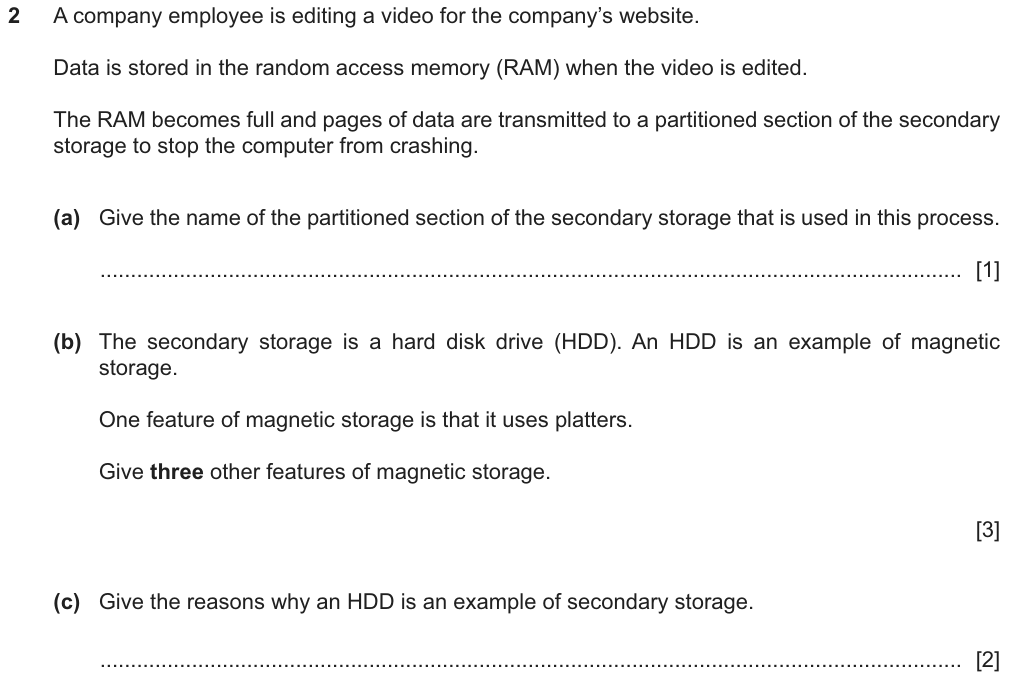
How to start (b) the question already gives platters, so give three other features. (c) two reasons from the definition of secondary storage.
Show a full-mark answer and the mark scheme
(a) Virtual memory.
(b) The platters are divided into tracks and sectors. The platters rotate (it has moving parts). It uses a read/write head with an electromagnet.
(c) It is not directly accessed by the CPU, and it stores data permanently until the user deletes it (non-volatile).
| Part | Answer / working | Marks | Guidance |
|---|---|---|---|
| 2(a) | Virtual memory | B1 | |
| 2(b) | Any three: tracks / sectors · platters rotate / moving parts · read/write head · electromagnet · magnetised dots | B3 | |
| 2(c) | not directly accessed by the CPU · stores data permanently / non-volatile | B2 | |
| Total: 6 marks | |||
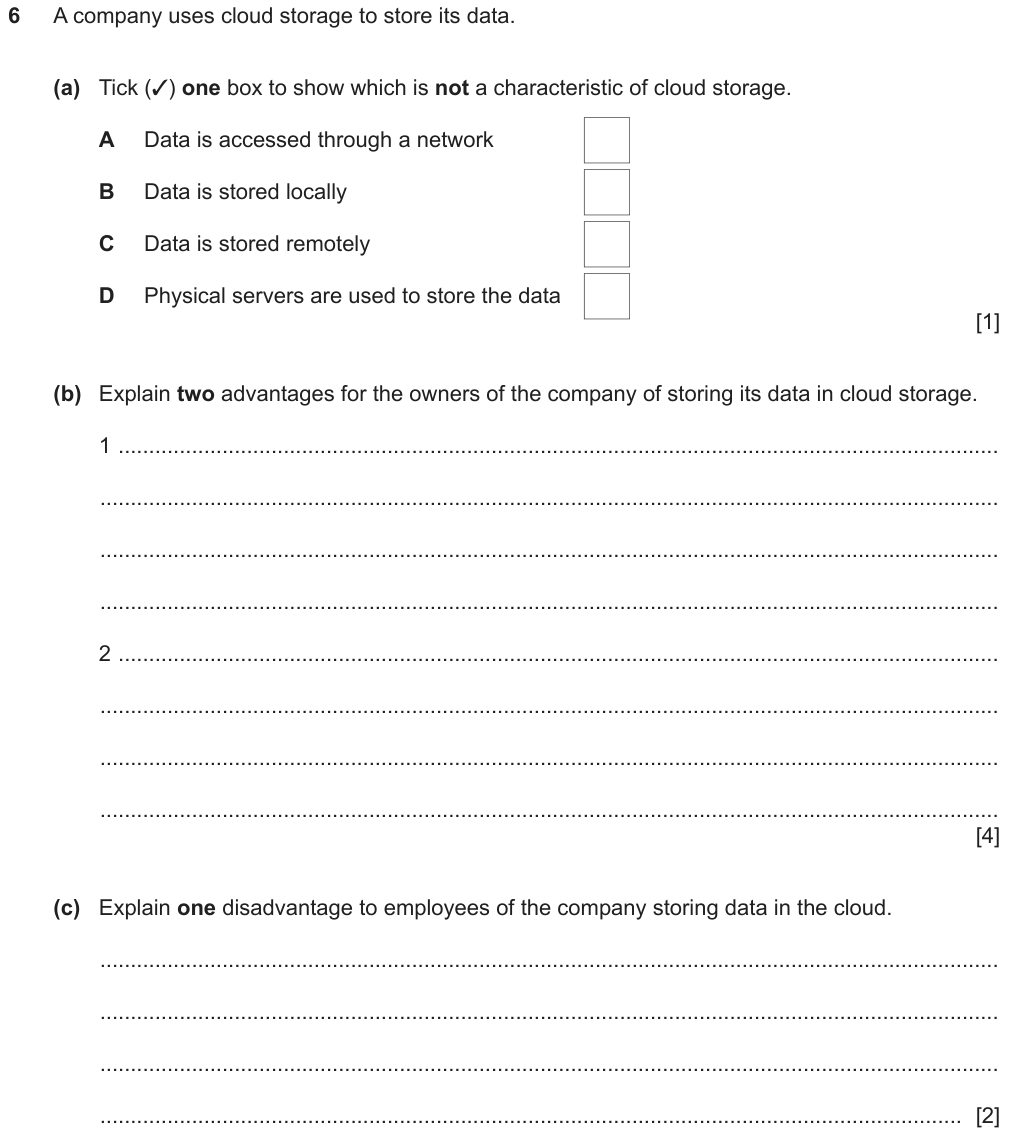
How to start (b) and (c) are point + expansion: say what happens for the owners / the employees.
Show a full-mark answer and the mark scheme
(a) B (data is stored locally).
(b) 1: The data can be accessed from any location, meaning employees can work from anywhere with an internet connection. 2: The hardware is maintained by a third party, meaning the company is not responsible for maintaining it or its security.
(c) An internet connection is needed, and if it is unavailable or unstable the employees cannot access the data.
| Part | Answer / working | Marks | Guidance |
|---|---|---|---|
| 6(a) | B | B1 | |
| 6(b) | Two advantages with expansion: any location … work anywhere · third party … not responsible · increase storage … no new hardware · no need to house hardware … saves cost · backs up … company need not | B4 | |
| 6(c) | internet connection needed … if unavailable, no access // pressured to work out of hours … access from anywhere | B2 | |
| Total: 7 marks | |||
Common mistakes
- ✗ "Virtual memory is extra RAM"✓ "Virtual memory is part of secondary storage used as RAM"
- ✗ "Virtual memory makes the computer faster"✓ "It stops it crashing; it is slower than RAM"
- ✗ "The cloud has no hardware"✓ "Cloud data is on physical servers owned by a third party"
- ✗ "You can access it anywhere" with no expansion✓ "… so employees can work from home"Explain = point + effect.
Practice
Practice: easy, medium, hard
Easy
Show answer
Answer Remotely
Show answer
Answer As extra RAM when RAM is full
Medium
Show answer
Answer When RAM is full, pages can be moved out so new data fits; stops the computer crashing
Show answer
Answer Access from any device / location; frees phone storage; backed up if the phone is lost
Hard
Show answer
Answer Secondary storage is slower than RAM, so moving pages back and forth slows the computer
Can I do this?
- I can describe how virtual memory is created and used, and why it is necessary.
- I can describe cloud storage.
- I can explain advantages and disadvantages of cloud storage vs local storage.
Anything unticked: revise that section first. All ticked: take the quiz.
Quiz
The multiple-choice and guided questions need JavaScript. The concept checks and exam practice below work without it.
Your progress on this note is saved when JavaScript is on.
⬇️ Download this chapter as a PDF: Full notes